Performance analysis
Ratchet & Clank Rift Apart (2023): what it takes to run it
Measured on 7 gaming laptops at 1920×1080, High preset, upscaling off.

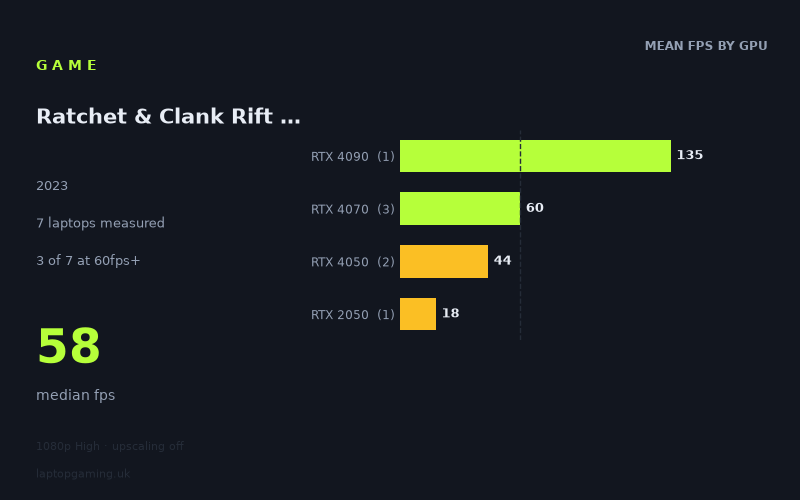
Every laptop we have figures for
Frame rates measured by Notebookcheck.
What it asks of a laptop
Ratchet & Clank Rift Apart is demanding at 1,920 x 1,080 on the High preset with upscaling off. Notebookcheck’s measured figures span from 18fps to 135fps across seven laptops, a very wide 117fps gap. The median result is 58fps, and only three of the seven machines reached 60fps or better. Just one exceeded 100fps, while none reached 144fps.
That sample is useful but still limited to seven laptops, so it should be read as evidence of how these specific machines performed rather than as a guarantee for every laptop carrying the same GPU name. Power limits matter in the supplied figures, too: the RTX 4070 results are all from 140W machines, while the RTX 2050 result comes from a 35W laptop.
The separation between GPU tiers is clear. The Lenovo Legion 9 with its 175W RTX 4090 produced 135fps, far ahead of the RTX 4070 group. The three RTX 4070 laptops clustered tightly between 58fps and 62fps, suggesting that this test setting is capable of holding roughly 60fps on those particular 140W RTX 4070 systems, but without much spare performance on the slower two examples.
Below that level, the RTX 4050 machines fell to 48fps and 40fps. Their 44fps average is distinctly below a 60fps target, even though one of the two was a 140W model. The Acer Aspire 5’s 35W RTX 2050 managed 18fps, making High at native 1080p without upscaling a poor fit for that specific lower-power machine.
In practical terms, the measured figures indicate that High settings at 1080p are not especially forgiving for mid-range and entry-level gaming laptops. A laptop can have a dedicated RTX GPU and still land well below 60fps in this test. The difference between the 140W RTX 4070 systems and the RTX 4050 pair is particularly important: the former sit around the 60fps line, whereas the latter sit around 40–50fps.
What runs it
RTX 4090: the only measured route to 100fps
The Lenovo Legion 9, equipped with an RTX 4090 at 175W, recorded 135fps. It is the fastest result in the supplied data and the only laptop to clear 100fps. It did not reach 144fps, however, so even this result should not be treated as evidence of a locked 144fps experience at these settings.
There is only one RTX 4090 result, so the figure describes this Legion 9 rather than every RTX 4090 laptop. Still, it shows the scale of hardware required in the measured sample for genuinely high-refresh-rate performance at 1080p High with upscaling disabled.
RTX 4070: around 60fps on the measured 140W laptops
The RTX 4070 is the most consistent tier in the figures. Three 140W RTX 4070 laptops delivered:
- Lenovo Aorus 15 BSF: 62fps
- Acer Nitro 17: 60fps
- HP Victus 16-r0077ng: 58fps
The group average is 60fps. Two of the three machines cleared 60fps, while the HP Victus narrowly missed it at 58fps. That is close enough to show that these particular 140W RTX 4070 laptops are in the right performance class for a roughly 60fps target, but the 58fps result also means there is little basis for promising a firm 60fps minimum across every RTX 4070 laptop.
None of the RTX 4070 laptops reached 100fps or 144fps. Buyers prioritising a high-refresh display should therefore not assume that an RTX 4070 laptop will make full use of a 120Hz or 144Hz panel in this game under the tested conditions.
RTX 4050: playable figures, but below 60fps in both examples
Notebookcheck’s two RTX 4050 results averaged 44fps:
- Schenker XMG Apex 15 (Late 23), RTX 4050 at 140W: 48fps
- Dell G15 5530, i5-13450HX RTX, RTX 4050: 40fps
Neither machine reached 60fps. The 48fps result from the 140W Schenker is the better showing, but it remains 12fps below the 60fps threshold. On the available evidence, an RTX 4050 laptop should be approached as a sub-60fps option at 1080p High with upscaling off, rather than as a dependable choice for this specific 60fps target.
RTX 2050: unsuitable for these measured settings
The Acer Aspire 5 with an RTX 2050 at 35W recorded 18fps. That is the lowest result by a substantial margin and is less than half the average result of the measured RTX 4050 systems. It demonstrates how difficult these settings are for a lower-power entry-level GPU. This specific Aspire 5 is not a sensible match for 1080p High without upscaling if acceptable performance means anything close to 60fps.
The cheapest laptop that handles it
The fact sheet does not include laptop prices, so it is not possible to identify the cheapest measured machine or make a valid GBP value comparison.
If “handles it” means reaching 60fps in the supplied test, the measured options are the Lenovo Legion 9 at 135fps, the Aorus 15 BSF at 62fps, and the Acer Nitro 17 at 60fps. Of those, only the Aorus 15 BSF and Acer Nitro 17 are near the 60fps line; the Legion 9 is in a much higher performance bracket at 135fps. The HP Victus 16-r0077ng is close at 58fps, but it does not meet the stated 60fps threshold.
What this means if you’re buying
For a laptop intended to run Ratchet & Clank Rift Apart at 1,920 x 1,080, High and with upscaling off, the measured results point to an RTX 4070-class machine as the sensible starting point for approximately 60fps. That conclusion is specifically supported by three 140W RTX 4070 laptops, which returned 58fps, 60fps and 62fps.
An RTX 4050 laptop is a more cautious purchase for these settings. The two measured examples reached 40fps and 48fps, so they may be acceptable only if a sub-60fps result suits your expectations. The RTX 2050 result is far lower still, at 18fps on the Acer Aspire 5.
For buyers targeting well above 60fps, the supplied data gives only one clear example: the RTX 4090 Lenovo Legion 9 at 135fps. Even that machine fell short of 144fps in this test. The safest reading is therefore straightforward: choose a measured RTX 4070-class laptop for roughly 60fps at the tested settings, and look to the RTX 4090 result only if substantially higher frame rates are the priority.
How these numbers were produced
Frame rates here are not measured by us, and we label how each one was arrived at. A figure marked measured comes from a published run on that exact machine. A figure marked representative is derived from the GPU and its power limit (TGP) and cross-referenced against published reviews - a sound estimate of what that configuration delivers, but not a measurement of that specific laptop. Unless stated otherwise, numbers are 1920x1080, High preset, upscaling off. Where a laptop ships in several power configurations we use the wattage of the exact SKU listed, because a 140W RTX 5070 and a 115W one are not the same product.