Performance analysis
Atomic Heart (2023): what it takes to run it
Measured on 11 gaming laptops at 1920×1080, High preset, upscaling off.

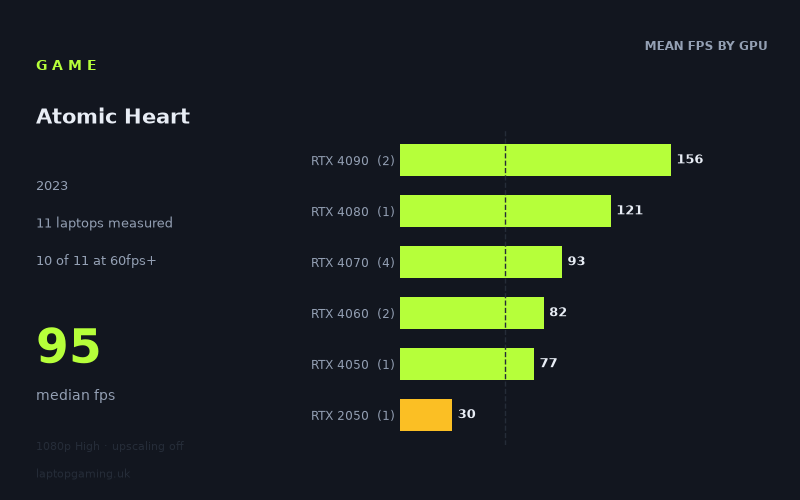
Every laptop we have figures for
Frame rates measured by Notebookcheck.
What it asks of a laptop
At 1920x1080 using the High preset with upscaling off, Atomic Heart is relatively accommodating for modern gaming laptops, at least in the 11 Notebookcheck results supplied here. Ten of the 11 machines reached 60fps or more, while the median result was 95fps. That makes a 60fps target realistic on most of the tested dedicated-GPU laptops, rather than something reserved for flagship hardware.
There is still a substantial overall spread: the fastest result was 167fps from the Aorus 17X AZF with an RTX 4090 running at 175W, while the Acer Aspire 5 with a 35W RTX 2050 managed 30fps. The 137fps gap is not just a matter of GPU model names. It also shows the importance of laptop power limits: the RTX 2050 result comes from a low-power 35W implementation, whereas several of the faster GeForce RTX 40-series results are from 140W or 175W laptops.
The measured figures separate quite cleanly by GPU tier. RTX 4090 laptops averaged 156fps across two machines, the single RTX 4080 result delivered 121fps, and the four RTX 4070 laptops averaged 93fps. Below that, the two RTX 4060 systems averaged 82fps and the RTX 4050 machine reached 77fps. These numbers suggest that the game does not need top-end hardware for a smooth 1080p High experience, but higher-tier GPUs are useful if the aim is to push beyond 100fps or make fuller use of a 144Hz display.
The notable outlier is the RTX 2050-equipped Acer Aspire 5 at 30fps. On this evidence, older or lower-power entry-level graphics hardware is where Atomic Heart becomes much more demanding at the tested settings. The supplied figures do not show what changes to settings or upscaling would do, so there is no measured basis here for recommending a specific compromise for that class of machine.
What runs it
For 60fps: 10 of the 11 measured laptops cleared the target. The lowest result above 60fps was the Schenker XMG Apex 15 (Late 23), whose RTX 4050 at 140W produced 77fps. The RTX 4060 laptops were also comfortably over the line: the Lenovo Legion Slim 7 reached 83fps with its 140W RTX 4060, while the MSI Katana 17 recorded 82fps. The four 140W RTX 4070 laptops ranged from 86fps to 96fps.
Those RTX 4070 results are particularly consistent in this set. The Aorus 15X ASF reached 96fps, the Acer Nitro 16 and Acer Nitro 17 both reached 95fps, and the HP Victus 16-r0077ng achieved 86fps. All four clear 60fps with room to spare at the tested 1080p High configuration, although the 10fps range between them is a reminder that laptops carrying the same GPU can still perform differently.
For 100fps: only three of the 11 laptops reached this mark. The HP Omen 17-ck2097ng with an RTX 4080 at 175W recorded 121fps, while the two RTX 4090 machines were faster still: 144fps from the Medion Erazer Beast X40 and 167fps from the Aorus 17X AZF at 175W. None of the tested RTX 4070 laptops reached 100fps; their best result was 96fps.
For 144fps: two laptops met or matched that threshold. The Medion Erazer Beast X40 recorded exactly 144fps with an RTX 4090, and the Aorus 17X AZF reached 167fps with its 175W RTX 4090. The RTX 4080 HP Omen 17 was close enough for a high-refresh experience at 121fps, but it did not reach 144fps in Notebookcheck’s numbers. If a consistent 144fps-class result at these settings is the priority, the available data points towards the tested RTX 4090 machines rather than the RTX 4080 or RTX 4070 examples.
- RTX 4090: 144fps and 167fps; 156fps mean across two laptops.
- RTX 4080: 121fps from one 175W laptop.
- RTX 4070: 86fps to 96fps across four 140W laptops; 93fps mean.
- RTX 4060: 82fps and 83fps; 82fps mean across two laptops.
- RTX 4050: 77fps from one 140W laptop.
- RTX 2050: 30fps from one 35W laptop.
The cheapest laptop that handles it
No laptop prices are included in the supplied fact sheet, so it is not possible to identify the cheapest measured machine in GBP without inventing information. Price also cannot safely be inferred from GPU tier alone: laptop pricing varies with processor, display, memory, storage, chassis design and retailer offers.
What the measured figures can establish is the lowest-performing configuration in this list that still handled the tested settings at more than 60fps. That was the Schenker XMG Apex 15 (Late 23), with an RTX 4050 at 140W, at 77fps. The MSI Katana 17 and Lenovo Legion Slim 7, both fitted with RTX 4060 graphics, returned 82fps and 83fps respectively. These are the named machines to compare on current UK pricing if the goal is the least expensive laptop represented by a measured 60fps-plus result.
The Acer Aspire 5 with a 35W RTX 2050 should not be treated as a like-for-like budget alternative for the tested preset. Its 30fps result was less than half that of the RTX 4050-equipped Schenker.
What this means if you’re buying
For Atomic Heart at 1080p High without upscaling, the measured data supports treating an RTX 4050 at 140W, RTX 4060 or RTX 4070 laptop as sufficient for a 60fps target. In this sample, the RTX 4050 result was 77fps, RTX 4060 results were just above 80fps, and RTX 4070 laptops sat between 86fps and 96fps. An RTX 4070 laptop offers a useful margin over the RTX 4060 examples here, but it does not automatically deliver 100fps in the supplied results.
Buy into RTX 4080 or RTX 4090 territory if high-refresh performance at these exact settings matters more than simply clearing 60fps. The RTX 4080 result reached 121fps, while the RTX 4090 laptops achieved 144fps and 167fps. Conversely, the supplied RTX 2050 result indicates that a low-power entry-level GPU is not an appropriate match for 1080p High if 60fps is the expectation.
Finally, these are figures from 11 specific laptops, not guarantees for every machine using the same GPU. Wattage is stated for several systems and varies across the list, so buyers should check the graphics power configuration of the particular laptop they are considering rather than relying only on the GPU label.
How these numbers were produced
Frame rates here are not measured by us, and we label how each one was arrived at. A figure marked measured comes from a published run on that exact machine. A figure marked representative is derived from the GPU and its power limit (TGP) and cross-referenced against published reviews - a sound estimate of what that configuration delivers, but not a measurement of that specific laptop. Unless stated otherwise, numbers are 1920x1080, High preset, upscaling off. Where a laptop ships in several power configurations we use the wattage of the exact SKU listed, because a 140W RTX 5070 and a 115W one are not the same product.