Details
Product prices and availability are accurate as of the date/time indicated and are subject to change. Any price and availability information displayed on Amazon.co.uk at the time of purchase will apply to the purchase of this product.Performance analysis
Armored Core 6 (2023): what it takes to run it
Measured on 8 gaming laptops at 1920×1080, High preset, upscaling off.
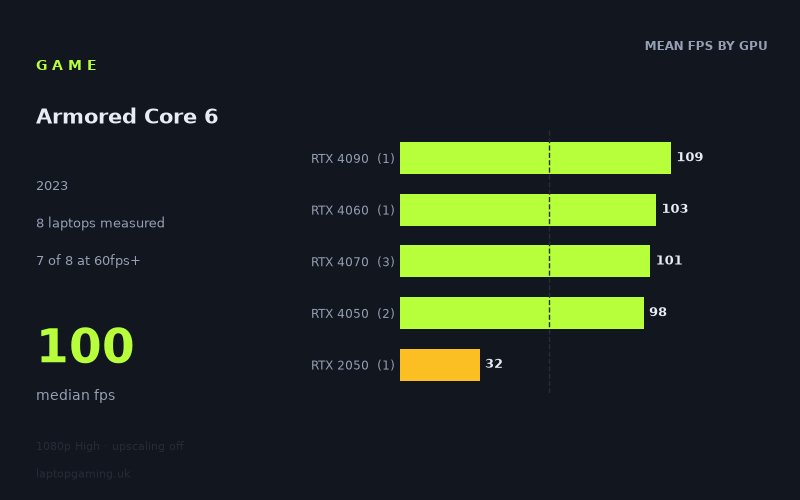
Every laptop we have figures for
Frame rates measured by Notebookcheck.
What it asks of a laptop
At 1,920 x 1,080 on the High preset with upscaling off, Armored Core 6 is relatively forgiving on the modern gaming laptops represented here, but it is not equally comfortable on every discrete GPU. Notebookcheck's measured figures cover eight laptops, with results ranging from 32fps to 109fps and a median of 100fps.
The headline result is that seven of the eight measured laptops reached at least 60fps. Four reached 100fps or more. None reached 144fps. That makes the game a good fit for a 60Hz or 100Hz-class display on most of the tested gaming machines, while the available figures do not support buying specifically for a locked 144fps experience at these settings.
There is an important limitation to the data: this is a small eight-laptop sample, and several GPU tiers are represented by only one machine. GPU names alone also do not explain every result. The RTX 4090-equipped Acer Predator Helios 18 recorded 109fps, but so did the HP Omen 16-xf0376ng with an RTX 4070 running at 140W. Meanwhile, the Lenovo Legion Slim 7 with an RTX 4060 at 140W managed 103fps, ahead of two of the three measured RTX 4070 laptops.
That close clustering at the top suggests that, at this particular resolution and preset, the fastest laptops in this sample are not separated dramatically. The gap that matters is lower down: the two RTX 4050 machines still delivered 97fps and 99fps, whereas the Acer Aspire 5 with an RTX 2050 at 35W fell to 32fps. The measured figures therefore point to a game that runs very well on the tested current mid-range gaming laptops, but is much tougher for a lower-power older entry-level configuration.
The 77fps spread between the fastest and slowest result is substantial, yet most of it comes from that 35W RTX 2050 result. Remove neither machine from consideration, however: it is precisely the contrast that shows why a laptop’s GPU class and power configuration still matter more than the overall median might initially suggest.
What runs it
60fps: seven of the eight measured laptops
For a conventional 60fps target at 1080p High without upscaling, the measured results are encouraging. Every tested laptop from RTX 4050 upwards cleared the mark comfortably:
- Acer Predator Helios 18, RTX 4090: 109fps.
- HP Omen 16-xf0376ng, RTX 4070 at 140W: 109fps.
- Lenovo Legion Slim 7, RTX 4060 at 140W: 103fps.
- HP Victus 16-r0077ng, RTX 4070 at 140W: 102fps.
- Schenker XMG Apex 15 (Late 23), RTX 4050 at 140W: 99fps.
- Dell G15 5530, i5-13450HX RTX, RTX 4050: 97fps.
- Acer Nitro 17, RTX 4070 at 140W: 91fps.
The only measured laptop below 60fps was the Acer Aspire 5 with an RTX 2050 at 35W, at 32fps. On this evidence, that specific machine does not provide a 60fps result at the tested settings.
100fps: four measured laptops
Four of the eight laptops reached 100fps or better. These were the Predator Helios 18 at 109fps, the HP Omen 16-xf0376ng at 109fps, the Legion Slim 7 at 103fps and the HP Victus 16-r0077ng at 102fps.
It is worth noting how narrow this group is. The Schenker RTX 4050 result of 99fps missed the threshold by only 1fps, while the Dell RTX 4050 reached 97fps and the Acer Nitro 17 RTX 4070 reached 91fps. These are all high frame-rate results, but they are not measured 100fps results. With only one RTX 4060 sample, three RTX 4070 samples and two RTX 4050 samples, the numbers describe these laptops rather than establishing firm performance guarantees for every laptop carrying those GPU labels.
144fps: no measured laptop
No laptop in the fact sheet reached 144fps at 1,920 x 1,080, High, with upscaling disabled. The fastest measured result was 109fps, shared by the RTX 4090 Predator Helios 18 and the 140W RTX 4070 HP Omen 16-xf0376ng. If a sustained 144fps target is the deciding factor in a purchase, there is no qualifying result in these figures.
The cheapest laptop that handles it
The fact sheet provides a price for only one of the measured laptops: the Acer Nitro 17 with an RTX 4070 at 140W, listed at £1,946. It produced 91fps, so it clearly handled the game above 60fps at the tested settings.
However, it cannot be identified as the cheapest suitable option from this data because prices are not supplied for the other seven machines. Several unpriced laptops also exceeded 60fps, including both RTX 4050 models: the Schenker XMG Apex 15 (Late 23) at 99fps and Dell G15 5530 at 97fps. Their measured performance is strong, but the available information does not permit a price comparison.
The least expensive sensible route is therefore not something the fact sheet can prove. What it does show is that the two tested RTX 4050 laptops were already close to 100fps, while the specific 35W RTX 2050 Aspire 5 was limited to 32fps.
What this means if you’re buying
For Armored Core 6 at the tested 1080p High settings, prioritise a laptop with measured performance in the RTX 4050-to-RTX 4070 range rather than assuming an expensive flagship GPU is necessary. The available results place the RTX 4050, RTX 4060, RTX 4070 and RTX 4090 machines between 91fps and 109fps, despite the large difference in their GPU labels.
That does not mean every laptop with one of those GPUs will match these results. The sample is limited, and the fact sheet specifically identifies 140W configurations for several machines. Still, the measured figures show that the tested RTX 4050 laptops are already sufficient for high-refresh play, while the tested RTX 2050 at 35W is not suitable for the same 1080p High, no-upscaling target if you want 60fps.
Buy around a 60fps or roughly 100fps expectation, depending on the specific laptop’s measured result. Do not buy on the assumption that 144fps is available at these settings: Notebookcheck's numbers show no such result among the eight laptops measured.
How these numbers were produced
Frame rates here are not measured by us, and we label how each one was arrived at. A figure marked measured comes from a published run on that exact machine. A figure marked representative is derived from the GPU and its power limit (TGP) and cross-referenced against published reviews - a sound estimate of what that configuration delivers, but not a measurement of that specific laptop. Unless stated otherwise, numbers are 1920x1080, High preset, upscaling off. Where a laptop ships in several power configurations we use the wattage of the exact SKU listed, because a 140W RTX 5070 and a 115W one are not the same product.