Details
Product prices and availability are accurate as of the date/time indicated and are subject to change. Any price and availability information displayed on Amazon.co.uk at the time of purchase will apply to the purchase of this product.Performance analysis
Crysis Remastered (2020): what it takes to run it
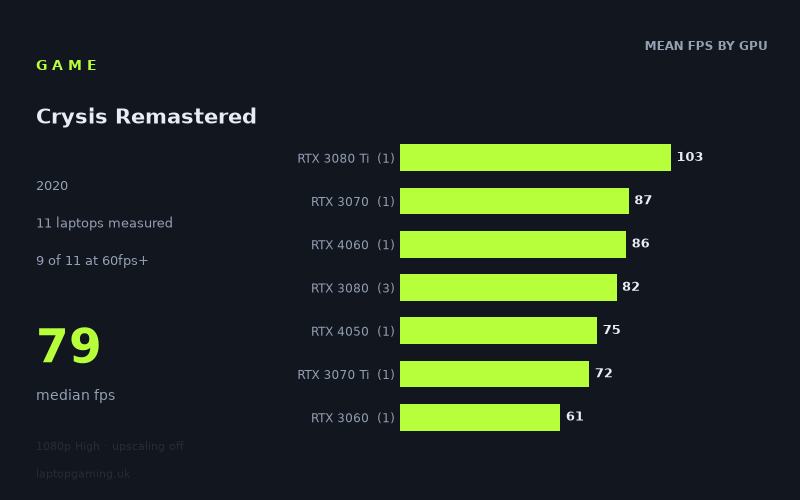
Measured on 11 gaming laptops at 1920×1080, High preset, upscaling off.

Every laptop we have figures for
Frame rates measured by Notebookcheck.
What it asks of a laptop
Crysis Remastered is measured here at 1,920 x 1,080 using the High preset with upscaling disabled. Across 11 laptops, Notebookcheck's numbers range from 47fps to 103fps, with a median result of 79fps. That is a substantial 56fps spread, so this is not a game that performs uniformly across gaming laptops, even at Full HD.
The encouraging part is that 9 of the 11 measured machines reached at least 60fps. A laptop capable of sustaining that level should provide the conventional 60fps target at these settings, at least based on this small group of tested systems. However, the high-refresh targets are much harder to reach: only one laptop managed 100fps or more, and none reached 144fps. A 144Hz laptop panel therefore should not be treated as evidence that Crysis Remastered will run at 144fps on High without upscaling.
The results separate reasonably clearly by graphics tier, though laptop GPU names alone are not the whole story. The three RTX 3080 laptops, for example, recorded 89fps, 79fps and 79fps, despite sharing the same GPU label. The RTX 3080 Ti-equipped MSI GE76 Raider was the fastest machine in this group at 103fps, while the RTX 3050 Ti-equipped Schenker XMG Focus 15 was slowest at 47fps.
There are also some useful cross-generation comparisons in the figures. The MSI Katana 17 with an RTX 4060 achieved 86fps, close to the 87fps recorded by the Schenker XMG Neo 17 with RTX 3070 graphics. Meanwhile, the 140W RTX 4050 in the Schenker XMG Apex 15 reached 75fps, ahead of the measured RTX 3070 Ti result of 72fps in the MSI Stealth GS66. These are results from specific laptops rather than universal rankings for those GPUs, but they show why buyers should look beyond a GPU name when choosing a machine for this game.
What runs it
For a measured 60fps-or-better result at 1080p High with upscaling off, the lowest-performing successful machine was the HP Victus 16-e0179ng. Its RTX 3060 at 95W delivered 61fps. That puts it just over the target, with little measured headroom compared with the faster systems in this list.
- RTX 3080 Ti: The MSI GE76 Raider, with a 175W RTX 3080 Ti, achieved 103fps. This was the only measured laptop to clear 100fps.
- RTX 3080: The three measured RTX 3080 laptops averaged 82fps. The Gigabyte Aero 17 HDR YC reached 89fps, while the MSI GS76 Stealth and Asus ROG Zephyrus G15 both recorded 79fps.
- RTX 3070 and RTX 4060: The RTX 3070 Schenker XMG Neo 17 managed 87fps, and the RTX 4060 MSI Katana 17 reached 86fps. Both are comfortably above 60fps in these figures.
- RTX 4050 and RTX 3070 Ti: The Schenker XMG Apex 15 with a 140W RTX 4050 produced 75fps, while the MSI Stealth GS66 with RTX 3070 Ti produced 72fps. Both cleared 60fps with a useful margin in these individual results.
- RTX 3060: The HP Victus 16-e0179ng reached 61fps with its 95W RTX 3060. It met the 60fps mark, but only narrowly.
- RTX 2060: The HP Omen 15-en0375ng recorded 53fps, below 60fps.
- RTX 3050 Ti: The 75W RTX 3050 Ti in the Schenker XMG Focus 15 recorded 47fps, the lowest result in the sample.
No measured laptop reached 144fps. Even the 103fps result from the MSI GE76 Raider falls 41fps short of that threshold. Similarly, only the GE76 Raider cleared 100fps; the next-fastest measured result was 89fps. If your aim is a consistent high-refresh experience rather than a 60fps-class one, the available figures are limited and do not support assuming that even a high-end gaming laptop will reach 144fps at these settings.
The cheapest laptop that handles it
The fact sheet does not provide prices for most of the 11 laptops, so it cannot identify the cheapest laptop overall that handles Crysis Remastered at 60fps. It would be misleading to label any unpriced model as the cheapest option.
Of the two machines with listed prices, the Asus ROG Zephyrus G15 is the less expensive at £2,196. Its RTX 3080 recorded 79fps, comfortably above 60fps. The MSI Stealth GS66 is listed at £2,688 and recorded 72fps with its RTX 3070 Ti. Both measured machines handle the game at the tested settings, but the available prices only establish that the Zephyrus G15 costs less than this particular GS66 configuration.
The HP Victus 16-e0179ng is the lowest-scoring system still to reach 60fps, at 61fps, but no price is supplied for it. It may be relevant to buyers seeking a lower-cost route to the 60fps mark, yet the measured figures do not provide enough pricing information to make a value judgement.
What this means if you're buying
For 1080p High with upscaling off, the measured evidence suggests that a laptop delivering roughly 75fps to 89fps is a sensible position for this game. The tested RTX 4050, RTX 4060, RTX 3070, RTX 3070 Ti and RTX 3080 systems all fell in or around that range, although most of those GPU tiers are represented by only one machine. Treat those figures as examples of what those specific laptops achieved, not as guaranteed performance for every laptop carrying the same graphics chip.
If 60fps is the priority, the measured RTX 3060 system made it, but only by 1fps. The RTX 2060 and RTX 3050 Ti examples did not reach that threshold. Buyers considering older or lower-tier hardware should therefore be cautious about expecting a 60fps result at the tested preset without changing something, as the figures here provide no measured basis for claiming they can do so.
If you are buying for a 120Hz or 144Hz display, do not buy on the assumption that Crysis Remastered will fill that panel at High settings with upscaling disabled. The sample covers 11 laptops, and none reached 144fps. The strongest measured result, 103fps from the 175W RTX 3080 Ti GE76 Raider, is the only figure above 100fps. For this game, the measured numbers favour choosing a laptop with proven 60fps-plus performance rather than treating a high-refresh panel as an achievable frame-rate target.
How these numbers were produced
Frame rates here are not measured by us, and we label how each one was arrived at. A figure marked measured comes from a published run on that exact machine. A figure marked representative is derived from the GPU and its power limit (TGP) and cross-referenced against published reviews - a sound estimate of what that configuration delivers, but not a measurement of that specific laptop. Unless stated otherwise, numbers are 1920x1080, High preset, upscaling off. Where a laptop ships in several power configurations we use the wattage of the exact SKU listed, because a 140W RTX 5070 and a 115W one are not the same product.