Performance analysis
F1 23 (2023): what it takes to run it
Measured on 17 gaming laptops at 1920×1080, High preset, upscaling off.

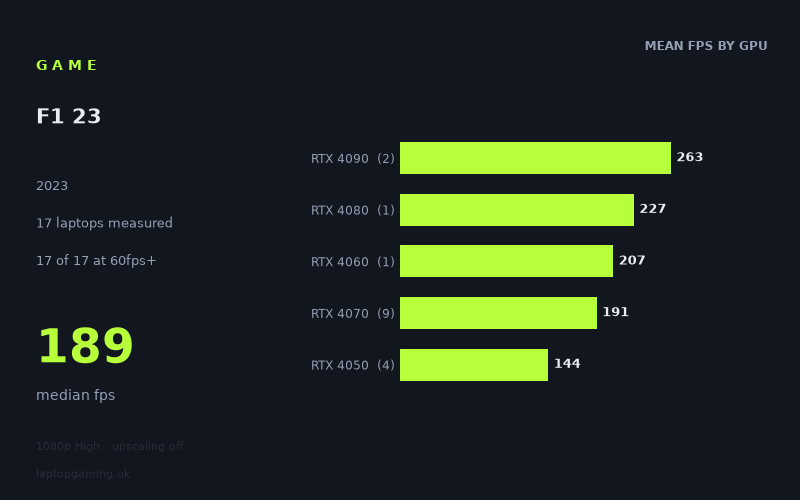
Every laptop we have figures for
Frame rates measured by Notebookcheck.
What it asks of a laptop
At 1,920 x 1,080 on the High preset with upscaling off, F1 23 looks relatively forgiving for a gaming laptop in this sample. Notebookcheck’s measured figures cover 17 laptops, every one of which reached 60fps or better. Sixteen of the 17 also exceeded 100fps, and 16 reached at least 144fps. The overall median is 189fps, while the full range runs from 94fps to 374fps.
That is a wide spread in absolute terms, but it does not mean that F1 23 requires flagship hardware for smooth play at these settings. Rather, the game appears able to make use of faster graphics hardware, particularly at the top end, while still delivering high frame rates on lower-tier dedicated GPUs. The fastest result came from the Asus ROG Strix Scar 17 with an RTX 4090 at 374fps, almost four times the 94fps recorded by the Samsung Galaxy Book4 Ultra with an RTX 4050.
The figures also show why laptop model matters as much as the GPU label. RTX 4070 results range from 153fps in the Asus ROG Zephyrus G14 2024, fitted with a 75W RTX 4070, to 222fps in the Lenovo Legion 7 16 IRX G9. The two RTX 4090 machines are even more widely separated: 374fps for the Asus ROG Strix Scar 17 and 152fps for the Lenovo Legion 9 16IRX9. Those are measured results from specific laptops, not a guarantee of what every machine using those chips will achieve.
For a buyer, the important conclusion is straightforward: F1 23 is not especially difficult to run at 1080p High without upscaling if the laptop has a modern dedicated RTX GPU. However, the difference between merely clearing 60fps and sustaining a high-refresh-rate panel can still depend heavily on the laptop’s particular configuration.
What runs it
60fps: every measured laptop clears it
All 17 measured machines exceeded 60fps. The slowest was the Samsung Galaxy Book4 Ultra with an RTX 4050 at 94fps, which is still comfortably above that threshold. The remaining RTX 4050 laptops were substantially faster: the Lenovo LOQ 15IRH8 Core i7 with a 95W RTX 4050 recorded 158fps, the Schenker XMG Apex 15 with a 140W RTX 4050 reached 159fps, and the Lenovo Legion Pro 5 16ARX8 with an RTX 4050 managed 165fps.
Based on these figures, an RTX 4050 laptop can be sufficient for 1080p High at a conventional 60Hz display target. The 94fps Galaxy Book4 Ultra result is a useful reminder, though, that the same GPU name does not settle the question by itself.
100fps: available on almost all of the sample
Sixteen of 17 laptops reached 100fps. The sole exception was the 94fps Samsung Galaxy Book4 Ultra. All three other RTX 4050 systems in the figures cleared 150fps, while the single RTX 4060 result, the Lenovo Legion 5 16IRX G9, reached 207fps.
RTX 4070 machines also performed strongly, though there is meaningful variation among them. Notebookcheck’s numbers show 153fps for the 75W RTX 4070 in the Asus ROG Zephyrus G14 2024; 165fps for the Asus ROG Zephyrus G16 2024; 175fps for the Dell XPS 16; 189fps for the MSI Stealth 16 Studio with a 105W RTX 4070; 198fps for the Schenker XMG Pro 16 Studio with a 140W RTX 4070; 199fps for the MSI Pulse 17; 209fps for both the Lenovo Yoga Pro 9 with a 100W RTX 4070 and the Aorus 15 BSF with a 140W RTX 4070; and 222fps for the Lenovo Legion 7 16 IRX G9.
144fps: realistic well below flagship level
Again, 16 of 17 measured laptops met or exceeded 144fps. This includes three RTX 4050 systems, the RTX 4060 result, all nine RTX 4070 systems, the RTX 4080 laptop and both RTX 4090 laptops.
The four RTX 4050 results averaged 144fps, but that mean conceals a major divide: three machines landed between 158fps and 165fps, while the Samsung Galaxy Book4 Ultra reached 94fps. For a 144Hz target, the measured evidence is strongest for the Lenovo LOQ 15IRH8 Core i7, Schenker XMG Apex 15 and Lenovo Legion Pro 5 16ARX8 rather than for every RTX 4050 laptop generally.
Among higher tiers, the measured mean was 191fps across nine RTX 4070 laptops, 207fps for the one RTX 4060 laptop, 227fps for the single RTX 4080 laptop, and 263fps across two RTX 4090 laptops. These averages should be read cautiously: the RTX 4080 and RTX 4060 entries each represent only one laptop, while the RTX 4090 average covers only two.
The cheapest laptop that handles it
The only price supplied in the measured figures is GBP 1,038 for the Asus ROG Zephyrus G14 2024 with a 75W RTX 4070. It recorded 153fps at 1080p High with upscaling off, making it one of the measured machines that clears both 100fps and 144fps.
It would not be accurate to call it the cheapest laptop overall from this fact sheet, because no prices are provided for the other 16 machines. There are measured RTX 4050 laptops that delivered 158fps, 159fps and 165fps, but their prices are not listed here, so the numbers do not support a price-led comparison.
What this means if you’re buying
If your target is smooth 60fps at 1080p High without upscaling, the measured results suggest that even the slowest laptop in this group, the RTX 4050-equipped Samsung Galaxy Book4 Ultra, has headroom. For a 100Hz or 120Hz display, nearly every laptop here is suitable, although the Galaxy Book4 Ultra is the clear exception at 94fps.
For a 144Hz screen, there is no need to assume that an RTX 4080 or RTX 4090 is necessary. The measured RTX 4050 results in the Lenovo LOQ 15IRH8 Core i7, Schenker XMG Apex 15 and Lenovo Legion Pro 5 16ARX8 all exceeded 144fps, as did every listed RTX 4070 machine. The Zephyrus G14’s 153fps result is particularly relevant for buyers considering a smaller RTX 4070 laptop, though it also illustrates that a lower-power design can sit well below the quickest RTX 4070 results.
Flagship hardware is chiefly for buyers chasing exceptionally high frame rates: the RTX 4080 Zenbook Pro 16X reached 227fps, while the fastest RTX 4090 result, the ROG Strix Scar 17, reached 374fps. Yet the 152fps result from the RTX 4090 Lenovo Legion 9 reinforces the central buying lesson: compare measured performance from the particular laptop, not just its GPU badge.
How these numbers were produced
Frame rates here are not measured by us, and we label how each one was arrived at. A figure marked measured comes from a published run on that exact machine. A figure marked representative is derived from the GPU and its power limit (TGP) and cross-referenced against published reviews - a sound estimate of what that configuration delivers, but not a measurement of that specific laptop. Unless stated otherwise, numbers are 1920x1080, High preset, upscaling off. Where a laptop ships in several power configurations we use the wattage of the exact SKU listed, because a 140W RTX 5070 and a 115W one are not the same product.