Performance analysis
F1 2020 (2020): what it takes to run it
Measured on 13 gaming laptops at 1920×1080, High preset, upscaling off.

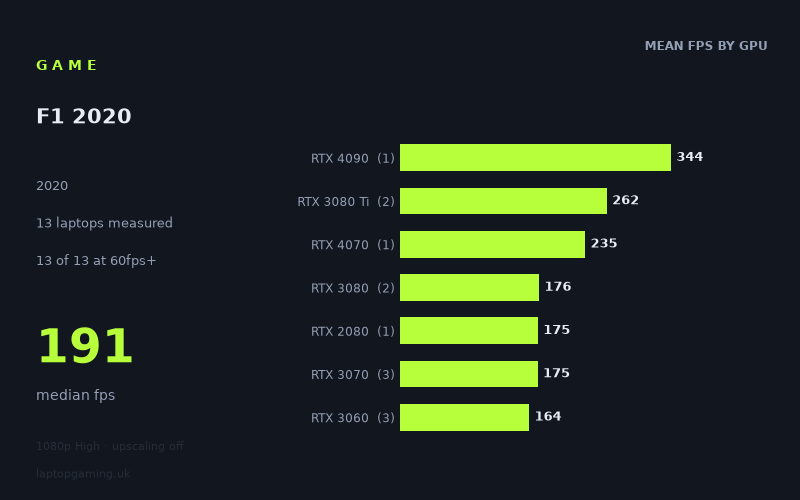
Every laptop we have figures for
Frame rates measured by Notebookcheck.
What it asks of a laptop
At the measured 1,920 × 1,080 High preset with upscaling off, F1 2020 is a very forgiving game for the gaming laptops in this sample. Notebookcheck’s figures cover 13 laptops, and every one of them exceeded 144fps. The full spread runs from 148fps on the MSI Katana GF76 with an 85W RTX 3060 to 344fps on the Aorus 17X AZF with a 175W RTX 4090. The median result is 191fps.
That is an unusually high floor. Even the slowest measured machine is 88fps above 60fps, 48fps above 100fps and 4fps above 144fps. For a buyer using a 60Hz, 100Hz, 120Hz or 144Hz display, the available evidence says that High settings at 1080p should not require an expensive top-tier GPU—although these figures describe the tested laptops rather than every laptop carrying the same graphics name.
The performance gaps do still matter if the aim is to chase extremely high frame rates. The RTX 4090-equipped Aorus reaches 344fps, while the two RTX 3080 Ti laptops average 262fps. Below that point, the results cluster more tightly than the GPU names alone might suggest. The RTX 4070 MSI Stealth 16 Studio records 235fps, but the RTX 3080, RTX 2080 and RTX 3070 tier averages are all around 175fps. The RTX 3060 group averages 164fps.
That clustering is important. The measured figures suggest that F1 2020 at these settings does not separate every GPU tier dramatically once performance is already well beyond 144fps. Laptop configuration also plainly matters. For example, the measured RTX 3070 machines range from 158fps to 207fps, while the RTX 3060 systems range from 148fps to 193fps. These are not results that support assuming one RTX 3070 or RTX 3060 laptop will necessarily match another.
What runs it
All 13 measured laptops clear 60fps, 100fps and 144fps. There is no measured GPU tier here that falls short of those targets at 1080p High with upscaling disabled.
- RTX 4090: The single measured RTX 4090 laptop, the Aorus 17X AZF with a 175W GPU, achieved 344fps. This is far beyond a 144Hz target and is the highest figure in the sample. As this tier has only one measured machine, it should be read as that Aorus model’s result rather than a general RTX 4090 expectation.
- RTX 3080 Ti: Two laptops were measured: the MSI Raider GE66 at 270fps and Schenker XMG Neo 17 M22 at 255fps. Their 262fps mean is comfortably above 144fps and gives substantial headroom beyond it.
- RTX 4070: The MSI Stealth 16 Studio, carrying a 105W RTX 4070, reached 235fps. That is well over 100fps and 144fps, but it is one laptop result rather than a broad tier verdict.
- RTX 3080: The Asus ROG Zephyrus Duo 15 SE with a 130W RTX 3080 produced 191fps, while the Asus ROG Zephyrus G15 produced 162fps. The two-machine mean is 176fps. Both are safely above 144fps.
- RTX 2080: The Asus Strix Scar 17 recorded 175fps. That clears all three frame-rate thresholds, though this is again a one-laptop sample.
- RTX 3070: The Lenovo Legion 5 Pro 16ACH6H reached 207fps, the Gigabyte Aero 15 OLED XD 159fps and the MSI Katana GF66 with an 85W GPU 158fps. The tier mean is 175fps, and every measured RTX 3070 laptop clears 144fps.
- RTX 3060: The Lenovo Legion 5 achieved 193fps, the Alienware m15 R5 Ryzen Edition with a 125W RTX 3060 reached 151fps, and the MSI Katana GF76 with an 85W RTX 3060 managed 148fps. The 164fps average is still above 144fps, but the 45fps gap between the fastest and slowest RTX 3060 results shows why the individual laptop matters.
The cheapest laptop that handles it
The fact sheet does not provide enough pricing information to identify the cheapest laptop that handles F1 2020. It includes a price for only one machine: the Asus ROG Zephyrus G15 with RTX 3080, listed at £2,196. That laptop achieved 162fps, clearing 60fps, 100fps and 144fps.
However, £2,196 should not be presented as the cheapest route to acceptable performance. The measured MSI Katana GF76 with an 85W RTX 3060 reached 148fps, and the MSI Katana GF66 with an 85W RTX 3070 reached 158fps, but no prices are supplied for either. Likewise, the Lenovo Legion 5’s RTX 3060 result of 193fps demonstrates that considerably lower-tier graphics hardware can run the game extremely well, but the supplied figures contain no price for that configuration.
What this means if you’re buying
If your target is a stable 60fps at 1080p High, the measured results indicate considerable surplus performance across the entire sample. The slowest laptop still recorded 148fps. A 100fps target is equally undemanding within these numbers: all 13 machines passed it, including every RTX 3060 result.
For a 144Hz laptop display, the key finding is similarly straightforward: every measured machine reached at least 144fps, though the slowest result only just did so at 148fps. Buyers who want more margin above 144fps should pay attention to the specific laptop rather than GPU branding alone. The measured RTX 3060 range is 148fps to 193fps, while the RTX 3070 range is 158fps to 207fps.
Higher-end hardware is most relevant for buyers seeking frame rates well beyond 144fps. The RTX 3080 Ti machines reached 255fps and 270fps, and the measured RTX 4090 system reached 344fps. For ordinary 60Hz to 144Hz play at the tested settings, though, Notebookcheck’s numbers suggest that an RTX 3060-class laptop can already be sufficient—provided the particular machine performs comparably to the three RTX 3060 laptops listed here.
How these numbers were produced
Frame rates here are not measured by us, and we label how each one was arrived at. A figure marked measured comes from a published run on that exact machine. A figure marked representative is derived from the GPU and its power limit (TGP) and cross-referenced against published reviews - a sound estimate of what that configuration delivers, but not a measurement of that specific laptop. Unless stated otherwise, numbers are 1920x1080, High preset, upscaling off. Where a laptop ships in several power configurations we use the wattage of the exact SKU listed, because a 140W RTX 5070 and a 115W one are not the same product.