Performance analysis
Far Cry New Dawn (2019): what it takes to run it
Measured on 16 gaming laptops at 1920×1080, High preset, upscaling off.

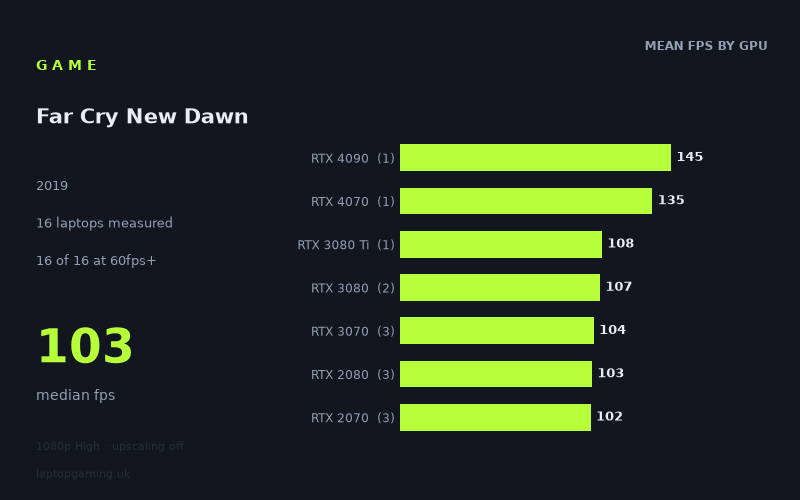
Every laptop we have figures for
Frame rates measured by Notebookcheck.
What it asks of a laptop
At 1,920 x 1,080 using the High preset with upscaling disabled, Far Cry New Dawn looks relatively forgiving for modern gaming laptops. Notebookcheck’s measured figures cover 16 laptops, and every one of them exceeded 60fps. The slowest result was still 78fps, while the fastest reached 145fps. The median result was 103fps.
That is a useful spread for prospective buyers. It suggests that this setting combination does not require an expensive current-generation GPU simply to achieve a smooth frame rate. Even the lowest-ranked machine in this set, the Asus ROG Strix G17 with a 95W RTX 3050 Ti, remained comfortably above 60fps. There is therefore a sizeable performance cushion at 1080p High among the tested laptops.
The separation between GPU tiers is not perfectly neat, however, and that matters when comparing laptop specifications. The RTX 3080 group averaged 107fps across two laptops, while the RTX 3070 group averaged 104fps across three. The RTX 2080 and RTX 2070 groups were also close behind, at 103fps and 102fps respectively across three laptops each. In these figures, an older high-end GPU can sit very close to a newer or nominally higher-tier part.
That is a reminder that a laptop GPU name alone is not a complete performance specification. The individual measured results range from 92fps for the Gigabyte Aero 17 HDR XB with an RTX 2070 to 110fps for the Gigabyte Aero 15 OLED, also with an RTX 2070. RTX 3070 results similarly span from 96fps on the Lenovo Legion 5 Pro 16ACH6H to 112fps on the Schenker XMG Neo 17. The supplied figures identify an 85W RTX 3070 in the MSI Katana GF66, which recorded 103fps, while the other RTX 3070 systems have different measured outcomes.
For this game at these settings, then, the main distinction is not between playable and unplayable hardware. All 16 tested machines are playable by a conventional 60fps standard. Instead, the meaningful question is whether a buyer wants approximately 80–100fps, a more consistent route beyond 100fps, or enough performance to approach a 144Hz display’s maximum refresh rate.
What runs it
For 60fps: every laptop in Notebookcheck’s 16-machine sample cleared the target. The entry point in this data is the Asus ROG Strix G17 with a 95W RTX 3050 Ti, at 78fps. The single tested RTX 3060 laptop, the Lenovo Legion 5, reached 94fps. Those figures indicate that 1080p High does not demand flagship hardware for smooth play, although the data does not establish how every RTX 3050 Ti or RTX 3060 laptop will perform.
For 100fps: 10 of the 16 laptops reached or exceeded it. The MSI Katana GF66 with an 85W RTX 3070 recorded 103fps, as did the median result across the full sample. The tested RTX 2070, RTX 2080, RTX 3070 and RTX 3080 groups all averaged between 102fps and 107fps, but their individual results overlap substantially. Examples include the MSI GE66 Raider with RTX 2070 at 104fps, the Asus Strix Scar 17 with RTX 2080 at 113fps, the Schenker XMG Neo 17 with RTX 3070 at 112fps, and the Gigabyte Aero 17 HDR YC with RTX 3080 at 113fps.
There are exceptions within those tiers. The Gigabyte Aero 17 HDR XB RTX 2070 measured 92fps, while the Lenovo Legion 5 Pro RTX 3070 measured 96fps. As a result, the measured numbers support treating roughly 100fps as realistic territory for several RTX 2070-and-above laptops, rather than as a guarantee attached to every laptop carrying one of those GPU labels.
For 144fps: only one laptop reached the threshold: the Aorus 17X AZF with an RTX 4090 at 175W, at 145fps. The MSI Stealth 16 Studio with an RTX 4070 at 105W came close at 135fps, but did not reach 144fps. The RTX 4090 and RTX 4070 results each represent only one laptop, so they describe those specific machines rather than the performance of their GPU classes as a whole.
The remaining high-end results were below that refresh-rate target: the RTX 3080 Ti-equipped Schenker XMG Neo 17 M22 delivered 108fps, while the two RTX 3080 machines averaged 107fps. A 144Hz panel may still be worthwhile with these laptops, but the measured figures do not show them sustaining 144fps at the stated settings.
The cheapest laptop that handles it
The only price supplied in the fact sheet is £1,167 for the Asus ROG Strix G17 with a 95W RTX 3050 Ti. It achieved 78fps at 1,920 x 1,080 High with upscaling off, making it the lowest-priced specifically priced machine in the supplied data and a clear 60fps option.
It would be wrong to call it the cheapest laptop overall for Far Cry New Dawn, because prices are not provided for the other 15 systems. What can be said is that the £1,167 Strix G17 handled the game comfortably at the tested settings, with 18fps of headroom over 60fps. Buyers targeting a basic smooth experience therefore do not need to use the 100fps or 144fps results as their spending baseline.
What this means if you’re buying
If Far Cry New Dawn at 1080p High is a priority, buy according to your frame-rate target rather than assuming the game needs a premium GPU. The measured sample shows a 78fps-to-145fps range, with all systems clearing 60fps and most delivering a result close to or above 100fps.
- Targeting 60fps: the tested RTX 3050 Ti laptop was sufficient, at 78fps. The tested RTX 3060 laptop reached 94fps.
- Targeting around 100fps: the sample is strongest from RTX 2070, RTX 2080, RTX 3070 and RTX 3080 laptops, though specific chassis results ranged from the low 90s to 113fps.
- Targeting 144fps: only the Aorus 17X AZF with its 175W RTX 4090 achieved it, at 145fps. The RTX 4070 MSI Stealth 16 Studio was close at 135fps.
For a laptop purchase, the practical conclusion is that this game should not force an upgrade to the most expensive GPU tier if 60fps or roughly 100fps is enough. Conversely, buyers selecting a 144Hz display specifically to pursue a full 144fps at these settings should note that Notebookcheck’s figures show only one of 16 tested laptops reaching that mark.
How these numbers were produced
Frame rates here are not measured by us, and we label how each one was arrived at. A figure marked measured comes from a published run on that exact machine. A figure marked representative is derived from the GPU and its power limit (TGP) and cross-referenced against published reviews - a sound estimate of what that configuration delivers, but not a measurement of that specific laptop. Unless stated otherwise, numbers are 1920x1080, High preset, upscaling off. Where a laptop ships in several power configurations we use the wattage of the exact SKU listed, because a 140W RTX 5070 and a 115W one are not the same product.