Performance analysis
High On Life (2023): what it takes to run it
Measured on 8 gaming laptops at 1920×1080, High preset, upscaling off.

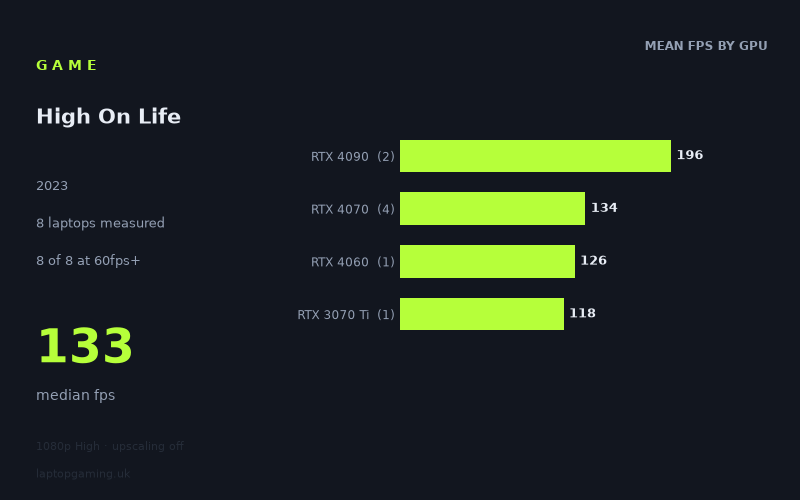
Every laptop we have figures for
Frame rates measured by Notebookcheck.
What it asks of a laptop
At 1,920 x 1,080 using the High preset with upscaling disabled, High On Life looks forgiving for the gaming laptops represented here. Notebookcheck's measured figures range from 118fps to 211fps, with a median of 133fps. Every one of the eight recorded laptops cleared both 60fps and 100fps.
That is an encouraging result, but the sample size still matters. These are figures from eight laptops only, and the lower end of the data is represented by just one RTX 4060 machine and one RTX 3070 Ti machine. The results are therefore useful for showing what these particular systems achieved, rather than proving that every laptop carrying one of these GPU names will perform identically.
The GPU tiers do separate, particularly at the top. The two RTX 4090 laptops averaged 196fps, compared with 134fps across the four RTX 4070 laptops. That is a substantial 62fps gap in the tier averages, and it is the difference between being comfortably above 144fps and falling just short of that refresh-rate target on the fastest RTX 4070 result.
However, this is not a game where the measured RTX 4070 systems struggle for ordinary 60Hz or 100Hz play. The four RTX 4070 machines recorded between 127fps and 142fps. Even the slowest laptop in the entire set, the Razer Blade 15 OLED with an RTX 3070 Ti at 110W, managed 118fps. On these figures, High On Life does not require a flagship laptop GPU for a smooth experience at the tested 1080p High settings.
The main demand is therefore not hitting 60fps, but sustaining very high frame rates for a 144Hz-class display. Only two of the eight laptops reached 144fps, and both were RTX 4090 models. The measured figures also show that GPU labels and stated power figures should not be treated as a simple performance ranking: the RTX 4070 results range from 127fps to 142fps, and the listed wattages do not create a neat order. Laptop implementation clearly matters, but this data alone cannot identify why each system falls where it does.
What runs it
RTX 4090 laptops
The measured RTX 4090 machines are the only systems here that clear 144fps. The Aorus 17X AZF, with an RTX 4090 at 175W, delivered 211fps. The Asus ROG Strix Scar 18 2023, with an RTX 4090 at 150W, managed 180fps. Their 196fps mean gives a considerable margin above 144fps at the tested settings.
For buyers specifically targeting a high-refresh 1080p experience with the High preset and no upscaling, these are the clearest results in the fact sheet. That said, there are only two RTX 4090 laptops in the sample. The sensible conclusion is that these two RTX 4090 systems ran the game extremely quickly, not that every RTX 4090 laptop can be assumed to produce the same result.
RTX 4070 laptops
The RTX 4070 group is well represented, with four results and a 134fps average. The Aorus 15X ASF, using an RTX 4070 at 140W, was the quickest RTX 4070 machine at 142fps. It was close to 144fps, but did not reach it in the recorded run.
The MSI Stealth 16 Studio recorded 134fps with its RTX 4070 at 105W, while the Asus ROG Strix G18 reached 132fps with an RTX 4070 at 165W. The HP Victus 16-r0077ng, equipped with an RTX 4070 at 140W, returned 127fps. All four comfortably exceeded 100fps, and all four were far beyond 60fps.
Based on these particular results, RTX 4070 laptops are the strongest measured option below the RTX 4090 pair for this game. They are not a verified 144fps solution in this data set, but they delivered a narrow and consistently high 127fps-to-142fps range.
RTX 4060 and RTX 3070 Ti laptops
The MSI Katana 17, the sole RTX 4060 laptop in the figures, achieved 126fps. That puts it above both 60fps and 100fps, and only 1fps behind the slowest RTX 4070 result. It is a strong individual result, although one laptop is not enough evidence to make a blanket RTX 4060 recommendation.
The Razer Blade 15 OLED (Early 2022), with an RTX 3070 Ti at 110W, posted 118fps. It is the slowest measured result, yet it still cleared 100fps by 18fps. For the tested 1080p High configuration, this specific older RTX 3070 Ti laptop was plainly capable of smooth high-frame-rate play.
The cheapest laptop that handles it
The fact sheet does not provide prices for most of the laptops, so it is not possible to identify the cheapest model from the supplied information. The only listed price is for the Asus ROG Strix Scar 18 2023, at £4,000, and it is not presented as a budget choice. Its 180fps result is excellent, but the measured data contains several much lower-tier machines that also exceeded 100fps without supplying their prices.
If the question is instead which named machine is the lowest GPU tier shown to handle the game well, the MSI Katana 17 with RTX 4060 recorded 126fps. The Razer Blade 15 OLED (Early 2022) with RTX 3070 Ti also managed 118fps. Neither can be called the cheapest without a price.
What this means if you're buying
For High On Life at 1,920 x 1,080, High settings and no upscaling, the measured figures suggest that buying a flagship laptop solely for this game is unnecessary if your target is 60fps or even 100fps. Every machine in the sample met both thresholds, including the RTX 4060 MSI Katana 17 and the RTX 3070 Ti Razer Blade 15 OLED.
An RTX 4070 laptop appears to be the practical high-performance tier in this limited set: all four measured examples landed between 127fps and 142fps. Buyers with a 120Hz display would have substantial headroom in these recorded results. A 144Hz target is less certain, as none of the measured RTX 4070 laptops quite reached 144fps.
Choose one of the measured RTX 4090 systems only if maintaining more than 144fps at these tested settings is a priority. The Aorus 17X AZF and Asus ROG Strix Scar 18 2023 are the only recorded laptops to do that, at 211fps and 180fps respectively. For everyone else, the numbers indicate that High On Life is comparatively easy to run at 1080p High—provided expectations are kept tied to these eight specific laptop results.
How these numbers were produced
Frame rates here are not measured by us, and we label how each one was arrived at. A figure marked measured comes from a published run on that exact machine. A figure marked representative is derived from the GPU and its power limit (TGP) and cross-referenced against published reviews - a sound estimate of what that configuration delivers, but not a measurement of that specific laptop. Unless stated otherwise, numbers are 1920x1080, High preset, upscaling off. Where a laptop ships in several power configurations we use the wattage of the exact SKU listed, because a 140W RTX 5070 and a 115W one are not the same product.