Performance analysis
Company of Heroes 3 (2023): what it takes to run it
Measured on 10 gaming laptops at 1920×1080, High preset, upscaling off.

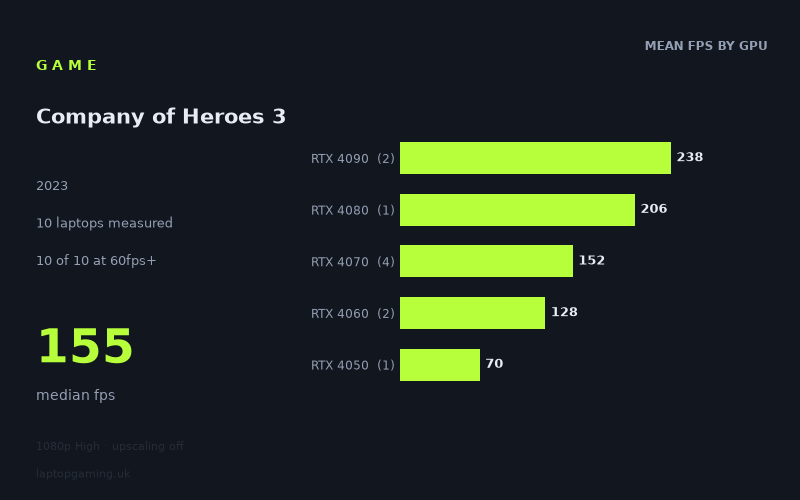
Every laptop we have figures for
Frame rates measured by Notebookcheck.
What it asks of a laptop
At 1,920 × 1,080 on the High preset with upscaling disabled, Company of Heroes 3 is relatively forgiving at a 60fps target, at least across the ten laptops in Notebookcheck’s measured figures. Every machine in this set cleared 60fps, with results ranging from 70fps on the Dell G15 5530 with RTX 4050 graphics to 240fps on the Aorus 17X AZF with an RTX 4090 running at 175W.
That is a wide 170fps spread, but it is more useful to look at the targets within it. All ten systems reached 60fps, nine reached 100fps, and six reached 144fps. The median result was 155fps, although that figure reflects a test group weighted towards RTX 4060, RTX 4070, RTX 4080 and RTX 4090 laptops rather than entry-level gaming machines.
The measured numbers separate quite clearly by GPU tier. The two RTX 4090 laptops averaged 238fps, while the single RTX 4080 machine reached 206fps. The four RTX 4070 systems averaged 152fps, the two RTX 4060 laptops averaged 128fps, and the one RTX 4050 result was 70fps.
That scaling suggests that the game does reward more powerful graphics hardware if you want very high frame rates, but it does not appear to require flagship hardware for a smooth 1080p High experience. The demanding part is not reaching a basic playable frame rate; it is sustaining the sort of performance that makes use of a 144Hz or faster laptop display without reducing the preset or enabling upscaling.
There are important sample-size limits within the tier averages. Notebookcheck’s figures include only one RTX 4080 laptop and one RTX 4050 laptop, while the RTX 4090 and RTX 4060 results each cover two machines. The RTX 4070 group, with four laptops, gives the broadest view of how the game behaves among these tested systems. These numbers show what these particular laptops achieved, rather than guaranteeing the same result from every laptop with the same GPU name.
What runs it
For 60fps: all ten measured laptops cleared the target. The lowest result came from the Dell G15 5530, i5-13450HX RTX, with an RTX 4050, at 70fps. On this evidence, an RTX 4050 laptop can run Company of Heroes 3 at 1,920 × 1,080 High without upscaling and remain above 60fps. However, this conclusion rests on one measured RTX 4050 system, so it should be treated as an indication rather than a broad buying guarantee.
For 100fps: the RTX 4060 tier and above cleared it in every measured example. The MSI Katana 17 with RTX 4060 recorded 133fps, while the Lenovo Legion Slim 7 with RTX 4060 at 140W reached 122fps. Among RTX 4070 systems, results ran from 135fps to 160fps: 160fps from the Aorus 15X ASF with RTX 4070 at 140W, 156fps from the MSI Stealth 16 Studio with RTX 4070 at 105W, 155fps from the Asus ROG Strix G18 with RTX 4070 at 165W, and 135fps from the HP Victus 16-r0077ng with RTX 4070 at 140W.
For 144fps: six of the ten laptops made the cut. The two RTX 4090 machines did so comfortably: the Aorus 17X AZF delivered 240fps and the Medion Erazer Beast X40 managed 235fps. The HP Omen 17-ck2097ng with RTX 4080 at 175W reached 206fps. Three of the four RTX 4070 systems also exceeded 144fps: the Aorus 15X ASF at 160fps, MSI Stealth 16 Studio at 156fps, and Asus ROG Strix G18 at 155fps.
The remaining RTX 4070 result, the HP Victus 16-r0077ng at 135fps, fell short of 144fps, as did both RTX 4060 laptops at 133fps and 122fps. That makes RTX 4070 the lowest tier in this set with measured 144fps-capable examples, but the 135fps Victus result shows that an RTX 4070 badge alone is not enough to promise that outcome.
The cheapest laptop that handles it
No laptop prices are included in the supplied fact sheet, so it is not possible to identify the cheapest measured machine in GBP without inventing information. What the performance data can establish is the lowest-performing tested laptop that still handled the game at the stated settings: the Dell G15 5530, i5-13450HX RTX with RTX 4050, which produced 70fps.
If your definition of “handles it” is a 60fps target at 1,920 × 1,080 High with upscaling off, that Dell is the lowest GPU tier represented here. If you want more headroom towards 100fps, the measured RTX 4060 options were the MSI Katana 17 at 133fps and Lenovo Legion Slim 7 at 122fps. Neither should be called the cheaper purchase without price information.
What this means if you’re buying
For a laptop bought chiefly to run Company of Heroes 3 at 1080p High, an RTX 4050-class machine may be sufficient for 60fps based on the single Dell G15 result. It is the minimum tier represented here, though, with far less spare performance than the RTX 4060 and RTX 4070 laptops.
An RTX 4060 looks like the more convincing target for a buyer wanting performance above 100fps in the tested machines. The two measured examples averaged 128fps and both exceeded 120fps. That is a substantial step above the RTX 4050’s 70fps result, although the sample is only two laptops.
If a 144Hz-class target matters, prioritise an RTX 4070 laptop, but check measured results for the exact model where possible. Three tested RTX 4070 machines exceeded 144fps, while one reached 135fps. RTX 4080 and RTX 4090 laptops offer much larger margins, at 206fps and 235–240fps respectively in these figures, but their advantage is primarily for very high frame-rate headroom rather than simply making the game playable.
How these numbers were produced
Frame rates here are not measured by us, and we label how each one was arrived at. A figure marked measured comes from a published run on that exact machine. A figure marked representative is derived from the GPU and its power limit (TGP) and cross-referenced against published reviews - a sound estimate of what that configuration delivers, but not a measurement of that specific laptop. Unless stated otherwise, numbers are 1920x1080, High preset, upscaling off. Where a laptop ships in several power configurations we use the wattage of the exact SKU listed, because a 140W RTX 5070 and a 115W one are not the same product.