Details
Product prices and availability are accurate as of the date/time indicated and are subject to change. Any price and availability information displayed on Amazon.co.uk at the time of purchase will apply to the purchase of this product.Performance analysis
Senua's Saga Hellblade 2 (2024): what it takes to run it
Measured on 15 gaming laptops at 1920×1080, High preset, upscaling off.

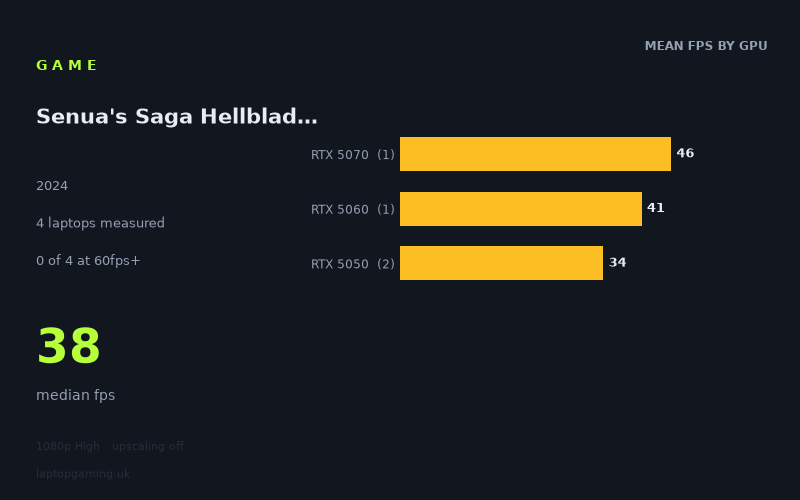
Every laptop we have figures for
Frame rates measured by Notebookcheck.
What it asks of a laptop
Start with the headline number from Notebookcheck's testing: not one of the four laptops measured reached 60fps. Not at 4K, not at 1440p — at 1920x1080, on the High preset, with upscaling switched off. The fastest machine in the set managed 46fps and the slowest 34fps. That is a game that has been built to a standard that current mainstream mobile silicon simply does not meet at native resolution.
The more revealing figure is the spread. From the RTX 5050 laptops at 34-35fps to the RTX 5070 at 46fps, you are looking at a total range of 12fps — roughly a 35 per cent gain for a jump of two GPU tiers. In a lightly threaded, CPU-limited game you would expect the results to bunch up near the top and stay there regardless of graphics hardware. Here they bunch up near the bottom, and they separate cleanly and predictably by GPU. The RTX 5050 pair sit at 34 and 35fps — one frame apart, across two different chassis from two different manufacturers. The RTX 5060 adds 7fps over that baseline. The RTX 5070 adds another 5fps on top.
That pattern tells you two things. First, this is a pure GPU workload. Nothing else in the system is the limiting factor — the two RTX 5050 machines landing within a single frame of each other, despite being entirely different laptops, is about as clean a demonstration of GPU-bound behaviour as you will find in a four-sample data set. Second, the returns from spending more are real but modest. Each tier upgrade buys you a handful of frames, not a transformation. You cannot buy your way to 60fps within this group; you would need hardware beyond anything measured here, and the fact sheet gives no evidence that even that would clear the bar at native 1080p High.
One important caveat sits in the test conditions themselves: these figures were captured with upscaling off. That is a deliberately punishing configuration, and it is not how most people will actually play. The measured numbers say nothing about what the game does with upscaling enabled, so treat 34-46fps as the floor of what these machines produce under the harshest realistic settings, not as a fixed ceiling on the experience.
What runs it
Working through the tiers with only the measured data:
- 144fps and above: nothing. Zero of four laptops. The fastest result is less than a third of that figure.
- 100fps and above: nothing. Zero of four. The RTX 5070 at 46fps is not within touching distance.
- 60fps and above: nothing. Zero of four. The RTX 5070's 46fps is the closest anything gets, and it is still 14fps short — a gap of roughly 30 per cent that no amount of chassis tuning is going to close.
- 40fps and above: two of four. The RTX 5070 at 46fps and the RTX 5060 at 41fps.
- Below 40fps: both RTX 5050 machines, at 35fps and 34fps.
The practical reading: at native 1080p High, an RTX 5070 gives you mid-40s, which is playable in the sense that the frame times are consistent enough for a slow, deliberate single-player game, but it is nowhere near a smooth 60. An RTX 5060 at 115W gives you low 40s — 41fps, only 5fps behind the 5070 despite the tier gap and, judging by the Katana's £2,312 price tag, a substantially lower cost. An RTX 5050 gives you mid-30s, which is where the experience starts to feel genuinely compromised at native resolution.
Worth noting that the Lenovo LOQ's RTX 5060 is specified at 115W. That is a healthy power budget for the tier, and its 41fps result should be read as close to the best that GPU will do. A more thermally constrained 5060 in a thinner chassis would reasonably be expected to land closer to the 5050 results than to this one.
The cheapest laptop that handles it
The fact sheet gives a price for one machine only: the MSI Katana 17 HX with an RTX 5070, at £2,312. That is the fastest laptop measured, and it delivers 46fps. Spending £2,312 to land 14fps short of 60 at 1080p is not a comfortable proposition, and it is the strongest argument in this data set for not overspending on this particular title.
The Lenovo LOQ with an RTX 5060 at 115W is the value pick by the numbers — 41fps, 89 per cent of the Katana's performance. No price is listed for it in the measured data, but LOQ-class machines with a 5060 sit well below the Katana's £2,312, and the performance you give up is five frames. If you are buying primarily around this game, that is where the sensible money goes.
The two RTX 5050 laptops — the Medion Erazer Scout 17 E1 at 35fps and the HP Victus 15-fa2160ng at 34fps — are the entry point, and their near-identical results mean there is nothing to choose between them on this workload. Pick on price, screen and build, because the GPU will behave the same way in both.
What this means if you're buying
Do not buy a laptop expecting to run this at native 1080p High and 60fps, because the measured evidence says that hardware is not in this sample. If a 60fps target matters to you, the lever is upscaling, not spending — and the figures here deliberately exclude it, so budget your expectations accordingly.
If you already own an RTX 5050 machine, you are looking at mid-30s natively. That is workable for a slow-paced game but leaves no headroom, and dropping the preset or enabling upscaling is the obvious response. If you are choosing between tiers on a new purchase, the RTX 5060 at a proper power budget is the efficient point on this curve: it captures most of the RTX 5070's advantage without the Katana's £2,312 outlay. And be sceptical of any 5060 that is not given room to breathe — the 115W figure attached to the LOQ result is doing real work in that 41fps number.
Finally, treat high-refresh panels as irrelevant to this specific title. With a measured ceiling of 46fps across four laptops, a 144Hz or 240Hz screen contributes nothing here. Judge the display on other games.
How these numbers were produced
Frame rates here are not measured by us, and we label how each one was arrived at. A figure marked measured comes from a published run on that exact machine. A figure marked representative is derived from the GPU and its power limit (TGP) and cross-referenced against published reviews - a sound estimate of what that configuration delivers, but not a measurement of that specific laptop. Unless stated otherwise, numbers are 1920x1080, High preset, upscaling off. Where a laptop ships in several power configurations we use the wattage of the exact SKU listed, because a 140W RTX 5070 and a 115W one are not the same product.