Details
Product prices and availability are accurate as of the date/time indicated and are subject to change. Any price and availability information displayed on Amazon.co.uk at the time of purchase will apply to the purchase of this product.Performance analysis
Doom: The Dark Ages: what it takes to run it
Measured on 20 gaming laptops at 1920×1080, High preset, upscaling off.

Every laptop we have figures for
Frame rates measured by Notebookcheck.
What it asks of a laptop
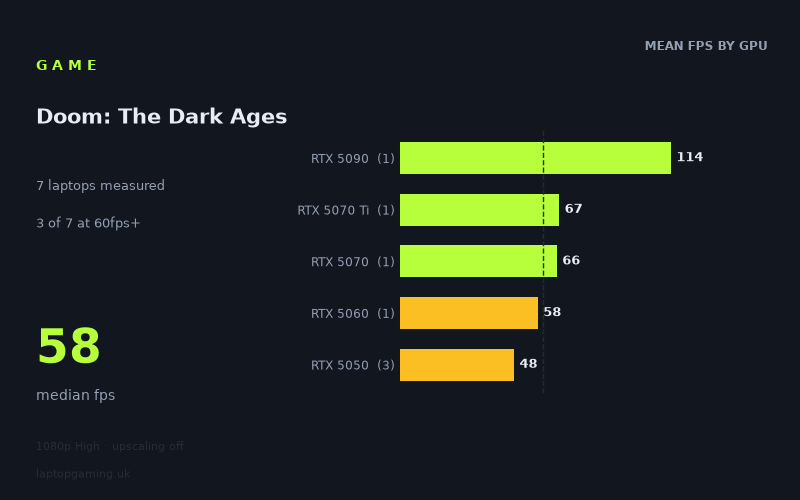
The spread tells the story quickly. Across six laptops at 1920x1080, High preset with upscaling switched off, Notebookcheck's numbers run from 114fps at the top to 42fps at the bottom, with a median of 55fps. Two of six machines clear 60fps. One clears 100fps. None reach 144fps.
That is not a forgiving game. A median that sits below 60fps in a six-laptop sample weighted towards current-generation hardware means the native-resolution 60fps line is a genuine target rather than a formality, even at 1080p. Plenty of titles have entry-level laptops comfortably above 60 at these settings and reserve the difficulty for 1440p or ray tracing. Here the difficulty starts at the bottom of the stack and at the lowest resolution most gaming laptops ship with.
Where does the load fall? Almost entirely on the GPU, judging by how cleanly the figures separate by tier. The RTX 5050 group averages 48fps, the single RTX 5060 result is 58fps, the RTX 5070 returns 66fps, and the RTX 5090 machine posts 114fps. That is a monotonic climb with no crossover — no lower-tier laptop beats a higher-tier one anywhere in the set. When results order themselves that neatly by graphics silicon, it is a strong sign the CPU is not the limiting factor at 1080p High on any of these machines, and that buying decisions should be made almost purely on GPU.
The second thing worth reading is the gap between tiers. From the 5050 mean to the 5060 is roughly 21%. From the 5060 to the 5070 is around 14%. From the 5070 to the 5090 is a 73% leap. The bottom four rungs are compressed into a narrow band — 42fps to 66fps covers three distinct GPU tiers — while the flagship sits in a different category entirely. Practically, that means stepping up one tier from an entry-level machine buys you a handful of frames, not a transformation.
What runs it
RTX 5050 (42–53fps): three laptops, all short of 60fps at native 1080p High. The Medion Erazer Scout 17 E1 leads the group at 53fps, the Acer Nitro V 16 AI at 115W manages 49fps, and the Acer Nitro V14 AI trails at 42fps. Note the ordering: the 115W Nitro V 16 sits below the Medion despite the higher stated power figure, which is a reminder that a wattage number on a spec sheet is not a performance guarantee once cooling, sustained clocks and chassis design are factored in. A 26% spread across a single GPU tier is substantial. If you are shopping at this level, the specific model matters as much as the GPU name.
RTX 5060 (58fps): the Lenovo LOQ at 115W lands agonisingly close to the 60fps line without crossing it. In practice, 58fps is a perfectly playable result and the difference between it and 60 is imperceptible — but it does mean that even the mid-tier 5060 has no native-resolution headroom at 1080p High. Anything you add on top, whether resolution or a heavier preset, comes out of an already thin margin.
RTX 5070 (66fps): the MSI Katana 17 HX is the first machine in the set to clear 60fps outright. It is a modest clearance — 10% above the line — but it is the point at which native 1080p High becomes comfortable rather than borderline.
RTX 5090 (114fps): the Medion Erazer Beast 16 X1 Ultimate is the only laptop here above 100fps, and it is not close to any of the others. It still does not reach 144fps, which is worth flagging given how many laptops in this price bracket ship with high-refresh panels.
So: 60fps needs an RTX 5070 or better in this sample (with the 5060 effectively at the line), 100fps needs the RTX 5090, and nothing in the six-laptop set saturates a 144Hz display at native 1080p High.
The cheapest laptop that handles it
Of the machines with prices attached, the MSI Katana 17 HX at £2,312 is the cheapest to clear 60fps, at 66fps. That is the entry point for a comfortable native-resolution experience among the priced options here.
The Lenovo LOQ with its 115W RTX 5060 is the more interesting value proposition at 58fps — functionally the same experience as the Katana for anyone not counting frames — but its price is not in the measured set, so we cannot state what the saving would be. If you find one meaningfully below the Katana's £2,312, the four-frame deficit is a poor reason to spend more.
At the top, the Medion Erazer Beast 16 X1 Ultimate at £4,884 buys 114fps. That is 73% more performance than the Katana for 111% more money — the usual flagship arithmetic. It is the only route to triple-figure frame rates in this data, but it is a route priced accordingly.
Among the RTX 5050 machines, the Medion Erazer Scout 17 E1's 53fps is the best of a group that all sit under 60. No prices are given for any of them, so we cannot identify a budget champion by cost per frame.
What this means if you're buying
Three points fall out of these figures.
- Don't buy for 144Hz on the strength of native performance. Even a £4,884 RTX 5090 laptop stops at 114fps at 1080p High with upscaling off. Every measured figure here was taken with upscaling disabled, so there is headroom to be found by turning it on — but the fact sheet does not measure it, and we are not going to guess at how much.
- The middle of the stack is compressed. Going from an RTX 5050 to an RTX 5060 or 5070 moves you from the low 40s or 50s into the high 50s or mid 60s. That is the difference between "playable with compromises" and "fine", not a step change. Only the 5090 changes the character of the experience, and it costs more than double the 5070 laptop.
- At the bottom, the individual laptop matters more than the tier. Three RTX 5050 machines returned 42, 49 and 53fps — a 11fps spread on nominally identical silicon, with the higher-wattage model not finishing top. If you are buying at entry level, look for tested figures on the exact model, not the GPU.
The short version: an RTX 5070-class laptop is the sensible floor for native 1080p at 60fps, an RTX 5060 gets you there in all but name, and RTX 5050 buyers should expect to be dropping settings or leaning on upscaling from day one.
How these numbers were produced
Frame rates here are not measured by us, and we label how each one was arrived at. A figure marked measured comes from a published run on that exact machine. A figure marked representative is derived from the GPU and its power limit (TGP) and cross-referenced against published reviews - a sound estimate of what that configuration delivers, but not a measurement of that specific laptop. Unless stated otherwise, numbers are 1920x1080, High preset, upscaling off. Where a laptop ships in several power configurations we use the wattage of the exact SKU listed, because a 140W RTX 5070 and a 115W one are not the same product.