Details
Product prices and availability are accurate as of the date/time indicated and are subject to change. Any price and availability information displayed on Amazon.co.uk at the time of purchase will apply to the purchase of this product.Performance analysis
Until Dawn (2024): what it takes to run it
Measured on 16 gaming laptops at 1920×1080, High preset, upscaling off.

Every laptop we have figures for
Frame rates measured by Notebookcheck.
What it asks of a laptop
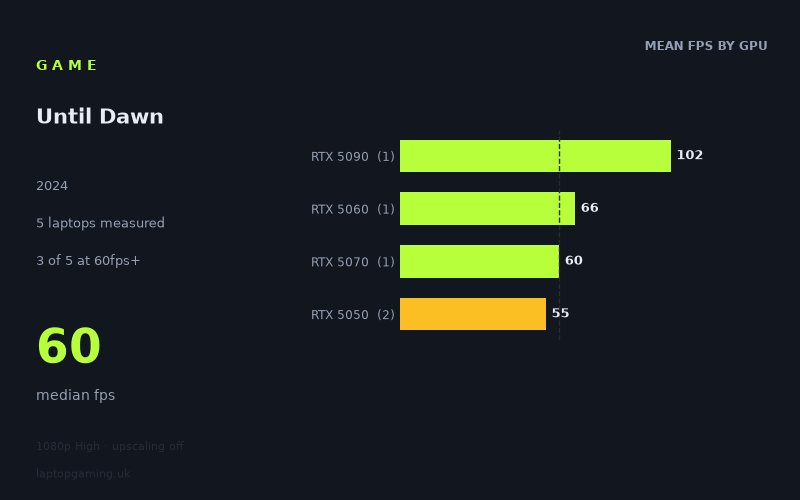
The measured spread on Until Dawn is narrow at the bottom and wide at the top, which tells you most of what you need to know. Across the five laptops Notebookcheck ran at 1920x1080 on the High preset with upscaling switched off, the slowest result was 54fps and the fastest 102fps. That's a range of less than 2x between an RTX 5050 in a mainstream chassis and an RTX 5090 in a £4,884 desktop-replacement — a compression that only happens when a game is leaning hard on the GPU's raw throughput rather than on clock speeds, CPU headroom or memory bandwidth quirks.
The more important number is the median: 60fps. Sitting exactly on the 60fps line at 1080p High is not where a forgiving game lands. Games that scale easily put their mid-tier hardware at 90-120fps and their flagship in the 200s. Here, the flagship RTX 5090 tops out at 102fps and nothing in the sample reaches 144fps. That is the single most revealing figure in the whole set. If the fastest mobile GPU currently sold can't push past 102fps at 1080p on High without upscaling, the bottleneck is the renderer itself, and no amount of money spent on a laptop will brute-force its way to a high-refresh experience at native resolution.
Judging by how the tiers separate, the cost is concentrated in per-frame GPU work. The RTX 5050 average of 55fps rises to 66fps on the RTX 5060 and then to 102fps on the RTX 5090 — a scaling curve that keeps climbing with shader and rasteriser count rather than flattening out. That pattern is consistent with heavy pixel-side load: dense materials, expensive lighting, high-cost post-processing. It is not consistent with a CPU-limited game, where you'd expect the top three tiers to converge on a similar ceiling.
What runs it
Clearing 60fps: three of the five laptops managed it, and only just. The RTX 5090 machine returned 102fps, the RTX 5060 at 115W returned 66fps, and the RTX 5070 laptop hit 60fps exactly. That's the practical entry point for a locked, comfortable 60 at native 1080p High.
Clearing 100fps: one of five. The RTX 5090 in the Medion Erazer Beast 16 X1 Ultimate managed 102fps, and it is the only measured configuration that gets there. If you want triple digits, the fact sheet offers exactly one route, and it costs £4,884.
Clearing 144fps: none. Zero of five laptops. If you've bought a 165Hz or 240Hz panel and you intend to feed it natively at High, the measured figures say that isn't happening on any of this hardware. You'd be looking at upscaling, a lower preset, or accepting that the panel is there for other games.
Below 60fps: the two RTX 5050 laptops, at 56fps (Acer Nitro V 16 AI, 115W) and 54fps (Medion Erazer Scout 17 E1). These are playable results — this is not a genre where a 55fps average is ruinous — but they're averages, which means dips into the 40s are likely in heavier scenes.
The RTX 5060 vs RTX 5070 anomaly
The Lenovo LOQ with an RTX 5060 at 115W (66fps) beat the MSI Katana 17 HX with an RTX 5070 (60fps). That inversion matters if you're shopping by GPU name alone. Each tier here is a single laptop, so this isn't a verdict on the silicon — it's a reminder that power budget and cooling decide outcomes in this class. The 5060 result carries a stated 115W allocation; the 5070 result doesn't. In a game this GPU-bound, a well-fed lower-tier chip beating a throttled higher-tier one is exactly the result you'd expect. Buy the cooling and the wattage, not the model number.
The cheapest laptop that handles it
On the measured numbers, the value pick is the Lenovo LOQ with the RTX 5060 at 115W. At 66fps it is the second-fastest laptop in the entire sample, ahead of a £2,312 RTX 5070 machine, and it has the only meaningful margin above 60fps outside the £4,884 flagship. No price is given for it in the measured set, but the LOQ line sits well below the Katana's £2,312 — which makes it comfortably the best frames-per-pound result here.
The MSI Katana 17 HX (RTX 5070, £2,312) gets you to 60fps exactly, and nothing more. Spending that much to land on the line rather than above it is hard to justify for this title on these figures.
The Medion Erazer Beast 16 X1 Ultimate (RTX 5090, £4,884) is the only machine that breaks 100fps. It costs roughly twice the Katana and delivers 70% more frames — better scaling than usual for a flagship, but still a large sum for a result that doesn't reach 144fps.
If your budget lands on an RTX 5050 — the Acer Nitro V 16 AI or Medion Erazer Scout 17 E1 — you get 54-56fps. That's the compromise tier: functional at native 1080p High, but you'll want either a step down in preset or upscaling enabled to hold a stable 60.
What this means if you're buying
Three conclusions follow directly from the data. First, 1080p High native is the realistic target, not a stepping stone. With a 102fps ceiling on an RTX 5090, there is no headroom in this sample for 1440p native at High on anything below the flagship — assume a meaningful drop from every figure above if you're shopping for a QHD panel.
Second, 60fps is achievable on mid-range hardware but not guaranteed. Three of five laptops cleared it. The two that didn't were both RTX 5050s, and both were close. This is a game where a well-cooled 115W mid-tier GPU is the sensible floor.
Third, high-refresh gaming here requires upscaling. Nothing measured reaches 144fps natively. If a 165Hz-plus panel is part of your buying case, budget on the assumption that you'll be rendering below native and letting the upscaler make up the difference — and prioritise a laptop with the thermal headroom to hold its clocks, because the RTX 5060-versus-5070 result shows that's where the frames actually come from.
How these numbers were produced
Frame rates here are not measured by us, and we label how each one was arrived at. A figure marked measured comes from a published run on that exact machine. A figure marked representative is derived from the GPU and its power limit (TGP) and cross-referenced against published reviews - a sound estimate of what that configuration delivers, but not a measurement of that specific laptop. Unless stated otherwise, numbers are 1920x1080, High preset, upscaling off. Where a laptop ships in several power configurations we use the wattage of the exact SKU listed, because a 140W RTX 5070 and a 115W one are not the same product.