Details
Product prices and availability are accurate as of the date/time indicated and are subject to change. Any price and availability information displayed on Amazon.co.uk at the time of purchase will apply to the purchase of this product.Performance analysis
Dragon's Dogma 2 (2024): what it takes to run it
Measured on 9 gaming laptops at 1920×1080, High preset, upscaling off.
Every laptop we have figures for
Frame rates measured by Notebookcheck.
What it asks of a laptop
The available sample is very small: Notebookcheck has measured Dragon's Dogma 2 on only three laptops. Those figures are still useful, but they describe these specific machines rather than every laptop carrying the same GPU name. All results here are at 1,920 x 1,080 using the High preset with upscaling disabled.
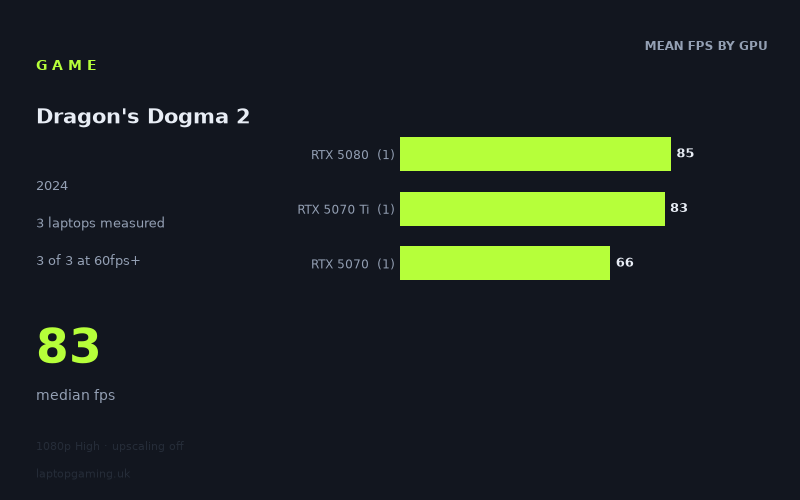
On that basis, Dragon's Dogma 2 is demanding enough that even the fastest measured laptop does not reach 100fps, but it is not so heavy that 60fps is out of reach for the current machines represented here. The measured range runs from 66fps to 85fps, a 19fps gap between the slowest and fastest results. The median is 83fps.
That spread matters. All three laptops clear 60fps, so the measured systems can provide a conventional 60fps-class experience at 1080p High without relying on upscaling. However, the game does not appear to be an easy route to very high-refresh-rate performance under these test conditions. None of the three machines reaches 100fps, despite the sample including an RTX 5080 laptop.
The separation between the measured GPU tiers is also worth reading carefully. The RTX 5080 result is 85fps, while the RTX 5070 Ti machine records 83fps: only 2fps behind. The RTX 5070 system is lower at 66fps, 17fps behind the RTX 5070 Ti result and 19fps behind the RTX 5080 result. That suggests that, in this particular three-laptop sample, moving from the RTX 5070 to the two faster-tier machines produces the more meaningful improvement, while the measured RTX 5080 and RTX 5070 Ti results are very close.
It would be a mistake, though, to turn that into a broad claim that an RTX 5070 Ti always performs almost like an RTX 5080 in this game. There is one laptop per GPU tier, and laptop performance can vary between individual machines. What the measured figures show is simply that the Medion RTX 5080 and MSI RTX 5070 Ti laptops tested by Notebookcheck were separated by only 2fps in this benchmark.
What runs it
Every laptop in the measured group clears 60fps at 1080p High with upscaling off.
- RTX 5080: the Medion Erazer Beast 18 X1 recorded 85fps. This is comfortably above 60fps, but below 100fps and well below 144fps.
- RTX 5070 Ti: the MSI Vector 16 HX AI recorded 83fps. Like the RTX 5080 result, it clears 60fps comfortably but does not reach 100fps or 144fps.
- RTX 5070: the MSI Katana 17 HX recorded 66fps. It clears 60fps, albeit with much less headroom than the other two measured laptops. It does not reach 100fps or 144fps.
Put another way, the measured figures place Dragon's Dogma 2 in the 60fps-capable rather than high-refresh-rate-capable category at these settings. Three out of three laptops reached at least 60fps. Zero out of three reached 100fps, and zero out of three reached 144fps.
For someone with a 120Hz, 144Hz or faster laptop display, that does not make the panel irrelevant, but the benchmark numbers do not support expecting the game to fill it at 1080p High with upscaling disabled. The 85fps peak in this sample is a useful result, but it remains 15fps short of 100fps and 59fps short of 144fps.
The RTX 5070 result deserves particular context. At 66fps, the MSI Katana 17 HX is above the 60fps line by 6fps, rather than sitting near the 80fps results of the other two machines. That is still a successful 1080p High result according to this benchmark, but buyers seeking substantial room above 60fps should pay attention to the 83fps and 85fps results instead. With only one RTX 5070 laptop measured, however, these numbers should not be treated as a guarantee for every RTX 5070 configuration.
The cheapest laptop that handles it
The lowest-priced laptop in the supplied figures is also one of the strongest performers. The MSI Vector 16 HX AI with RTX 5070 Ti costs £1,592 and recorded 83fps at 1,920 x 1,080, High preset, with upscaling off. It is the cheapest measured option here and clears 60fps by 23fps.
That makes it a notably better value proposition within this very limited sample than the other listed machines. The Medion Erazer Beast 18 X1 with RTX 5080 costs £2,499 and recorded 85fps, only 2fps ahead of the £1,592 MSI Vector. The MSI Katana 17 HX with RTX 5070 costs £2,312 and recorded 66fps, making it both more expensive than the Vector and 17fps slower in Notebookcheck's numbers.
This is not enough evidence to rank all gaming laptops or every configuration of these GPUs. It does show that the specific MSI Vector 16 HX AI measured here is the price-performance standout for Dragon's Dogma 2 among the three listed systems.
What this means if you're buying
If your target is 1080p High without upscaling and you consider 60fps acceptable, all three measured laptops handle Dragon's Dogma 2. The RTX 5070-equipped MSI Katana 17 HX reaches that threshold at 66fps, while the measured RTX 5070 Ti and RTX 5080 systems provide more headroom at 83fps and 85fps respectively.
If you want the strongest result for the least money in this data set, the MSI Vector 16 HX AI is the clear choice: £1,592 for 83fps. The Medion Erazer Beast 18 X1 delivers the highest measured figure at 85fps, but its £2,499 price is £907 higher for a 2fps lead over the Vector in this benchmark.
Buyers chasing 100fps or 144fps should be more cautious. The measured evidence does not identify a laptop that reaches either target at 1080p High with upscaling disabled. Even the fastest recorded machine stops at 85fps. Based on these figures, a purchase for Dragon's Dogma 2 should be aimed at solid 60fps-plus performance rather than assuming a high-refresh display will be fully utilised at the tested settings.
How these numbers were produced
Frame rates here are not measured by us, and we label how each one was arrived at. A figure marked measured comes from a published run on that exact machine. A figure marked representative is derived from the GPU and its power limit (TGP) and cross-referenced against published reviews - a sound estimate of what that configuration delivers, but not a measurement of that specific laptop. Unless stated otherwise, numbers are 1920x1080, High preset, upscaling off. Where a laptop ships in several power configurations we use the wattage of the exact SKU listed, because a 140W RTX 5070 and a 115W one are not the same product.