Details
Product prices and availability are accurate as of the date/time indicated and are subject to change. Any price and availability information displayed on Amazon.co.uk at the time of purchase will apply to the purchase of this product.Performance analysis
Counter-Strike 2 (2023): what it takes to run it
Measured on 11 gaming laptops at 1920×1080, High preset, upscaling off.

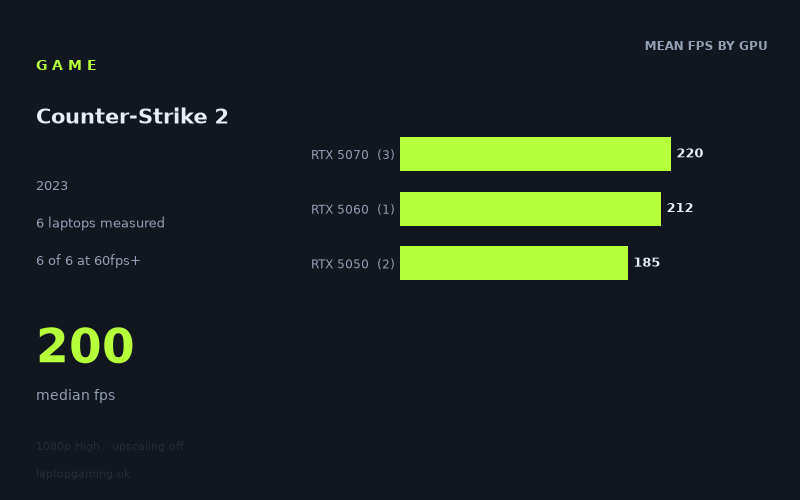
Every laptop we have figures for
Frame rates measured by Notebookcheck.
What it asks of a laptop
Look at the spread before anything else: 170fps at the bottom, 255fps at the top, with a median of 200fps. Every one of the six laptops in Notebookcheck's data clears 60fps, 100fps and 144fps at 1920x1080 on the High preset with upscaling off. There is no failure case here. The question with Counter-Strike 2 is not whether your laptop runs it — it is whether your laptop runs it fast enough to make your panel's refresh rate worth paying for.
The more interesting signal is how little the GPU tier matters. Grouped by silicon, the measured means come out at 220fps for the RTX 5070, 212fps for the RTX 5060 and 185fps for the RTX 5050. That is a 19% gap between the cheapest GPU in the set and the most expensive, and only 4% between the 5060 and the 5070. In a genuinely GPU-bound game, three tiers of hardware would not cluster that tightly — you would expect the 5070 to be pulling something closer to 50-60% ahead of the 5050. It isn't. The figures are compressing at the top, which is the classic fingerprint of a workload that is limited by something other than the graphics card: CPU throughput, memory latency, engine overhead, or all three.
The single-laptop anomaly reinforces it. The MSI Katana 17 HX, at £2,312 the most expensive machine in the set and fitted with an RTX 5070, produces the lowest result of the six at 170fps — 85fps behind the £1,375 HP OMEN 16 running the same GPU class. That is a 50% deficit on identical silicon tier. Nothing about a graphics card explains a gap that large in a game where the whole field sits inside 85fps. What explains it is the rest of the machine: platform, sustained clocks under a mixed CPU/GPU load, thermal headroom, memory configuration. Whatever the cause, the lesson holds — in CS2, laptop-level engineering outweighs the GPU badge, and spending more does not reliably buy more frames.
The corollary is that CS2's demands are cheap to satisfy and expensive to maximise. Getting to a comfortable, above-144fps figure costs almost nothing in GPU terms. Getting from 185fps to 255fps requires a substantially better-balanced machine, and the returns only matter if you own a panel fast enough to display them.
What runs it
Working through the tiers with the measured numbers:
- RTX 5050 (75W): 188fps on the ASUS TUF Gaming A14, 182fps on the HP Victus 15, mean 185fps. Both clear 144fps with roughly 25-30% of headroom to spare, at 1080p High with no upscaling. This is the entry point and it is already comfortable.
- RTX 5060 (115W): 212fps on the Acer Nitro V 15. A 15% gain over the 5050 average — real, but not transformative. Enough to sit meaningfully above 200fps.
- RTX 5070: 255fps on the HP OMEN 16 (140W), 235fps on the Acer Nitro V16 (115W), 170fps on the MSI Katana 17 HX. Mean 220fps, but the variance inside this tier is larger than the variance between tiers, which tells you the tier label is close to meaningless in this title.
Note also the power scaling within the 5070 results: 140W returns 255fps versus 235W-class 115W at 235fps — an 8.5% gain for a 22% power increase. That is a diminishing return, and it is consistent with the game being bottlenecked elsewhere. If CS2 is your primary title, chasing the highest-wattage GPU variant is not where your money does the most work.
Refresh-rate matching, using the measured figures: every machine here saturates a 144Hz panel. A 165Hz panel is also fully covered by all six. A 240Hz panel is covered by the OMEN 16 at 255fps and closely approached by the Nitro V16 at 235fps; the 5050 machines at 182-188fps would leave roughly a quarter of a 240Hz panel's capability unused. Anything faster than 240Hz is not supported by any result in this data set at these settings.
The cheapest laptop that handles it
The HP Victus 15 at £799, with an RTX 5050 at 75W, is the cheapest machine measured and it returns 182fps. That clears 144fps by 26% and clears 100fps by 82%. For CS2 specifically, at 1080p High with upscaling off, this is the answer — nothing above it in the price list buys you a change in category, only a change in degree.
The Acer Nitro V 15 at £931 is the more interesting value case: £132 more than the Victus for the RTX 5060 and 212fps, a 16% frame-rate uplift for a 17% price increase. Roughly linear, which is unusual and reasonable.
The ASUS TUF Gaming A14 at £1,007 returns 188fps — 6fps and 3% more than the £799 Victus, from the same GPU tier at the same 75W. You are paying £208 for something other than CS2 performance in that comparison.
At the top, the HP OMEN 16 at £1,375 is the only machine that genuinely feeds a 240Hz panel, at 255fps. The Acer Nitro V16 at £1,199 gets to 235fps for £176 less. And the MSI Katana 17 HX at £2,312 is, on this evidence, the worst CS2 buy in the set: 170fps for nearly three times the price of the Victus 15's 182fps.
What this means if you're buying
If CS2 is the game you play most, stop shopping for GPU tiers and start shopping for panels and platforms. The measured range across six laptops spanning £799 to £2,312 is 170-255fps — a 1.5x spread across a 2.9x price spread, with the most expensive machine finishing last. That is about as clear a signal as benchmark data gets that the graphics card is not the constraint.
Practically: buy the cheapest machine with a panel that matches what your hardware can actually feed. A £799 RTX 5050 laptop paired with a 165Hz screen is a fully coherent CS2 build, because 182fps saturates it. Pairing that same 5050 with a 240Hz screen is not coherent — you would be leaving a quarter of the panel unused. If a 240Hz display is the goal, the data only supports the £1,375 OMEN 16 at 255fps as a machine that genuinely reaches it, with the £1,199 Nitro V16 at 235fps close enough to be defensible.
And if you are cross-shopping a machine primarily for heavier, genuinely GPU-bound titles, treat these CS2 numbers as what they are: evidence that this particular game will not be the thing that decides your purchase. Every laptop here already runs it well past 144fps.
How these numbers were produced
Frame rates here are not measured by us, and we label how each one was arrived at. A figure marked measured comes from a published run on that exact machine. A figure marked representative is derived from the GPU and its power limit (TGP) and cross-referenced against published reviews - a sound estimate of what that configuration delivers, but not a measurement of that specific laptop. Unless stated otherwise, numbers are 1920x1080, High preset, upscaling off. Where a laptop ships in several power configurations we use the wattage of the exact SKU listed, because a 140W RTX 5070 and a 115W one are not the same product.