Details
Product prices and availability are accurate as of the date/time indicated and are subject to change. Any price and availability information displayed on Amazon.co.uk at the time of purchase will apply to the purchase of this product.Performance analysis
Call of Duty Black Ops Cold War (2020): what it takes to run it
Measured on 5 gaming laptops at 1920×1080, High preset, upscaling off.

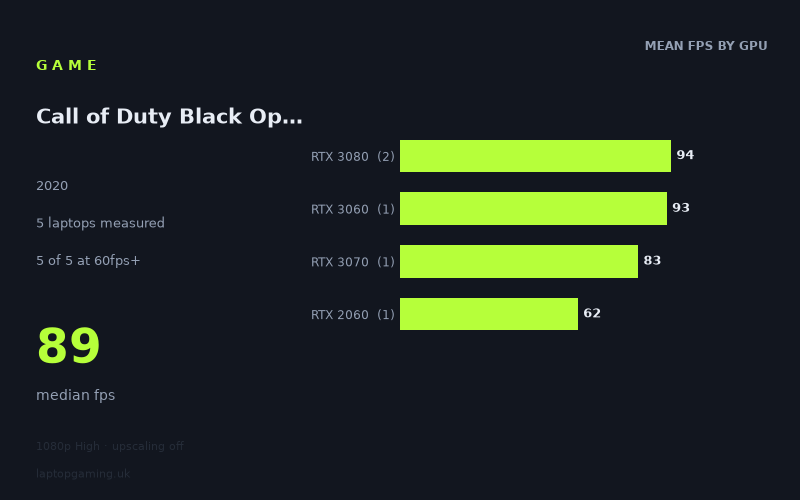
Every laptop we have figures for
Frame rates measured by Notebookcheck.
What it asks of a laptop
Call of Duty Black Ops Cold War was measured by Notebookcheck on just five laptops, all at 1,920 × 1,080 using the High preset with upscaling off. That is a small sample, so the useful conclusion is not that every laptop with a given graphics chip will perform identically. Instead, these are the specific machines we have figures for and what their results suggest.
The measured spread is 62fps to 100fps, with a median of 89fps. Crucially, all five laptops cleared 60fps in this test. That makes 1080p High look manageable for the machines represented here, including the oldest and slowest graphics option in the sample, the RTX 2060-equipped HP Omen 15-en0375ng.
It is less forgiving if your aim is to feed a 144Hz display at a matching frame rate. None of the five measured laptops reached 144fps, while only one reached 100fps. The game therefore appears much easier to run at a conventional 60fps target than at high-refresh targets with this exact 1080p High, no-upscaling configuration.
The GPU-tier results do not form a neat performance ladder, which is an important warning against buying purely by the name of the GPU. The two RTX 3080 laptops averaged 94fps, but their individual results were 100fps and 89fps. Meanwhile, the Lenovo Legion S7 15ACH6 with an RTX 3060 running at 100W recorded 93fps, ahead of the measured RTX 3070 laptop at 83fps and one of the RTX 3080 systems at 89fps.
That does not mean an RTX 3060 is generally faster than an RTX 3070 or RTX 3080. With one example of each of those tiers, and only two RTX 3080 laptops, the data is too limited for that claim. It does show that these particular laptop implementations differ substantially enough that a GPU label alone is not a reliable guide to Cold War performance.
What runs it
For a 60fps target at 1,920 × 1,080 High with upscaling disabled, every measured laptop made the grade.
- RTX 2060: The HP Omen 15-en0375ng achieved 62fps. That is the lowest result in the set, but it is still above 60fps. There is not much measured headroom, however: its result sits only 2fps above that threshold.
- RTX 3070: The Schenker XMG Neo 17, an early-2021 model with an RTX 3070 and Ryzen 7 5800H, reached 83fps. That is comfortably above 60fps, though it remains short of 100fps.
- RTX 3060 at 100W: Lenovo's Legion S7 15ACH6 recorded 93fps. In this small sample it is close to the fastest result and well clear of 60fps, but remains below 100fps.
- RTX 3080: The Asus ROG Zephyrus G15 reached 89fps, while the Gigabyte Aero 17 HDR YC reached 100fps. The RTX 3080 average from these two laptops is 94fps.
For 100fps, the Gigabyte Aero 17 HDR YC is the only measured machine to get there, at exactly 100fps. The Legion S7 15ACH6 was close at 93fps, followed by the Zephyrus G15 at 89fps. The figures do not support describing 100fps as a reliable outcome for every RTX 3080 laptop, nor for every RTX 3060 laptop: only one machine in the data reached that mark.
For 144fps, there is no qualifying result. The fastest measured figure, 100fps from the Aero 17 HDR YC, is 44fps short. Anyone intending to use a 144Hz panel fully at these settings should treat the available numbers as evidence that 1080p High without upscaling is not enough on the tested systems. The fact sheet does not provide results for lower presets, reduced resolution, or enabled upscaling, so no measured estimate can be given for those alternatives.
The cheapest laptop that handles it
The available data cannot identify the cheapest laptop that handles Call of Duty Black Ops Cold War. Only one price is supplied in the fact sheet: the Asus ROG Zephyrus G15 with RTX 3080 is listed at £2,196, and it produced 89fps.
That result is comfortably above 60fps, but it would be misleading to call the Zephyrus G15 the cheapest suitable option when no prices are provided for the other four laptops. In particular, the HP Omen 15-en0375ng achieved 62fps with an RTX 2060, while the Schenker XMG Neo 17 reached 83fps with an RTX 3070 and the Lenovo Legion S7 15ACH6 reached 93fps with an RTX 3060 at 100W. Any of those may have been cheaper or more expensive than the £2,196 Zephyrus, but the supplied figures do not say.
The practical budget floor suggested by this sample is therefore the specific RTX 2060 Omen result: it is the least powerful measured configuration and still cleared 60fps. That is not a guarantee for every RTX 2060 laptop, nor a buying recommendation based on price; it is simply the lowest measured performance point available here.
What this means if you're buying
If your target is a stable-looking 60fps-class experience at 1080p High with upscaling off, the measured results are encouraging. Every laptop in the sample cleared 60fps, from the RTX 2060 HP Omen 15-en0375ng at 62fps to the RTX 3080 Gigabyte Aero 17 HDR YC at 100fps.
If you want more headroom, the results point towards the specific RTX 3060, RTX 3070 and RTX 3080 machines measured here, which returned 83fps to 100fps. Yet the ordering is inconsistent enough to make laptop-level benchmarking more useful than tier labels. The 100W RTX 3060 Legion recorded 93fps, above the 83fps RTX 3070 Schenker and the 89fps RTX 3080 Zephyrus.
For a 144Hz-focused purchase, do not assume that a high-end GPU badge alone will deliver 144fps at these settings. Notebookcheck's five results all fall below that target. The best measured outcome is 100fps, so a buyer prioritising very high refresh rates would need additional benchmark evidence for the exact laptop and settings they intend to use.
How these numbers were produced
Frame rates here are not measured by us, and we label how each one was arrived at. A figure marked measured comes from a published run on that exact machine. A figure marked representative is derived from the GPU and its power limit (TGP) and cross-referenced against published reviews - a sound estimate of what that configuration delivers, but not a measurement of that specific laptop. Unless stated otherwise, numbers are 1920x1080, High preset, upscaling off. Where a laptop ships in several power configurations we use the wattage of the exact SKU listed, because a 140W RTX 5070 and a 115W one are not the same product.