Performance analysis
Need for Speed Unbound (2022): what it takes to run it
Measured on 4 gaming laptops at 1920×1080, High preset, upscaling off.

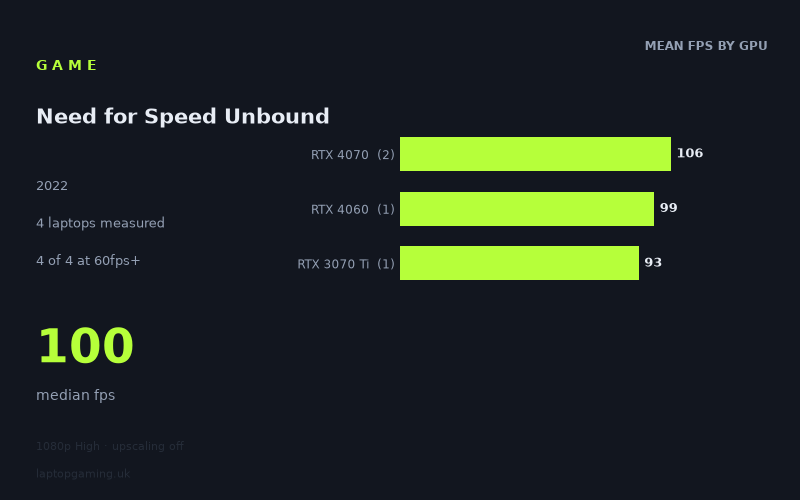
Every laptop we have figures for
Frame rates measured by Notebookcheck.
What it asks of a laptop
Need for Speed Unbound looks relatively forgiving at 1,920 × 1,080 using the High preset with upscaling disabled, at least among the four laptops covered by Notebookcheck's measured figures. Every one of those machines exceeded 60fps, with results ranging from 93fps to 110fps. That is a narrow 17fps spread between the slowest and fastest result.
There is an important limitation: this is a four-laptop sample. The figures show what these particular machines achieved, rather than proving what every laptop with the same GPU will do. This matters especially where laptop GPUs can be configured with different power limits and cooling designs.
Even so, the results suggest that High at 1080p is not especially punishing for the upper-mid-range and older high-end laptop hardware represented here. The RTX 4070 machines were quickest, averaging 106fps across two laptops, but the gap to the single RTX 4060 result was modest: the MSI Katana 17 managed 99fps. The RTX 3070 Ti result was also close enough to remain comfortably above 60fps, with the Razer Blade 15 OLED recording 93fps.
The measured figures separate more clearly around the 100fps mark than around 60fps. All four laptops had enough performance for a consistently high frame-rate experience by the usual 60fps standard, but only the two RTX 4070 laptops crossed 100fps. The MSI Katana 17's RTX 4060 was just 1fps below that line, however, so this is not evidence of a dramatic divide between the GPUs. It is a small sample with closely grouped results.
What the numbers do not support is a claim that this is an easy route to 144fps at High. The fastest recorded result, from the Asus ROG Strix G18 with a 165W RTX 4070, was 110fps. None of the four measured laptops reached 144fps.
What runs it
For 1080p High without upscaling, the measured figures are unequivocal on one point: all four laptops cleared 60fps.
- RTX 4070: The Asus ROG Strix G18, equipped with an RTX 4070 at 165W, reached 110fps. The Aorus 15X ASF, with an RTX 4070 at 140W, reached 101fps. The RTX 4070 average was 106fps across these two laptops. Both are above 60fps and above 100fps, but neither reached 144fps.
- RTX 4060: The MSI Katana 17 achieved 99fps. That is comfortably above 60fps and only narrowly misses 100fps, but it is not a measured 100fps result. It is also well short of 144fps.
- RTX 3070 Ti: The early-2022 Razer Blade 15 OLED, using an RTX 3070 Ti at 110W, recorded 93fps. It clears 60fps with room to spare, but falls below both 100fps and 144fps.
Put another way, the Notebookcheck figures show four out of four laptops at or above 60fps, two out of four at or above 100fps, and none out of four at or above 144fps. The median result was 100fps.
The two RTX 4070 results also demonstrate why it is sensible to focus on specific laptop implementations rather than just the GPU name. The 165W Asus result was 9fps ahead of the 140W Aorus result. That does not establish that power limit alone caused the difference, as these are different laptops, but it does show that the measured RTX 4070 outcomes were not identical.
The cheapest laptop that handles it
The supplied fact sheet does not include UK prices for any of the four laptops, so it is not possible to identify the cheapest model from the measured data without inventing a price comparison.
What can be said is that every named machine handled the game above 60fps in Notebookcheck's figures:
- Asus ROG Strix G18 — RTX 4070 at 165W — 110fps
- Aorus 15X ASF — RTX 4070 at 140W — 101fps
- MSI Katana 17 — RTX 4060 — 99fps
- Razer Blade 15 OLED (Early 2022) — RTX 3070 Ti at 110W — 93fps
Of those measured systems, the MSI Katana 17 is the closest to 100fps without using an RTX 4070, at 99fps. That makes it the relevant result for buyers looking at the lower-performing end of this particular four-machine group, but it cannot be called the cheapest without pricing information.
What this means if you're buying
If your target is simply 60fps at 1080p High with upscaling off, the four measured laptops indicate substantial headroom: even the slowest result was 93fps. On this evidence, Need for Speed Unbound should not require an RTX 4070-class laptop merely to achieve a 60fps result.
If you want measured performance above 100fps under these conditions, the strongest evidence is for the two specific RTX 4070 laptops: the Asus ROG Strix G18 at 110fps and Aorus 15X ASF at 101fps. The RTX 4060-equipped MSI Katana 17 came extremely close at 99fps, so its result should not be read as a categorical failure to provide roughly 100fps-class performance.
For a 144Hz display, do not assume that the panel’s refresh rate will be fully utilised at this preset. None of the measured laptops reached 144fps, including the 165W RTX 4070 system. Buyers prioritising a locked or near-144fps result need more evidence than this small dataset provides.
The practical conclusion is straightforward: these measured laptops all run the game well at 1080p High by a 60fps standard, while the move from roughly 90–100fps to above 100fps is where the RTX 4070 machines pull ahead. Because there are only four results, treat those as useful reference points for the named laptops rather than a blanket buying rule for every RTX 4060, RTX 4070 or RTX 3070 Ti gaming laptop.
How these numbers were produced
Frame rates here are not measured by us, and we label how each one was arrived at. A figure marked measured comes from a published run on that exact machine. A figure marked representative is derived from the GPU and its power limit (TGP) and cross-referenced against published reviews - a sound estimate of what that configuration delivers, but not a measurement of that specific laptop. Unless stated otherwise, numbers are 1920x1080, High preset, upscaling off. Where a laptop ships in several power configurations we use the wattage of the exact SKU listed, because a 140W RTX 5070 and a 115W one are not the same product.