Details
Product prices and availability are accurate as of the date/time indicated and are subject to change. Any price and availability information displayed on Amazon.co.uk at the time of purchase will apply to the purchase of this product.Performance analysis
Back 4 Blood (2021): what it takes to run it
Measured on 10 gaming laptops at 1920×1080, High preset, upscaling off.
Every laptop we have figures for
Frame rates measured by Notebookcheck.
What it asks of a laptop
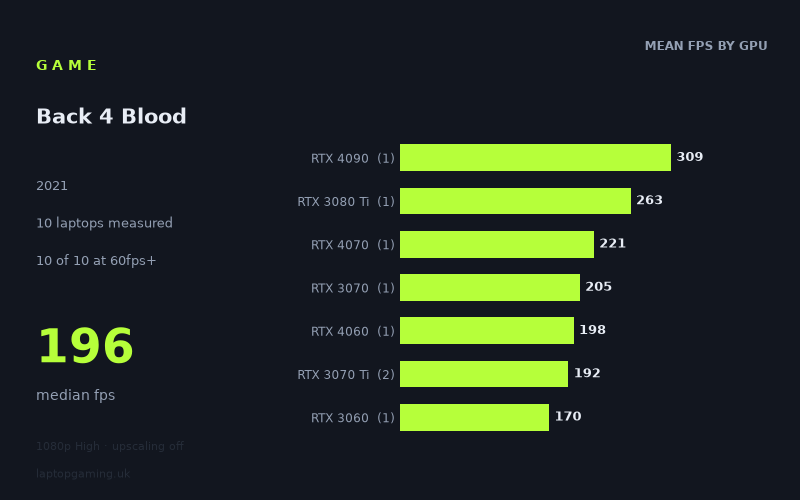
At the measured 1,920 x 1,080 High preset with upscaling off, Back 4 Blood is a forgiving game for gaming laptops in this sample. Notebookcheck’s figures cover 10 laptops, ranging from 124fps on the HP Victus 16-e0145ng with an RTX 3050 Ti at 75W to 309fps on the Medion Erazer Beast X40 with an RTX 4090. The median result is 196fps.
That is an unusually high baseline for this preset and resolution. Every one of the 10 measured laptops exceeds 60fps, and every one also exceeds 100fps. Nine of 10 clear 144fps. For a buyer with a 1080p 60Hz or 120Hz display, the available numbers indicate substantial performance headroom even at the bottom of this particular group.
The figures do still separate according to GPU class, so faster graphics hardware is not wasted. The RTX 4090-equipped Medion reaches 309fps, while the RTX 3080 Ti MSI GE76 Raider records 263fps and the RTX 4070 Asus ROG Strix G18 reaches 221fps. At the other end, the 75W RTX 3050 Ti returns 124fps. That 185fps gap between the fastest and slowest machines is large in absolute terms, but it does not turn into a question of playability at the tested settings: even the slowest laptop remains comfortably above 100fps.
The difficulty, based on these measured results, is therefore less about achieving a conventional playable frame rate and more about matching the laptop to a high-refresh-rate screen. A 144Hz panel is the meaningful dividing line in this data. Most of the sample can feed one at above 144fps at 1080p High, but the RTX 3050 Ti result does not quite reach that threshold.
There is an important limitation to keep in mind. Although the overall sample contains 10 laptops, most GPU tiers are represented by only one machine. The RTX 3070 Ti has two results; every other listed tier has one. These are useful measurements of those specific laptops, including their particular power limits where supplied, rather than proof that every laptop carrying the same GPU will produce the same result.
What runs it
60fps: all 10 measured laptops clear 60fps at 1,920 x 1,080 High with upscaling off. The slowest recorded machine is the HP Victus 16-e0145ng, whose RTX 3050 Ti at 75W produces 124fps. On the evidence here, even that entry-level result is more than double the 60fps target.
100fps: again, all 10 laptops clear the target. The RTX 3050 Ti machine is the lowest result at 124fps, followed by the Medion Erazer Scout E20 with an RTX 4050 at 100W at 166fps. The Lenovo Legion S7 15ACH6, using an RTX 3060 at 100W, reaches 170fps.
144fps: nine of the 10 systems achieve this. The one exception is the HP Victus 16-e0145ng with RTX 3050 Ti at 75W, at 124fps. The next result up is the RTX 4050 Medion Erazer Scout E20 at 166fps, so the measured data places that specific machine safely beyond 144fps.
- RTX 4090: Medion Erazer Beast X40, 309fps. This is one laptop result.
- RTX 3080 Ti at 175W: MSI GE76 Raider, 263fps. One measured laptop.
- RTX 4070 at 165W: Asus ROG Strix G18, 221fps. One measured laptop.
- RTX 3070: Schenker XMG Apex 17 M21, 205fps. One measured laptop.
- RTX 4060: MSI Katana 17, 198fps. One measured laptop.
- RTX 3070 Ti: HP Omen 16-b1090ng, 195fps; MSI Stealth GS66, 189fps. The two-machine tier average is 192fps.
- RTX 3060 at 100W: Lenovo Legion S7 15ACH6, 170fps. One measured laptop.
- RTX 4050 at 100W: Medion Erazer Scout E20, 166fps. One measured laptop.
- RTX 3050 Ti at 75W: HP Victus 16-e0145ng, 124fps. One measured laptop.
The middle of the sample is particularly notable. The measured RTX 4060 laptop reaches 198fps, close to the RTX 3070 Ti average of 192fps and the RTX 3070 result of 205fps. That does not establish a general ranking between those GPU families, especially with such limited tier-by-tier samples, but it does show that the MSI Katana 17 is already far beyond the frame rates required for 60Hz, 100Hz and 144Hz play at these settings.
The cheapest laptop that handles it
The fact sheet does not provide prices for most of the measured laptops, so it cannot identify the cheapest laptop in this group. It would be misleading to call any unpriced model the budget choice.
The only supplied price is for the MSI Stealth GS66 with RTX 3070 Ti, listed at £2,688. Notebookcheck’s measured figure for that machine is 189fps, putting it above 60fps, 100fps and 144fps at the tested 1080p High preset. It clearly handles the game well, but the available price information does not show whether it was cheaper or more expensive than the other nine laptops.
If the priority is simply the lowest measured performance level that still handles the game comfortably, the HP Victus 16-e0145ng is the relevant system: its RTX 3050 Ti at 75W records 124fps. No price is given for it, however, so its value cannot be compared directly with the Stealth GS66 or the rest of the sample.
What this means if you’re buying
For Back 4 Blood specifically, a laptop does not need top-end graphics hardware to deliver high frame rates at 1080p High without upscaling. Every measured system clears 100fps, including the HP Victus with RTX 3050 Ti at 75W. If your display is 60Hz or 120Hz, the figures suggest that these particular machines all have enough performance for the tested configuration.
A 144Hz screen changes the buying calculation slightly. Nine of the 10 laptops exceed 144fps, with the RTX 4050 Medion at 166fps and RTX 3060 Lenovo at 170fps among the lower measured results that still clear it. The RTX 3050 Ti Victus reaches 124fps instead, which is still high, but below the panel-refresh target.
Do not choose between laptops on GPU name alone. The results include explicitly different GPU power limits, such as 175W for the RTX 3080 Ti, 165W for the RTX 4070, 100W for the RTX 3060 and RTX 4050, and 75W for the RTX 3050 Ti. With only one result for most tiers, treat these as evidence for the named laptops rather than universal performance promises. For this game at the measured settings, prioritise the screen refresh rate, price and the performance of the specific laptop model you are considering over buying more GPU than you need.
How these numbers were produced
Frame rates here are not measured by us, and we label how each one was arrived at. A figure marked measured comes from a published run on that exact machine. A figure marked representative is derived from the GPU and its power limit (TGP) and cross-referenced against published reviews - a sound estimate of what that configuration delivers, but not a measurement of that specific laptop. Unless stated otherwise, numbers are 1920x1080, High preset, upscaling off. Where a laptop ships in several power configurations we use the wattage of the exact SKU listed, because a 140W RTX 5070 and a 115W one are not the same product.