Performance analysis
Vampire Bloodhunt (2022): what it takes to run it
Measured on 4 gaming laptops at 1920×1080, High preset, upscaling off.
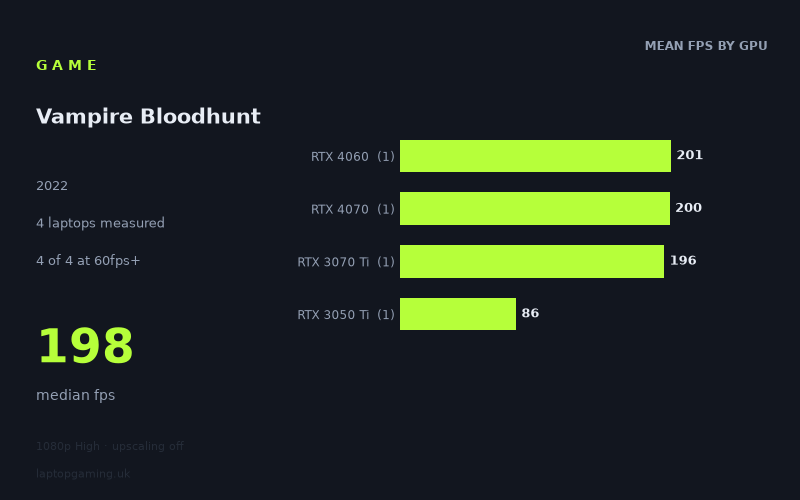
Every laptop we have figures for
Frame rates measured by Notebookcheck.
What it asks of a laptop
Vampire Bloodhunt looks relatively forgiving at 1920x1080 using the High preset with upscaling disabled, at least among the four laptop results available from Notebookcheck. Every measured machine exceeded 60fps, including the lowest-tier GPU in this sample, while three of the four were close to 200fps.
That conclusion needs a clear caveat: this is a small sample of four laptops, with one result for each GPU tier. These figures show how these specific machines performed; they are not enough to guarantee that every laptop carrying the same GPU will deliver the same result. Laptop GPU power limits, cooling and other differences can matter, and the supplied data includes a power figure only for the RTX 4070 and RTX 3050 Ti systems.
The measured range runs from 86fps on the HP Victus 16-e0145ng with an RTX 3050 Ti at 75W to 201fps on the MSI Katana 17 with an RTX 4060. That is a 115fps spread between the slowest and fastest systems. However, the important pattern is not a smooth climb through every GPU generation. The RTX 3070 Ti, RTX 4070 and RTX 4060 results are tightly grouped: 196fps, 200fps and 201fps respectively. Their median across the complete four-laptop sample is 198fps.
Instead, the main separation is between the RTX 3050 Ti laptop and the other three machines. The Victus’s 86fps is still well above a 60fps target, but it is substantially below the near-200fps results recorded by the RTX 3070 Ti, RTX 4060 and RTX 4070 laptops. On these figures, Bloodhunt does not appear especially punishing for modern mid-range and upper-mid-range gaming laptops at this resolution and preset. It is more limiting for an older or lower-tier GPU if the aim is to match a high-refresh display rather than simply maintain smooth play.
There is also no evidence here that an RTX 4070 laptop has a meaningful advantage over the particular RTX 4060 or RTX 3070 Ti laptops tested. Notebookcheck measured 200fps from the Asus ROG Strix G18 with an RTX 4070 at 165W, compared with 201fps from the MSI Katana 17’s RTX 4060 and 196fps from the HP Omen 16-b1090ng’s RTX 3070 Ti. Those are effectively a single performance group in this limited data set, rather than a reason to pay more for one GPU label alone.
What runs it
All four measured laptops clear 60fps at 1920x1080 High with upscaling off. For a buyer targeting a conventional 60Hz display, the available figures suggest that each of these specific systems is sufficient without needing to lower the tested preset.
- RTX 3050 Ti: The HP Victus 16-e0145ng, fitted with a 75W RTX 3050 Ti, recorded 86fps. It clears 60fps, but does not reach 100fps, 144fps or the performance levels of the other three laptops. It is the measured entry point for acceptable 1080p High performance, rather than the choice for maximising high-refresh headroom.
- RTX 3070 Ti: The HP Omen 16-b1090ng achieved 196fps. It clears 60fps, 100fps and 144fps comfortably in this result, with 52fps above 144fps.
- RTX 4060: The MSI Katana 17 recorded the highest figure in the supplied data, at 201fps. It clears 60fps, 100fps and 144fps, and is 57fps above the 144fps threshold.
- RTX 4070: The Asus ROG Strix G18, using an RTX 4070 rated at 165W, returned 200fps. It also clears 60fps, 100fps and 144fps, sitting 56fps above 144fps.
In simple threshold terms, Notebookcheck’s numbers show four of four laptops at or above 60fps, three of four at or above 100fps, and three of four at or above 144fps. The dividing line in this sample is therefore straightforward: the RTX 3050 Ti system is adequate for 60fps-oriented play, while the tested RTX 3070 Ti, RTX 4060 and RTX 4070 machines are the options that reached high-refresh territory.
For a 120Hz or 144Hz laptop panel, the measured RTX 3070 Ti, RTX 4060 and RTX 4070 systems have enough average-frame-rate headroom in this test to make use of that refresh class. The RTX 3050 Ti result of 86fps would still look smoother than 60fps, but it cannot be described as a 144fps-class result from the available numbers.
The cheapest laptop that handles it
No prices are included in the fact sheet, so it is not possible to identify the cheapest measured laptop or make a credible value-for-money ranking in GBP.
What can be said is that the lowest-performing measured system that still handled the tested configuration above 60fps was the HP Victus 16-e0145ng with an RTX 3050 Ti at 75W, at 86fps. If “handles it” means maintaining at least 60fps at 1920x1080 High without upscaling, that is the lowest performance level represented here. It should not automatically be assumed to be the cheapest machine in the group, because no purchase prices have been supplied.
For a higher-refresh target, the measured alternatives are the HP Omen 16-b1090ng with RTX 3070 Ti at 196fps, the MSI Katana 17 with RTX 4060 at 201fps, and the Asus ROG Strix G18 with RTX 4070 at 165W at 200fps. Without UK pricing, there is no basis for saying which is the best buy.
What this means if you’re buying
Buy for the display target, not simply for the highest number in this four-machine table. A laptop intended for 60fps gaming does not need the performance represented by the three near-200fps results, based on these measurements. The HP Victus 16-e0145ng’s 86fps shows that the tested 75W RTX 3050 Ti configuration already clears that baseline at 1080p High with upscaling off.
If you want Bloodhunt to suit a 144Hz-class panel at the same tested settings, the available evidence points to the specific RTX 3070 Ti, RTX 4060 and RTX 4070 laptops listed above. All three exceeded 144fps by more than 50fps in Notebookcheck’s figures. Importantly, there is no meaningful separation between those three results: 196fps to 201fps is only a 5fps range.
That makes GPU naming alone a poor reason to choose between these particular machines for this game. The RTX 4060 MSI Katana 17 was fractionally fastest at 201fps, ahead of the 200fps RTX 4070 ROG Strix G18 and 196fps RTX 3070 Ti Omen 16. With no prices, screen specifications or other laptop details provided, the measured results cannot establish which one is the smarter purchase overall.
The practical conclusion is cautious but clear. Vampire Bloodhunt is well within reach of all four measured gaming laptops at 1920x1080 High without upscaling. The RTX 3050 Ti result is sufficient for a 60fps-focused buyer, while the tested RTX 3070 Ti, RTX 4060 and RTX 4070 laptops are the measured high-refresh options. Treat those conclusions as evidence about these four configurations, rather than a blanket promise for every laptop carrying the same GPU.
How these numbers were produced
Frame rates here are not measured by us, and we label how each one was arrived at. A figure marked measured comes from a published run on that exact machine. A figure marked representative is derived from the GPU and its power limit (TGP) and cross-referenced against published reviews - a sound estimate of what that configuration delivers, but not a measurement of that specific laptop. Unless stated otherwise, numbers are 1920x1080, High preset, upscaling off. Where a laptop ships in several power configurations we use the wattage of the exact SKU listed, because a 140W RTX 5070 and a 115W one are not the same product.