Performance analysis
Assassin's Creed Mirage (2023): what it takes to run it
Measured on 4 gaming laptops at 1920×1080, High preset, upscaling off.

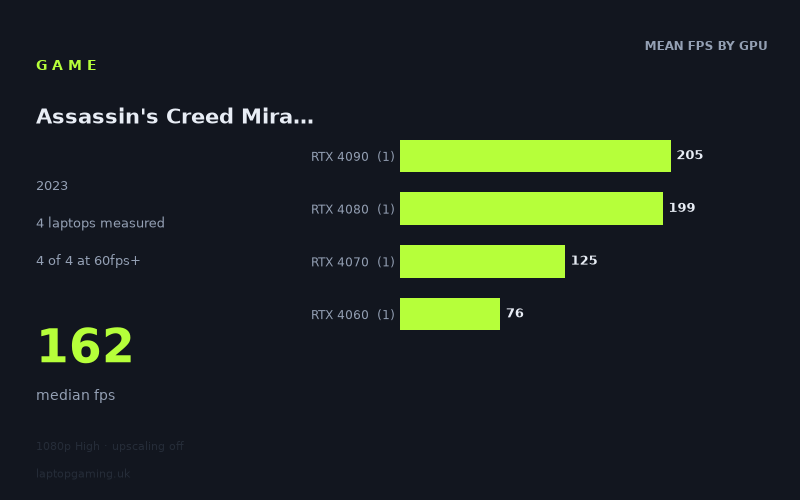
Every laptop we have figures for
Frame rates measured by Notebookcheck.
What it asks of a laptop
Assassin's Creed Mirage looks relatively forgiving at 1920x1080 using the High preset with upscaling off, at least on the four laptops represented in Notebookcheck's measured figures. Every machine in this small sample cleared 60fps, with results ranging from 76fps to 205fps. The median is 162fps, although that figure should not be treated as a typical result for all gaming laptops: there are only four results, with one laptop at each GPU tier.
The main point is that performance separates clearly as the GPU tier rises. The Lenovo Legion Slim 7 with an RTX 4060 at 140W recorded 76fps, while the Schenker XMG Pro 16 Studio with an RTX 4070 at 140W reached 125fps. Above that, the Lenovo Legion Pro 7 with an RTX 4080 managed 199fps and the Alienware m18 R2 with an RTX 4090 at 175W reached 205fps.
That is a substantial 49fps gap between the measured RTX 4060 and RTX 4070 machines, then a further 74fps jump from the measured RTX 4070 system to the RTX 4080 laptop. The move from the RTX 4080 result to the RTX 4090 result is much smaller, at 6fps. On these specific systems, then, Mirage benefits strongly from moving beyond the RTX 4060 tier, while the two highest-end laptops are already producing extremely high frame rates at these settings.
It is important not to over-read those figures. Notebookcheck's numbers cover only four laptops, rather than a broad selection of power limits, cooling designs, screen resolutions and configurations. They show what these particular machines achieved at 1080p High with upscaling disabled; they do not establish that every laptop carrying the same GPU will deliver the same result.
What runs it
For a 60fps target, all four measured laptops are suitable at the tested settings. The lowest result is still the Lenovo Legion Slim 7, whose RTX 4060 at 140W produced 76fps. That leaves a 16fps margin over 60fps in this result, making it the entry point in the available data for someone whose priority is conventional 60fps play at 1920x1080 High without upscaling.
- RTX 4060 at 140W: Lenovo Legion Slim 7, 76fps. This is the lowest measured result, but it still clears 60fps.
- RTX 4070 at 140W: Schenker XMG Pro 16 Studio (Mid 23), 125fps. This clears both 60fps and 100fps.
- RTX 4080: Lenovo Legion Pro 7, 199fps. This clears 60fps, 100fps and 144fps by a wide margin.
- RTX 4090 at 175W: Alienware m18 R2, 205fps. This is the fastest result in the sample and also comfortably exceeds 144fps.
For a 100fps target, three of the four laptops qualify in the measured figures: the RTX 4070, RTX 4080 and RTX 4090 systems. The RTX 4070 result of 125fps is 25fps above that threshold, whereas the RTX 4060 result of 76fps does not reach it.
For a 144fps target, only two machines do so: the Lenovo Legion Pro 7 with RTX 4080 at 199fps and the Alienware m18 R2 with RTX 4090 at 205fps. The measured RTX 4070 laptop is not far away at 125fps, but it remains 19fps short of 144fps. The RTX 4060 result is 68fps below 144fps.
In practical buying terms, the figures support a straightforward division between the tested machines. The Legion Slim 7's measured RTX 4060 result is enough for 60fps. The XMG Pro 16 Studio's RTX 4070 result is the first in this data set to make a 100fps target realistic at the tested settings. The RTX 4080 and RTX 4090 laptops are the only measured options for a 144fps-or-higher result.
The cheapest laptop that handles it
No laptop prices are included in the fact sheet, so it is not possible to identify the cheapest machine by GBP price. The lowest-performing, and therefore lowest GPU tier, laptop in the available measurements is the Lenovo Legion Slim 7 with RTX 4060 at 140W, which recorded 76fps. It handles the tested 1080p High configuration above 60fps, but that does not prove it was the least expensive laptop when sold.
If the question is simply which measured machine represents the least demanding route to acceptable performance, the Legion Slim 7 is the answer from this four-laptop sample. If the requirement is 100fps, the measured step up is the Schenker XMG Pro 16 Studio (Mid 23) with RTX 4070 at 140W, at 125fps. For 144fps, the first qualifying machine listed here is the Lenovo Legion Pro 7 with RTX 4080, at 199fps.
What this means if you're buying
Buy around the frame-rate target rather than assuming the fastest GPU is necessary. For 60fps at the measured 1080p High settings with upscaling off, the RTX 4060 Lenovo Legion Slim 7 result shows that a 140W RTX 4060 laptop can be sufficient. It is the only RTX 4060 result here, though, so treat that as evidence for this particular laptop rather than a blanket guarantee for the GPU.
For a higher-refresh target around 100fps, the measured RTX 4070 laptop is the more convincing option. Its 125fps result provides a meaningful advantage over the RTX 4060 system's 76fps, while avoiding the need to move to the top two GPU tiers represented here.
For a laptop intended to run Mirage above 144fps at these settings, the available evidence points to the RTX 4080 Legion Pro 7 and RTX 4090 Alienware m18 R2. Their 199fps and 205fps results are very close to one another, despite the difference in GPU tier. With only one result for each tier, that should be read as a comparison of these two laptops, not a claim that RTX 4080 and RTX 4090 laptops always perform within 6fps of each other.
Overall, the measured figures make Mirage look manageable for a modern gaming laptop at 1080p High without upscaling, with all four systems above 60fps. The larger purchasing decision is whether 76fps, 125fps or roughly 200fps best matches the display and performance target you want.
How these numbers were produced
Frame rates here are not measured by us, and we label how each one was arrived at. A figure marked measured comes from a published run on that exact machine. A figure marked representative is derived from the GPU and its power limit (TGP) and cross-referenced against published reviews - a sound estimate of what that configuration delivers, but not a measurement of that specific laptop. Unless stated otherwise, numbers are 1920x1080, High preset, upscaling off. Where a laptop ships in several power configurations we use the wattage of the exact SKU listed, because a 140W RTX 5070 and a 115W one are not the same product.