Details
Product prices and availability are accurate as of the date/time indicated and are subject to change. Any price and availability information displayed on Amazon.co.uk at the time of purchase will apply to the purchase of this product.Performance analysis
Monster Hunter Wilds (2025): what it takes to run it
Measured on 2 gaming laptops at 1920×1080, High preset, upscaling off.

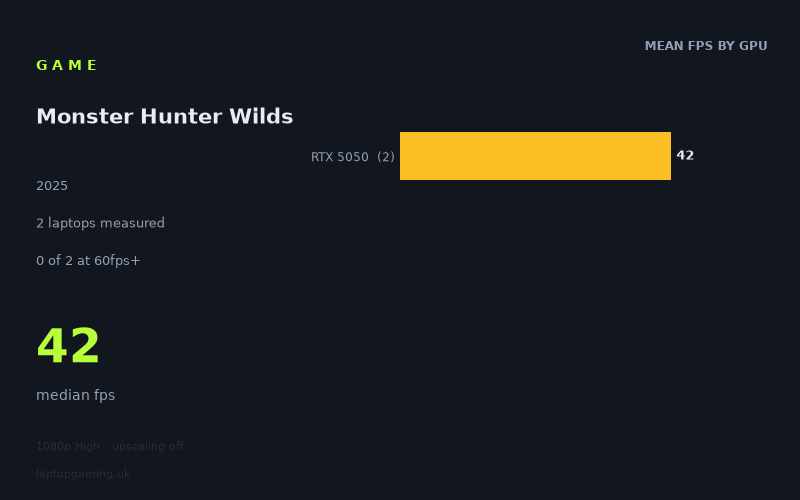
Every laptop we have figures for
Frame rates measured by Notebookcheck.
A word on the sample before we start
We only have measured figures for two laptops, and both of them use the same GPU: the RTX 5050. That is a very thin base to build recommendations on, so this piece is deliberately narrow. What follows is a description of what those two specific machines did with Monster Hunter Wilds at 1080p, High preset, upscaling disabled — plus what those numbers reasonably imply about the shape of the game's demands. It is not a tier-by-tier buying guide, because the data doesn't exist to write one honestly.
If you came here to find out whether an RTX 5070 or 5080 laptop clears 100fps, we can't tell you. Nobody has handed us a figure for those chips in this game. What we can tell you is where the floor of the current-generation stack sits, and that turns out to be genuinely useful information, because the floor is low.
What it asks of a laptop
The two measured results:
- 44fps — Acer Nitro V14 AI (RTX 5050)
- 41fps — MSI Cyborg 15 (RTX 5050), £984
Median 42fps. Neither machine reached 60fps. Neither came close. The gap between them is three frames, which at this level is roughly seven per cent — the sort of difference you'd expect from cooling design, sustained power limits and chassis size rather than anything fundamental. Two RTX 5050 laptops from different manufacturers landing within three frames of each other is the normal, boring outcome, and it suggests neither machine is thermally embarrassing itself.
The interesting number is not the spread, it's the absolute level. A brand-new entry-level GPU from the current generation, running a game at 1080p on a High preset with no upscaling assistance, produces low-40s. That is a demanding game. For comparison of expectation rather than measurement: plenty of modern titles will put an entry-level current-gen mobile GPU comfortably into the 60s or 70s under those same conditions. Wilds does not.
Because both data points share a GPU, we can't observe how the game separates by tier — we have exactly one tier. But the fact that the 5050 lands at 42fps mean tells us something structural: the bottleneck here is almost certainly the GPU rather than the CPU, because two different laptops with different chassis, different cooling and presumably different processors converged on nearly the same number. When results cluster that tightly across different systems with the same graphics silicon, the graphics silicon is what's setting the pace. That's the usual signature of a game that scales with GPU power, which is at least good news in the sense that spending more on the GPU should buy you frames.
What runs it
Being blunt about what the measurements support:
- 60fps at 1080p/High/no upscaling: zero of two laptops. The RTX 5050 does not get there. It misses by roughly 40 per cent, which is not a margin you close with a driver update or a fan curve.
- 100fps: zero of two. Nothing in the measured set is remotely in this conversation.
- 144fps: zero of two. Irrelevant at this tier.
Everything above the 5050 is unmeasured. We are not going to put a number on an RTX 5060, 5070 or 5080 laptop in this game, because we don't have one. What we will say is that a 42fps starting point at the bottom of the stack means the mid-range has real work to do, and that anyone assuming a mainstream gaming laptop will casually run this at high refresh rates is making an assumption the available data does not support.
There is one lever the measured configuration deliberately leaves untouched: the figures were taken with upscaling off. Rendering at a lower internal resolution and upscaling to 1080p is the standard route out of the low 40s on an entry-level GPU, and it is a route these numbers don't measure. It's reasonable to expect it helps. It is not reasonable for us to quantify by how much, so we won't.
The cheapest laptop that handles it
Strictly speaking, neither of the two measured laptops "handles it" if your bar is 60fps at native 1080p on High. Both fall short.
Of the two, the MSI Cyborg 15 at £984 is the only machine with a price attached in our figures, and it produced 41fps — the slower of the pair. The Acer Nitro V14 AI was marginally quicker at 44fps, but we have no price for it, so we can't tell you whether it represents better value.
What that £984 figure establishes is a useful reference point rather than a recommendation: it tells you roughly what a sub-£1,000 current-generation gaming laptop delivers in this game, and the answer is low-40s at native 1080p/High. If that's acceptable to you — Monster Hunter is not a twitch shooter, and 40fps is playable in a way it wouldn't be in a competitive FPS — then a machine at this price does the job. If it isn't, the honest conclusion is that you need to either drop settings, enable upscaling, or budget above this class of hardware.
What this means if you're buying
Three practical takeaways, kept proportionate to two data points.
Don't buy an RTX 5050 laptop expecting 60fps at High. This is the one thing the data says clearly and with two independent confirmations. Both machines, from different manufacturers, landed in the same place. That's a hardware ceiling, not a bad sample.
Treat 1080p as the working resolution at this tier. The measured figures are 1080p results. There is no basis here for expecting 1440p to be viable on a 5050 in this game, and every reason to think it wouldn't be.
Budget above the entry tier if smoothness matters to you. We can't tell you what a 5060 or 5070 laptop does, and we're not going to guess. But a 42fps floor at the bottom of the stack is a strong signal that this game rewards GPU spending, and that the comfortable-headroom machines sit somewhere above the sub-£1,000 bracket. Wait for figures on the mid-range before committing if you can — or accept that at around £984 you are buying a 40fps experience at native resolution, with upscaling as your route to something better.
How these numbers were produced
Frame rates here are not measured by us, and we label how each one was arrived at. A figure marked measured comes from a published run on that exact machine. A figure marked representative is derived from the GPU and its power limit (TGP) and cross-referenced against published reviews - a sound estimate of what that configuration delivers, but not a measurement of that specific laptop. Unless stated otherwise, numbers are 1920x1080, High preset, upscaling off. Where a laptop ships in several power configurations we use the wattage of the exact SKU listed, because a 140W RTX 5070 and a 115W one are not the same product.