Performance analysis
Alone in the Dark (2024): what it takes to run it
Measured on 5 gaming laptops at 1920×1080, High preset, upscaling off.

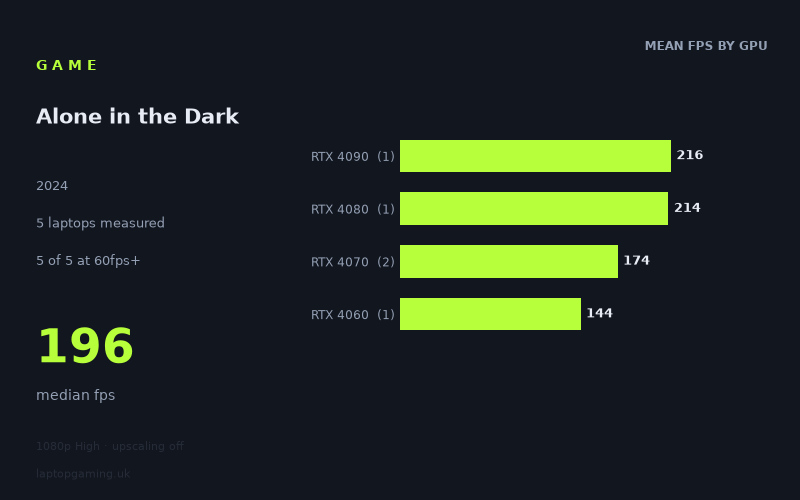
Every laptop we have figures for
Frame rates measured by Notebookcheck.
What it asks of a laptop
At the measured 1,920 x 1,080 High preset with upscaling off, Alone in the Dark (2024) ran very quickly on all five laptops in the Notebookcheck sample. This is still a limited sample, so it would be wrong to turn it into a blanket claim about every laptop carrying these GPUs. However, the five specific machines measured all delivered at least 144fps.
The measured range runs from 144fps to 216fps, with a median of 196fps. Every tested laptop exceeded 60fps, 100fps and 144fps. On this evidence, the game is not especially punishing for the level of gaming hardware represented here at 1080p High without upscaling.
There is a meaningful performance gap between the fastest and slowest results, but it is not a case of lower-end hardware struggling to reach a playable frame rate. The RTX 4090-equipped Schenker XMG Neo 16 reached 216fps, while the RTX 4060 Asus TUF Gaming A15 still returned 144fps. That is a 72fps difference, but both figures are already suitable for high-refresh-rate 1080p panels.
The results also show that GPU names alone do not explain every difference. The two RTX 4070 laptops were both listed at 140W, yet the Schenker XMG Fusion 15 recorded 196fps and the Aorus 16X managed 151fps. That 45fps spread is substantial, and it is a reminder that these are results from particular laptop configurations rather than universal GPU forecasts. If you are comparing individual machines, the exact model matters.
At this tested setting, the game’s performance demands appear forgiving for the laptops in this sample. The available figures do not show where performance falls below 144fps, because even the slowest measured machine reached that mark exactly. They also do not tell us how these laptops perform at higher resolutions, different presets, or with upscaling enabled.
What runs it
All five measured laptops cleared 60fps. More than that, all five also passed 100fps and 144fps at 1080p High with upscaling off. For someone with one of these exact systems, the measured data suggests there is ample performance for a standard 60Hz display and enough headroom for a 120Hz or 144Hz panel.
RTX 4090
The Schenker XMG Neo 16 (Early 24), fitted with an RTX 4090 at 175W, delivered 216fps. This is the fastest result in the sample, although it is only one laptop result and should be read as evidence for that machine rather than an RTX 4090 average.
RTX 4080
The Lenovo Legion Pro 7 with an RTX 4080 measured 214fps. It sits just 2fps behind the RTX 4090 Schenker in this test, putting it comfortably above all of the stated frame-rate thresholds. Again, this tier is represented by one laptop only.
RTX 4070
Two RTX 4070 laptops were measured, both specified here as 140W models. Their results were notably different:
- Schenker XMG Fusion 15 (Early 24): 196fps
- Aorus 16X: 151fps
The RTX 4070 mean across those two machines is 174fps. Both cleared 144fps, but the 45fps separation means buyers should not assume that every RTX 4070 laptop will perform identically. These particular results show that an RTX 4070 can be very fast in this game at the tested settings, while also showing why it is worth looking for model-specific benchmark coverage.
RTX 4060
The Asus TUF Gaming A15 with an RTX 4060 produced 144fps. That makes it the slowest result in the five-laptop set, but it still meets the 144fps threshold exactly. On the measured evidence, this specific RTX 4060 laptop handled 1080p High without upscaling very well.
The cheapest laptop that handles it
No laptop prices are included in the fact sheet, so the measured figures cannot identify the cheapest option. The lowest-performing machine in the sample was the Asus TUF Gaming A15 with RTX 4060 at 144fps, but lowest measured performance is not the same thing as lowest purchase price.
The other named machines are the Aorus 16X with RTX 4070 at 151fps, the Schenker XMG Fusion 15 (Early 24) with RTX 4070 at 196fps, the Lenovo Legion Pro 7 with RTX 4080 at 214fps, and the Schenker XMG Neo 16 (Early 24) with RTX 4090 at 175W at 216fps. Without GBP pricing for those configurations, a value ranking would be speculation.
What this means if you’re buying
If your target is 1080p High with upscaling off, the measured figures are reassuring: every laptop in this five-machine sample delivered at least 144fps. A buyer prioritising a 60Hz display does not need anything close to the fastest tested result for this game alone. Likewise, the Asus TUF Gaming A15’s 144fps result indicates that this particular RTX 4060 machine was already sufficient for a 144Hz target in the tested scenario.
For a 144Hz laptop screen, all five measured systems are viable according to Notebookcheck’s numbers. The RTX 4070, RTX 4080 and RTX 4090 results provide additional headroom above 144fps, but the practical benefit depends on the display refresh rate and on whether you intend to change the tested settings. The data does not establish performance at a higher resolution or more demanding settings.
The main buying lesson is to compare complete laptops rather than GPU labels alone. The two 140W RTX 4070 systems differed sharply, at 196fps and 151fps. For Alone in the Dark at the tested settings, an RTX 4060 laptop may be enough if the specific model performs similarly to the measured Asus TUF Gaming A15. If you want the highest measured frame rates from this set, the Lenovo Legion Pro 7 and Schenker XMG Neo 16 led the field at 214fps and 216fps respectively.
How these numbers were produced
Frame rates here are not measured by us, and we label how each one was arrived at. A figure marked measured comes from a published run on that exact machine. A figure marked representative is derived from the GPU and its power limit (TGP) and cross-referenced against published reviews - a sound estimate of what that configuration delivers, but not a measurement of that specific laptop. Unless stated otherwise, numbers are 1920x1080, High preset, upscaling off. Where a laptop ships in several power configurations we use the wattage of the exact SKU listed, because a 140W RTX 5070 and a 115W one are not the same product.