Performance analysis
Lords of the Fallen (2023): what it takes to run it
Measured on 3 gaming laptops at 1920×1080, High preset, upscaling off.

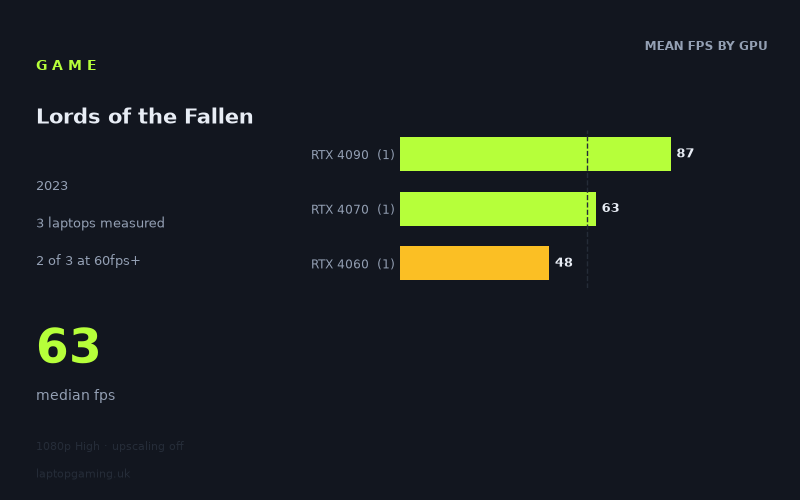
Every laptop we have figures for
Frame rates measured by Notebookcheck.
What it asks of a laptop
The available sample is very small: just three laptops. These figures therefore show what these particular machines achieved, rather than establishing a rule for every laptop carrying an RTX 4060, RTX 4070 or RTX 4090. The measurements are from Notebookcheck at 1,920 x 1,080 using the High preset with upscaling disabled.
Within that limited sample, Lords of the Fallen is not an especially forgiving fit for a gaming laptop at High settings. The slowest measured result was 48fps on the Lenovo Legion Slim 7 with an RTX 4060 at 140 W, while even the fastest machine, the Acer Predator Helios 18 with an RTX 4090, reached 87fps rather than 100fps. The median result was 63fps.
That matters because the results do not leave much surplus performance at this preset. Two of the three measured laptops reached 60fps or better, but none reached 100fps and none reached 144fps. A buyer targeting a high-refresh-rate display should therefore not assume that High settings at 1080p will fully exploit a 100 Hz or 144 Hz panel, even with the most powerful GPU represented here.
The separation between the three results also suggests that GPU class makes a substantial difference. Notebookcheck's numbers rise from 48fps with the RTX 4060 to 63fps with the RTX 4070, then to 87fps with the RTX 4090. That is a 15fps step between the measured RTX 4060 and RTX 4070 laptops, followed by a further 24fps increase between the RTX 4070 and RTX 4090 results.
However, each GPU tier is represented by only one laptop. The RTX 4060 and RTX 4070 machines were both specified at 140 W, while no power figure is supplied here for the RTX 4090 laptop. Those results are useful as concrete reference points, but they are not enough to say that every laptop using one of these GPUs will perform identically.
What runs it
For a 60fps target at 1,920 x 1,080 on High with upscaling off, the measured figures identify two machines that cleared the line.
- RTX 4090: The Acer Predator Helios 18 achieved 87fps. This was the fastest result in the sample and comfortably exceeded 60fps, although it remained 13fps short of 100fps.
- RTX 4070 at 140 W: The Schenker XMG Pro 16 Studio (Mid 23) achieved 63fps. It cleared 60fps, but only by 3fps, so the measured result offers little headroom above that target.
- RTX 4060 at 140 W: The Lenovo Legion Slim 7 achieved 48fps. This did not reach 60fps in the stated test, falling 12fps below that level.
On the evidence available, the RTX 4090 and RTX 4070 machines are the two measured options for 60fps-or-better play at these settings. The distinction is important: the RTX 4070 result is technically above 60fps, but the RTX 4090 machine produced a materially higher 87fps. If 60fps is the minimum acceptable outcome rather than an occasional target, the 63fps figure should be read cautiously because the sample contains only that single RTX 4070 laptop.
For 100fps, there is no qualifying result. The RTX 4090-based Acer Predator Helios 18 was closest at 87fps, while the RTX 4070 and RTX 4060 results were 63fps and 48fps respectively. For 144fps, none of the three measured laptops came close enough to claim that target at 1080p High without upscaling. The fastest figure, 87fps, is 57fps short of 144fps.
The cheapest laptop that handles it
No laptop prices are included in the fact sheet, so it is not possible to identify the cheapest option in GBP from the measured data. It would be misleading to attach a price ranking to the Acer Predator Helios 18, Schenker XMG Pro 16 Studio (Mid 23), or Lenovo Legion Slim 7 without supplied pricing.
If “handles it” means reaching 60fps in Notebookcheck's stated test, the lower-performing of the two qualifying specific machines was the Schenker XMG Pro 16 Studio (Mid 23), with its RTX 4070 at 140 W and a measured 63fps. The Acer Predator Helios 18 with RTX 4090 was faster at 87fps. The Lenovo Legion Slim 7 with RTX 4060 at 140 W produced 48fps and did not meet that 60fps threshold under the measured conditions.
That is a performance comparison, not a value judgement. With no prices provided, there is no evidence here for saying which of those machines is the better buy or the least expensive route to acceptable performance.
What this means if you’re buying
Buy around the performance target rather than the display refresh rate. The available figures show that 1080p High without upscaling can be a 60fps-level workload for the measured RTX 4070 machine, while the measured RTX 4060 machine sat below that point. The RTX 4090 result provided the strongest performance in the sample, but still did not establish a 100fps or 144fps result.
For a buyer considering an RTX 4060 laptop, the Lenovo Legion Slim 7 result is the clearest warning in this data set: 48fps at the tested settings is not a 60fps outcome. That does not prove that every RTX 4060 laptop will return 48fps, but it does mean there is no measured RTX 4060 result here that supports a confident 60fps recommendation for this preset.
An RTX 4070 laptop has the most relevant measured 60fps result, represented by the 140 W Schenker XMG Pro 16 Studio (Mid 23) at 63fps. Buyers should nevertheless treat that as a narrow pass, not proof of abundant headroom. The RTX 4090-powered Acer Predator Helios 18 is the only machine here to move well beyond 60fps, at 87fps, but the measured figures still do not support buying for 100fps or 144fps High-settings performance without upscaling.
How these numbers were produced
Frame rates here are not measured by us, and we label how each one was arrived at. A figure marked measured comes from a published run on that exact machine. A figure marked representative is derived from the GPU and its power limit (TGP) and cross-referenced against published reviews - a sound estimate of what that configuration delivers, but not a measurement of that specific laptop. Unless stated otherwise, numbers are 1920x1080, High preset, upscaling off. Where a laptop ships in several power configurations we use the wattage of the exact SKU listed, because a 140W RTX 5070 and a 115W one are not the same product.