Performance analysis
The First Descendant (2024): what it takes to run it
Measured on 3 gaming laptops at 1920×1080, High preset, upscaling off.

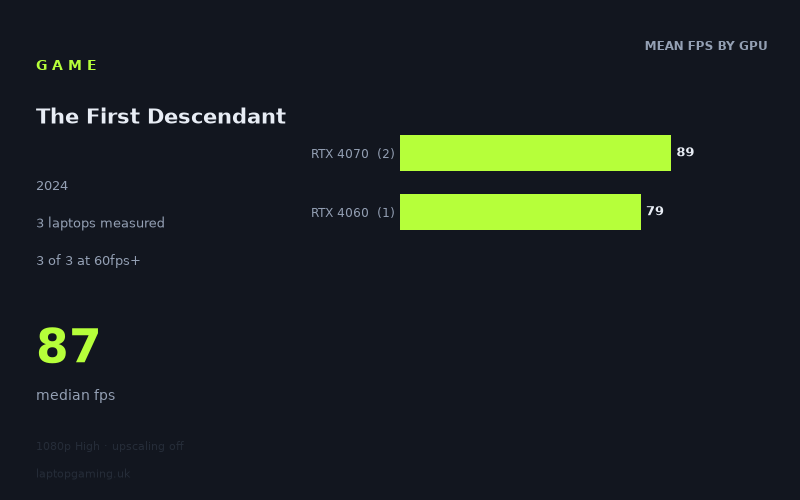
Every laptop we have figures for
Frame rates measured by Notebookcheck.
What it asks of a laptop
The First Descendant was measured on only three gaming laptops, so this is a small sample rather than a complete guide to every mobile GPU configuration. The available Notebookcheck figures are nevertheless consistent: at 1,920 x 1,080 using the High preset with upscaling disabled, all three machines stayed above 60fps.
The measured range is 79fps to 91fps, with a median of 87fps. That is a relatively narrow 12fps spread between the fastest and slowest tested laptops, despite the sample including both RTX 4060 and RTX 4070 systems. On these particular machines, the game does not appear to require an exceptionally high-end laptop GPU merely to achieve a smooth 60fps result at the tested settings.
There is still a visible separation between the GPU tiers. The two RTX 4070 laptops averaged 89fps, while the single RTX 4060 result was 79fps. That is a 10fps gap, or roughly 13% in favour of the RTX 4070 average. It suggests that GPU tier matters, but the numbers do not indicate a dramatic divide at 1080p High without upscaling. The RTX 4060 result was already comfortably clear of 60fps, while the RTX 4070 machines added more headroom rather than transforming the experience into a high-refresh-rate result.
The RTX 4070 figures also show that laptop power configuration can matter, although three results are not enough to isolate its effect. The Schenker XMG Pro 16 Studio, with an RTX 4070 rated at 140W, recorded 91fps. The Acer Predator Helios Neo 14, with an RTX 4070 at 125W, recorded 87fps. That is only a 4fps difference in these measurements, so it would be unwise to treat wattage alone as a reliable predictor. These are results for two specific laptops, not a guarantee for every RTX 4070 machine.
What runs it
For the tested 1,920 x 1,080 High-preset configuration with upscaling off, every measured laptop cleared 60fps. That is three out of three machines: two RTX 4070 laptops and one RTX 4060 laptop.
- RTX 4070: The Schenker XMG Pro 16 Studio recorded 91fps, while the Acer Predator Helios Neo 14 recorded 87fps. The RTX 4070 mean from these two laptops is 89fps. Both are well above 60fps, but neither reached 100fps.
- RTX 4060: The Asus TUF Gaming A15 recorded 79fps. This is 19fps above 60fps and therefore comfortably within the measured smooth-playback range, but it is also below 100fps.
No tested system reached 100fps. The fastest recorded result, the 140W RTX 4070 in the Schenker, stopped at 91fps, 9fps short of that mark. Equally, no system reached 144fps: the best result was 53fps below 144fps.
That makes the measured picture straightforward. An RTX 4060 laptop can handle this tested mode at more than 60fps, based on the one Asus TUF Gaming A15 result available. The two tested RTX 4070 laptops also handle it comfortably, averaging 89fps, but the figures do not support describing either tier as a verified 100fps or 144fps option at 1080p High with upscaling disabled.
It is important not to stretch that conclusion beyond the data. There are no measured figures here for lower GPU tiers, other RTX 4060 or RTX 4070 laptop designs, alternative resolutions, other quality presets, or upscaling modes. A buyer looking for assured triple-digit performance would need further measurements rather than assuming that moving from RTX 4060 to RTX 4070 is sufficient.
The cheapest laptop that handles it
The fact sheet does not provide UK prices for any of the tested laptops, so it is not possible to identify the cheapest model from the supplied information. It would be misleading to assign a value winner without current GBP pricing.
The lowest-performing measured machine was also the least powerful GPU tier represented: the Asus TUF Gaming A15 with RTX 4060 recorded 79fps. It therefore handled the tested 1080p High configuration above 60fps, with 19fps of measured headroom over that threshold.
The other confirmed options are the Acer Predator Helios Neo 14 (2024) with RTX 4070 at 125W, at 87fps, and the Schenker XMG Pro 16 Studio (Mid 24) with RTX 4070 at 140W, at 91fps. Both are faster in Notebookcheck’s numbers, but no price information has been provided to establish whether their extra performance represents good value against the Asus.
What this means if you’re buying
If your target is a consistent-looking 60fps-class result at 1,920 x 1,080 on High with upscaling off, the measured RTX 4060 Asus TUF Gaming A15 is the entry point in this small data set. Its 79fps result leaves useful room above 60fps, rather than merely scraping past it.
An RTX 4070 laptop offers additional performance in the available figures, but the gain is moderate rather than enormous. The two RTX 4070 systems were 8fps and 12fps ahead of the RTX 4060 result respectively. Choose one of those machines if the extra headroom matters to you, but do not buy on the assumption that it will deliver 100fps or make a 144Hz panel fully utilised in this game at the tested settings: neither measured RTX 4070 did so.
Finally, compare the exact laptop rather than relying only on the GPU label. The available RTX 4070 results differ by 4fps, and the sample is too small to turn that into a broad rule. For this game, the evidence supports RTX 4060 and RTX 4070 laptops for 60fps-plus 1080p High play; it does not yet support confident claims about cheaper GPUs, 100fps targets, or 144fps targets.
How these numbers were produced
Frame rates here are not measured by us, and we label how each one was arrived at. A figure marked measured comes from a published run on that exact machine. A figure marked representative is derived from the GPU and its power limit (TGP) and cross-referenced against published reviews - a sound estimate of what that configuration delivers, but not a measurement of that specific laptop. Unless stated otherwise, numbers are 1920x1080, High preset, upscaling off. Where a laptop ships in several power configurations we use the wattage of the exact SKU listed, because a 140W RTX 5070 and a 115W one are not the same product.