Performance analysis
Final Fantasy XVI (2024): what it takes to run it
Measured on 4 gaming laptops at 1920×1080, High preset, upscaling off.

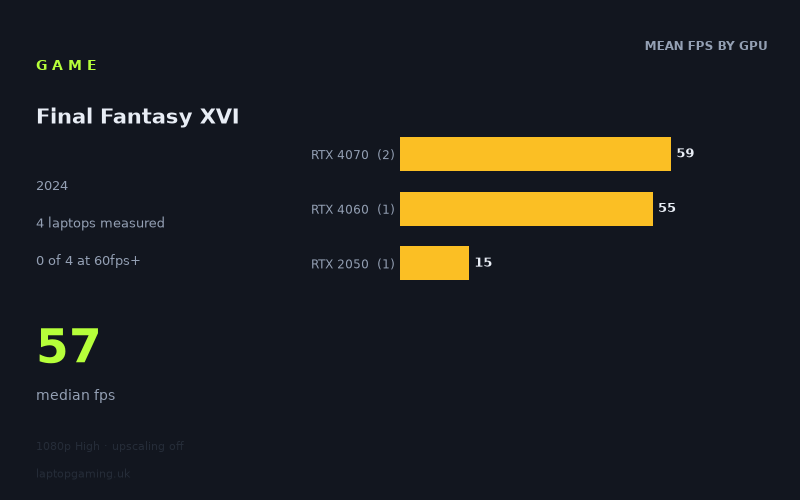
Every laptop we have figures for
Frame rates measured by Notebookcheck.
What it asks of a laptop
Final Fantasy XVI is demanding at the measured configuration: 1,920 × 1,080, the High preset and upscaling disabled. Notebookcheck’s figures cover only four laptops, so this is a small sample rather than a definitive map of every gaming laptop on sale. Still, the results show a clear divide between modern mid-range RTX machines and an older, low-power entry-level GPU.
The four measured results span from 59fps to 15fps, with a median of 57fps. That is a wide 44fps gap, and it matters more than the headline median. The two RTX 4070 laptops reached 59fps, while the RTX 4060 machine managed 55fps. Those three results are closely grouped: moving from the 85W RTX 4060 in the Acer Nitro V 16 to the 105W and 110W RTX 4070 implementations in the MSI Katana A15 AI and Acer Predator Triton Neo 16 produced only a 4fps improvement in these numbers.
By contrast, the Acer Aspire 17’s 35W RTX 2050 managed 15fps. That is not a small compromise from the newer GPUs; it is a fundamentally different level of performance. Based on these measured machines, Final Fantasy XVI needs a reasonably capable current-generation gaming GPU for acceptable 1080p High performance without upscaling. An RTX 2050 at this power level is plainly not sufficient for this configuration.
The narrow separation among the RTX 4060 and RTX 4070 results also suggests that simply buying the higher-numbered GPU does not guarantee a large gain here. Laptop GPU power limits matter: the measured RTX 4070 machines ran at 105W and 110W, while the RTX 4060 ran at 85W. However, with only three modern gaming laptops in the sample, it would be too much to claim that every RTX 4060 or RTX 4070 laptop will perform similarly.
There is also an important ceiling to note. None of the four laptops reached 60fps at the tested settings, despite two being only 1fps short. None reached 100fps or 144fps either. This is therefore not a game for which the available figures support buying a high-refresh-rate panel specifically to expect 100fps-plus gameplay at 1080p High without upscaling.
What runs it
At 1080p High with upscaling off, the measured figures place the available laptops into two practical groups.
- RTX 4070, 105W–110W: The Acer Predator Triton Neo 16 with its 110W RTX 4070 recorded 59fps, as did the MSI Katana A15 AI with a 105W RTX 4070. Across the two RTX 4070 laptops, the mean was therefore 59fps. These were the fastest results in the sample, but they did not clear 60fps according to Notebookcheck’s numbers.
- RTX 4060, 85W: The Acer Nitro V 16 recorded 55fps. That is close to the RTX 4070 pair, only 4fps behind, but it is still below 60fps. It is the only RTX 4060 result supplied, so it should be treated as evidence for this specific 85W laptop rather than a universal RTX 4060 expectation.
- RTX 2050, 35W: The Acer Aspire 17 recorded 15fps. This is far below the performance of the RTX 4060 and RTX 4070 laptops, and the measured result does not make a case for using this machine at the tested High preset without upscaling.
For strict performance thresholds, the answer is straightforward. Zero of four laptops reached 60fps. The closest were the two RTX 4070 systems at 59fps. Zero of four reached 100fps, and zero of four reached 144fps. The measured data therefore supports describing 55–59fps as the best observed range at this configuration, rather than presenting 60fps, 100fps or 144fps as achieved targets.
That distinction is worth making if you are comparing laptop displays. A 144Hz or faster screen may still be useful in other games, but Final Fantasy XVI did not come close to exploiting that refresh rate in these particular 1080p High, no-upscaling measurements. Equally, a 60Hz target is within touching distance for the RTX 4060 and RTX 4070 examples, but “within touching distance” is not the same as measured 60fps.
The cheapest laptop that handles it
The lowest-priced machine in the supplied figures is the Acer Aspire 17 at £899, equipped with a 35W RTX 2050. Its measured 15fps result means it does not handle Final Fantasy XVI well at 1080p High with upscaling disabled.
Among the laptops with a measured result near a conventional 60fps target, the cheapest priced option listed is the Acer Nitro V 16 at £1,249. Its 85W RTX 4060 achieved 55fps. That is the most affordable specific laptop in this data set that delivers broadly playable-looking performance at the tested settings, although it remains 5fps short of 60fps.
The other priced high-performing option is the Acer Predator Triton Neo 16 at £2,061, with a 110W RTX 4070. It reached 59fps, only 4fps ahead of the £1,249 Nitro V 16. On these figures alone, the £812 price difference does not translate into a major performance increase in Final Fantasy XVI at the tested configuration. No price was provided for the MSI Katana A15 AI, though its 105W RTX 4070 also recorded 59fps.
What this means if you’re buying
If Final Fantasy XVI is one of the games shaping your laptop purchase, the measured numbers favour an RTX 4060-class or RTX 4070-class gaming laptop over an entry-level RTX 2050 system. The Acer Nitro V 16’s 55fps result shows that an 85W RTX 4060 can get close to 60fps at 1080p High without upscaling, while both measured RTX 4070 laptops improved that to 59fps.
However, do not assume that spending more for an RTX 4070 will automatically produce a substantially faster result in this game. In this four-laptop sample, the 85W RTX 4060 was close behind the 105W and 110W RTX 4070 machines. Check the exact laptop model and its GPU power configuration rather than buying on the GPU label alone.
For value from the provided figures, the Acer Nitro V 16 is the key reference point: £1,249 for 55fps, versus £2,061 for the Predator Triton Neo 16’s 59fps. Buyers who need a measured 60fps result at these exact settings should be cautious, because no supplied laptop reached it. Buyers considering a low-power RTX 2050 laptop should be more cautious still: the Aspire 17’s 15fps result is not in the same performance class as the RTX 4060 and RTX 4070 machines.
How these numbers were produced
Frame rates here are not measured by us, and we label how each one was arrived at. A figure marked measured comes from a published run on that exact machine. A figure marked representative is derived from the GPU and its power limit (TGP) and cross-referenced against published reviews - a sound estimate of what that configuration delivers, but not a measurement of that specific laptop. Unless stated otherwise, numbers are 1920x1080, High preset, upscaling off. Where a laptop ships in several power configurations we use the wattage of the exact SKU listed, because a 140W RTX 5070 and a 115W one are not the same product.