Performance analysis
Dead Island 2 (2023): what it takes to run it
Measured on 4 gaming laptops at 1920×1080, High preset, upscaling off.

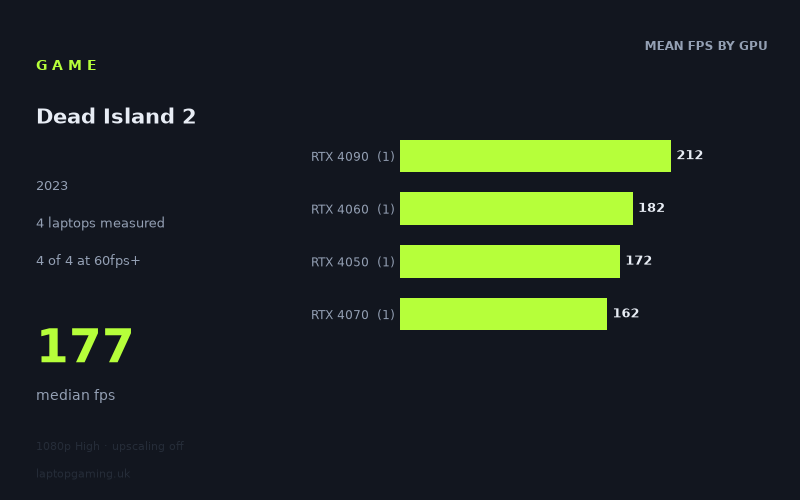
Every laptop we have figures for
Frame rates measured by Notebookcheck.
What it asks of a laptop
These results cover only four laptops, so treat them as evidence of what these specific configurations achieved rather than a definitive ranking of every gaming laptop GPU. All four were measured by Notebookcheck at 1,920 x 1,080 using the High preset with upscaling switched off.
Within that limited sample, Dead Island 2 looks relatively forgiving for a modern gaming laptop. The slowest result is 162fps, while the fastest reaches 212fps: a 50fps spread, with a median of 177fps. More importantly, every tested machine clears 60fps, 100fps and 144fps. That is unusually strong coverage across laptops equipped with RTX 4050, RTX 4060, RTX 4070 and RTX 4090 graphics.
The figures do not show a clean, tier-by-tier scaling pattern. The RTX 4090-powered Schenker Key 17 Pro is predictably the fastest system here at 212fps, but the 140W RTX 4060 Medion Erazer Defender P40 records 182fps, ahead of both the RTX 4050 Medion Erazer Scout E20 at 172fps and the 140W RTX 4070 Acer Nitro 16 at 162fps.
That does not mean an RTX 4060 is generally faster than an RTX 4070, or that an RTX 4050 is broadly close to an RTX 4090. There is just one laptop representing each GPU tier, and laptop performance depends on the complete implementation rather than the graphics label alone. The measured numbers instead suggest that, at these 1080p High settings without upscaling, the game is not separating these particular laptops as sharply as their nominal GPU tiers might imply.
For a buyer, that is encouraging. The game does not appear to demand a top-end laptop merely to achieve a smooth frame rate at 1080p High. Even the lowest-scoring machine in this sample is already far beyond the 60fps target and above the refresh rate of many 144Hz laptop displays.
What runs it
Every laptop in the supplied results runs Dead Island 2 comfortably at the measured settings. The important caveat is that this is a four-machine sample, not a complete database of every power limit, chassis design or display resolution.
- RTX 4050, 100W: The Medion Erazer Scout E20 achieves 172fps. This clears 60fps, 100fps and 144fps, with 28fps to spare over the latter threshold. In this particular laptop, the entry-level RTX 40-series GPU is already sufficient for high-refresh 1080p play at High settings without upscaling.
- RTX 4060, 140W: The Medion Erazer Defender P40 posts 182fps. It also clears all three targets, exceeding 144fps by 38fps. Among the mid-range machines listed, this is the highest measured result.
- RTX 4070, 140W: The Acer Nitro 16 returns 162fps. It is the slowest figure in the sample but remains 18fps above 144fps, 62fps above 100fps and 102fps above 60fps. That makes it plainly capable at the tested settings, even if this individual result sits below the two lower-numbered RTX GPUs represented here.
- RTX 4090, 175W: The Schenker Key 17 Pro reaches 212fps, the fastest result available. It is 68fps above 144fps and 112fps above 100fps. This is substantial headroom, although the four-laptop data set cannot show how consistently that advantage would carry across other RTX 4090 systems or other settings.
If your goal is simply a stable 60fps at 1080p High without upscaling, all four measured laptops are well beyond it. For a 100Hz or 120Hz display, the same is true: even the Acer Nitro 16’s 162fps result has considerable room above that level. The 144Hz target is also met by all four, though the amount of margin varies from 18fps on the Nitro 16 to 68fps on the Schenker.
The cheapest laptop that handles it
No laptop prices are included in the fact sheet, so it is not possible to identify the cheapest machine or make a GBP value comparison from the measured data alone.
What can be said is that the Medion Erazer Scout E20 with an RTX 4050 at 100W is the least powerful GPU configuration represented in the results, yet it records 172fps at 1080p High with upscaling off. The Medion Erazer Defender P40 with an RTX 4060 at 140W records 182fps, while the Acer Nitro 16 with an RTX 4070 at 140W reaches 162fps.
Those figures make the Scout E20 particularly relevant if you are shopping at the lower end of gaming-laptop pricing, but its actual value depends on its current price and on the rest of its specification. The data supports saying that this specific RTX 4050 laptop handles Dead Island 2 extremely well at the tested settings; it does not support claiming it is the cheapest suitable model on sale.
What this means if you’re buying
For Dead Island 2 at 1,920 x 1,080 on High with upscaling disabled, there is no evidence here that you need an expensive flagship GPU to get a high-refresh experience. The measured RTX 4050 laptop reaches 172fps, and the RTX 4060 result is higher still at 182fps. On this evidence, a well-configured lower- or mid-tier RTX 40-series gaming laptop can be enough if this game is a major part of your buying decision.
Do not buy solely by GPU name, however. The unusual ordering in this sample is the key warning: the RTX 4070 Acer Nitro 16 records 162fps, below the RTX 4060 and RTX 4050 machines listed. With only one example per tier, that is not a reason to avoid RTX 4070 laptops. It is a reason to compare the specific laptop, its power configuration and independent measurements rather than assuming a higher-numbered GPU guarantees a higher result.
The RTX 4090 Schenker Key 17 Pro offers the highest measured performance at 212fps, but its advantage is most relevant if you specifically want the greatest possible frame-rate headroom. For a conventional 60Hz, 100Hz or 144Hz laptop display at the tested 1080p High settings, every machine in this small sample already meets the relevant target.
How these numbers were produced
Frame rates here are not measured by us, and we label how each one was arrived at. A figure marked measured comes from a published run on that exact machine. A figure marked representative is derived from the GPU and its power limit (TGP) and cross-referenced against published reviews - a sound estimate of what that configuration delivers, but not a measurement of that specific laptop. Unless stated otherwise, numbers are 1920x1080, High preset, upscaling off. Where a laptop ships in several power configurations we use the wattage of the exact SKU listed, because a 140W RTX 5070 and a 115W one are not the same product.