Details
Product prices and availability are accurate as of the date/time indicated and are subject to change. Any price and availability information displayed on Amazon.co.uk at the time of purchase will apply to the purchase of this product.Performance analysis
Red Dead Redemption 2 (2019): what it takes to run it
Measured on 13 gaming laptops at 1920×1080, High preset, upscaling off.

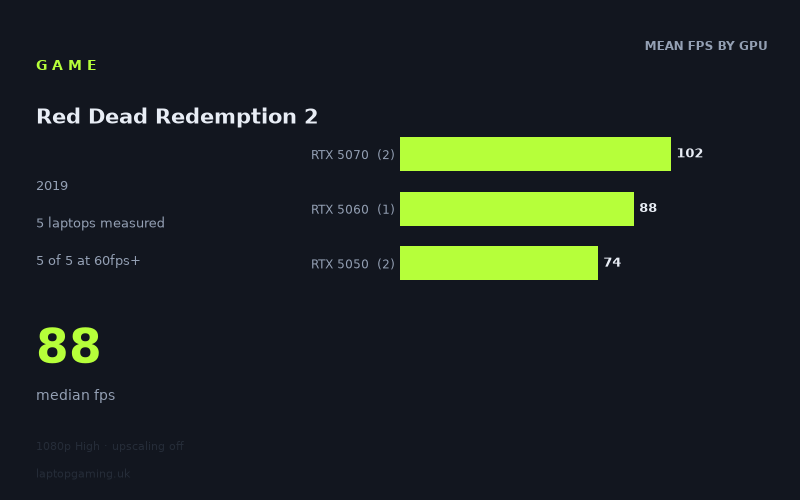
Every laptop we have figures for
Frame rates measured by Notebookcheck.
What it asks of a laptop
The measured spread on Red Dead Redemption 2 is unusually tidy, and that tidiness is the story. At 1920x1080 on the High preset with upscaling switched off, Notebookcheck's numbers run from 74fps on an RTX 5050 to 106fps on a 140W RTX 5070 — a total gap of just 43% between the slowest and fastest machines in the sample. For a game with this reputation for chewing through hardware, that is a narrow band, and every single laptop tested cleared 60fps.
What that narrow spread tells you is that the game is scaling cleanly with GPU class rather than falling off a cliff at the bottom end. Group the figures by silicon and the pattern is almost linear: RTX 5050 averages 74fps, RTX 5060 hits 88fps, RTX 5070 averages 102fps. Each step up the stack buys roughly 16-19%. There is no threshold effect, no point where a tier suddenly becomes unviable, and no sign of a VRAM wall or CPU bottleneck distorting the results at 1080p High. That is the signature of a workload that is purely and predictably GPU-bound.
The one place the numbers get interesting is power. The two RTX 5070 laptops differ only in how much wattage they're allowed to draw, and the gap is 106fps at 140W versus 98fps at 115W — about 8% for an extra 25W. That's meaningful but not dramatic, and it confirms the 5070 isn't being strangled at 115W in this title. Conversely, the two RTX 5050 machines land at 75fps and 74fps, both at 75W, which is as close to identical as benchmark results get. Same GPU, same power ceiling, same result — cooling design and chassis size aren't rescuing anyone here. The GPU and its wattage budget are doing essentially all of the work.
The upsh: this is a moderately demanding game rather than a punishing one, at least at 1080p High. But note the ceiling as much as the floor. Only one of five laptops broke 100fps, and none came close to 144fps. If you were hoping to feed a high-refresh panel with native frames, nothing in this sample gets you there.
What runs it
Working through the tiers with the measured figures:
- RTX 5050 (75W) — 74-75fps. Comfortably above 60fps at 1080p High with room to spare. This is a genuinely playable result, and the consistency across two different machines means you can trust it rather than hoping for a well-cooled unit.
- RTX 5060 (115W) — 88fps. The middle of the sample and, judged on the numbers alone, the sweet spot. It clears 60fps by nearly 50% and sits close enough to 100fps that a modest settings trim would likely get it there.
- RTX 5070 (115W) — 98fps. Fractionally short of triple figures. Effectively a 100fps card in this game.
- RTX 5070 (140W) — 106fps. The only machine in the sample above 100fps, and the only one that gives you real headroom for a 120Hz or 144Hz panel to do something useful.
So: 5 of 5 clear 60fps, 1 of 5 clears 100fps, 0 of 5 clear 144fps. If your target is a locked 60, any of these laptops does it and does it with margin — the slowest has 23% of headroom over the line, which matters when you leave a benchmark scene and hit the parts of the game that stress the hardware harder. If your target is 100fps native at these settings, you need an RTX 5070 and you want it at 140W rather than 115W. If your target is 144fps, the measured data says no laptop here achieves it on High with upscaling off, and you'd be looking at either lower settings or upscaling to get there.
The cheapest laptop that handles it
The HP Victus 15 at £799 is the entry point, and it delivers 74fps — the slowest figure in the sample, but a figure that clears 60fps by a comfortable margin. On pure cost-per-frame it works out at roughly £10.80 per fps, which is the second-best ratio in the group. For someone whose question is simply "will this run properly for under £800", the answer is yes.
The best value in the sample, though, is the Acer Nitro V 15 at £931. Its RTX 5060 returns 88fps — 19% more performance than the Victus for 17% more money, which works out to about £10.58 per fps, the strongest ratio here. That extra £132 buys you a machine that's meaningfully further from the 60fps line, and that headroom is what you're actually paying for.
The ASUS TUF Gaming A14 at £1,007 is the awkward one on this chart. It posts 75fps — statistically the same as the £799 Victus — for £208 more, giving the worst cost-per-frame in the sample at roughly £13.43. Whatever you're buying there, on this game's numbers it isn't frames.
At the top, the Acer Nitro V16 at £1,199 gets you 98fps and the HP OMEN 16 at £1,375 gets you 106fps. That last 8fps costs £176, which is the steepest incremental spend in the set — but the OMEN is the only machine in the sample that clears 100fps, so if that's your threshold, it's the only option here.
What this means if you're buying
Red Dead Redemption 2 is not the game that should decide your GPU tier. Because it scales so evenly and every tested laptop clears 60fps, it doesn't create a hard buying threshold the way a genuinely punishing title would. The £799 Victus runs it. The £1,375 OMEN runs it better by 43%. Neither result is a surprise and neither is a disaster.
Two practical conclusions from the measured figures. First, wattage is worth checking on the spec sheet — the 140W versus 115W RTX 5070 comparison shows an 8% real difference, and the identical 5050 results show that when wattage is equal, the rest of the chassis barely moves the needle. Second, if a high-refresh display is the point of your purchase, this game won't feed it natively at High. Nothing here reached 144fps, so you'd be relying on upscaling or reduced settings — factor that into whether the 144Hz-plus panel is worth paying for.
On the numbers alone, the RTX 5060 in the £931 Nitro V 15 is the pick: it's the cheapest frame-per-pound in the sample and it puts real distance between you and the 60fps floor.
How these numbers were produced
Frame rates here are not measured by us, and we label how each one was arrived at. A figure marked measured comes from a published run on that exact machine. A figure marked representative is derived from the GPU and its power limit (TGP) and cross-referenced against published reviews - a sound estimate of what that configuration delivers, but not a measurement of that specific laptop. Unless stated otherwise, numbers are 1920x1080, High preset, upscaling off. Where a laptop ships in several power configurations we use the wattage of the exact SKU listed, because a 140W RTX 5070 and a 115W one are not the same product.