Performance analysis
Palworld (2024): what it takes to run it
Measured on 4 gaming laptops at 1920×1080, High preset, upscaling off.

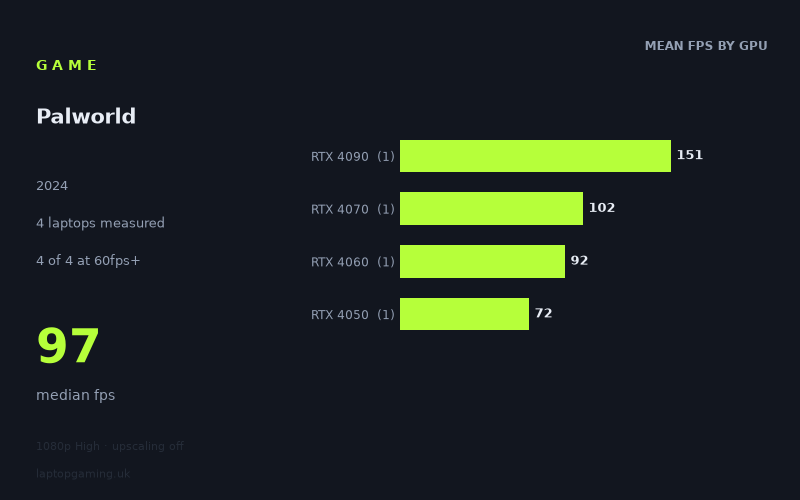
Every laptop we have figures for
Frame rates measured by Notebookcheck.
What it asks of a laptop
This is a small data set: Notebookcheck has measured Palworld on four laptops only. All figures here use 1,920 x 1,080, the High preset and upscaling disabled, so they offer a useful snapshot of these specific machines rather than a guarantee for every laptop carrying the same GPU name.
Within that limited sample, Palworld looks reasonably accommodating at 1080p High for a gaming laptop with a dedicated RTX GPU. The slowest measured machine, the HP Victus 15-fa1057ng with an RTX 4050, reached 72fps. That means all four measured laptops cleared 60fps under the same test conditions.
There is still a substantial spread from top to bottom. Notebookcheck’s numbers range from 72fps to 151fps, a difference of 79fps, with a median result of 97fps. The RTX 4090-equipped Asus ROG Strix Scar 18 G834JYR was far ahead at 151fps, while the RTX 4070, RTX 4060 and RTX 4050 machines grouped more closely together at 102fps, 92fps and 72fps respectively.
That pattern suggests that Palworld can use more graphics performance when it is available, particularly if the aim is to feed a high-refresh-rate display. However, the measured figures do not show an especially steep requirement for 60fps at the tested settings: even the lowest GPU tier represented here remained above that target.
The gap between the RTX 4070 HP Omen Transcend 16-u1095ng and the RTX 4060 HP Victus 16 was only 10fps, while the gap from the RTX 4060 result to the RTX 4050 result was 20fps. The largest step was between the RTX 4070 result and the RTX 4090 result: 49fps. As each GPU tier is represented by just one laptop, though, those are comparisons between individual systems, not definitive GPU-to-GPU scaling results.
What runs it
For a 60fps target at 1,920 x 1,080 High with upscaling off, every measured laptop passed. The HP Victus 15-fa1057ng, equipped with an RTX 4050, produced 72fps, leaving a 12fps margin over 60fps. The RTX 4060 HP Victus 16 reached 92fps, while the RTX 4070 HP Omen Transcend 16-u1095ng recorded 102fps. At the top end, the RTX 4090 Asus ROG Strix Scar 18 G834JYR reached 151fps.
- RTX 4050: 72fps in the HP Victus 15-fa1057ng. This was the lowest result in the four-laptop sample, but it still cleared 60fps.
- RTX 4060: 92fps in the HP Victus 16. This was comfortably above 60fps, but below 100fps.
- RTX 4070: 102fps in the HP Omen Transcend 16-u1095ng. This was the first measured result to exceed 100fps.
- RTX 4090 at 175W: 151fps in the Asus ROG Strix Scar 18 G834JYR. This was the only result to exceed 144fps.
For 100fps, two of the four machines made the cut: the RTX 4070 Omen at 102fps and the RTX 4090 Strix Scar 18 at 151fps. The RTX 4060 Victus at 92fps was close, but it did not reach the threshold in this measurement. The RTX 4050 Victus was further away at 72fps.
For a 144Hz-class target, only one of the four measured laptops qualified: the RTX 4090 Asus ROG Strix Scar 18 G834JYR, at 151fps. The RTX 4070 result of 102fps is well above 60fps and just over 100fps, but it is not evidence of 144fps performance at the tested settings. Equally, the 92fps RTX 4060 result and 72fps RTX 4050 result should be viewed as results aimed more naturally at a 60fps-class experience than at consistently filling a 144Hz panel.
The cheapest laptop that handles it
The fact sheet does not provide prices for the RTX 4050, RTX 4060 or RTX 4070 laptops, so it is not possible to identify the cheapest measured laptop overall. It would be misleading to assume that the lowest-performing system was also the least expensive without a listed price.
What the figures do establish is that the HP Victus 15-fa1057ng with RTX 4050 was the least powerful measured option and still delivered 72fps at 1,920 x 1,080 High with upscaling off. If the question is simply whether a lower-tier RTX laptop can handle Palworld at these settings, this specific Victus provides evidence that it can clear 60fps.
The only price supplied is for the fastest system: the Asus ROG Strix Scar 18 G834JYR (2024), with an RTX 4090 running at 175W, listed at £4,000. It achieved 151fps, but its price and performance place it in a very different category from the 60fps-capable RTX 4050 result. The available figures therefore do not support treating a £4,000 RTX 4090 laptop as necessary for Palworld at 1080p High.
What this means if you’re buying
If 60fps at 1,920 x 1,080 High without upscaling is the goal, the four Notebookcheck results are encouraging: all four measured laptops achieved it, including the RTX 4050 HP Victus 15-fa1057ng at 72fps. That is the clearest indication in this data that Palworld does not require a flagship laptop for an acceptable frame rate at the tested settings.
If you are buying around a 100fps target, the distinction becomes sharper. The measured RTX 4070 laptop reached 102fps, whereas the measured RTX 4060 laptop reached 92fps. That makes the RTX 4070 Omen the only non-flagship system in this small sample to clear 100fps, although the narrow 10fps difference means this should not be read as a universal rule for all RTX 4060 and RTX 4070 laptops.
For 144fps, the evidence is narrower still. Only the £4,000 RTX 4090 Strix Scar 18 reached that level, at 151fps. The sample is too small to say that an RTX 4090 is required for 144fps, but it does show that the other three measured machines did not get there under the same conditions.
In short, buy according to the frame-rate target rather than assuming Palworld demands top-tier hardware. The measured RTX 4050 system cleared 60fps; the measured RTX 4070 system cleared 100fps; and only the measured RTX 4090 system cleared 144fps. Those are useful buying guideposts, provided they are kept in proportion to the four-laptop sample.
How these numbers were produced
Frame rates here are not measured by us, and we label how each one was arrived at. A figure marked measured comes from a published run on that exact machine. A figure marked representative is derived from the GPU and its power limit (TGP) and cross-referenced against published reviews - a sound estimate of what that configuration delivers, but not a measurement of that specific laptop. Unless stated otherwise, numbers are 1920x1080, High preset, upscaling off. Where a laptop ships in several power configurations we use the wattage of the exact SKU listed, because a 140W RTX 5070 and a 115W one are not the same product.