Performance analysis
Rise of the Tomb Raider (2016): what it takes to run it
Measured on 2 gaming laptops at 1920×1080, High preset, upscaling off.

Every laptop we have figures for
Frame rates measured by Notebookcheck.
What it asks of a laptop
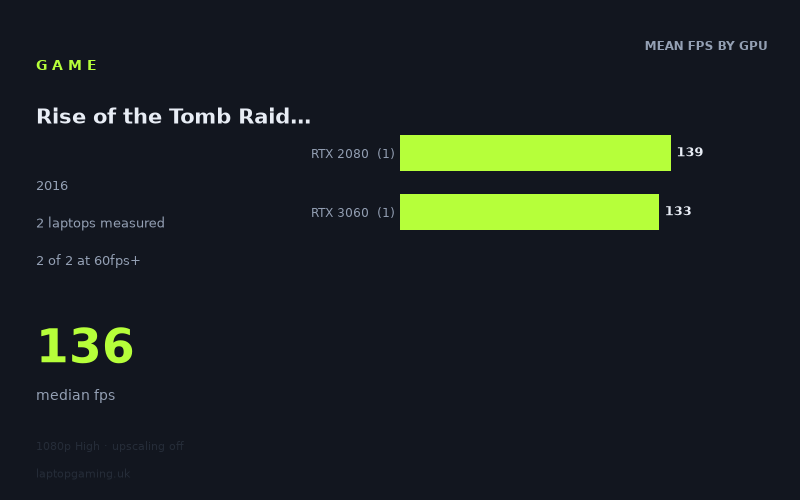
At the measured 1,920 × 1,080 High preset with upscaling disabled, Rise of the Tomb Raider looks forgiving on the two laptops in this data set. Both machines are comfortably above 100fps, and their results are unusually close: 139fps for the Lenovo Legion Y740-17IRHg-81UJ001VGE with an RTX 2080 and 133fps for the MSI Katana GF76 with an 85W RTX 3060.
That is a spread of just 6fps, from 133fps to 139fps, with a 136fps median. In percentage terms, the slower result is only around 4% behind the faster one. On these particular laptops, then, the game does not show a large separation between the two GPU tiers at these settings.
However, the sample is very small: there are measured figures for only two laptops, with one RTX 2080 machine and one RTX 3060 machine. That matters. The figures show what these two specific systems achieved, rather than establishing a reliable ranking for every laptop using either GPU. Laptop GPU performance can vary between individual machines, and the supplied results are not broad enough to make a confident claim about every RTX 2080 or RTX 3060 laptop.
Within this limited sample, neither machine appears troubled by a 60fps target at 1080p High. A 100fps target is also well within reach. The harder target is 144fps: both results are close enough that the experience should still suit a high-refresh display well, but neither measured laptop actually reaches 144fps on average under the stated test conditions.
The narrow gap also means there is no evidence here that moving from the measured RTX 3060 laptop to the measured RTX 2080 laptop produces a transformative improvement for this game at 1080p High. The Legion is faster, but by 6fps rather than by a margin that would change its performance class. Both sit in the same practical bracket: well above 100fps, but short of a measured 144fps average.
What runs it
The measured figures are straightforward, though they cover only two GPU tiers and one laptop per tier.
- RTX 2080: The Lenovo Legion Y740-17IRHg-81UJ001VGE recorded 139fps. That clears 60fps and 100fps comfortably. It does not clear 144fps in the measured result.
- RTX 3060 at 85W: The MSI Katana GF76 recorded 133fps. It also clears 60fps and 100fps comfortably. It does not clear 144fps in the measured result.
Across the entire sample, 2 of 2 laptops reached at least 60fps, and 2 of 2 reached at least 100fps. By contrast, 0 of 2 reached 144fps. Those are the most useful thresholds supported by Notebookcheck’s numbers.
For a laptop owner playing at 1,920 × 1,080 with the High preset and upscaling off, either of these measured machines has substantial headroom over a standard 60Hz target. Both also produce averages that make a 120Hz or similar high-refresh panel meaningful. There is less certainty around a full 144fps average, since the fastest result is still 5fps below that mark and the slower one is 11fps below it.
There are no measured figures here for lower-tier GPUs, newer GPU tiers, alternative resolutions, other presets, or upscaling modes. It would therefore be unsafe to use these two results to promise 60fps, 100fps or 144fps on an unlisted laptop configuration. The available evidence is strong for these two machines at the stated settings, but narrow beyond them.
The cheapest laptop that handles it
The fact sheet does not provide prices for either measured laptop, so it is not possible to identify the cheapest option in GBP from the supplied data.
The two named machines both handle the measured 1080p High workload very well:
- MSI Katana GF76, RTX 3060 at 85W: 133fps.
- Lenovo Legion Y740-17IRHg-81UJ001VGE, RTX 2080: 139fps.
If choosing solely on the measured game performance, the MSI is only 6fps behind the Lenovo. That makes the price difference especially important in a real purchase decision, but no pricing information has been supplied. It would be misleading to label either laptop the better-value or cheaper choice without it.
What this means if you’re buying
For this specific 1080p High test, the main message is that a laptop capable of matching either measured configuration has no difficulty maintaining a high frame rate. Notebookcheck’s numbers put both systems above 130fps, with a 136fps median across the pair.
Buyers targeting a dependable 60fps experience have considerable measured headroom on these two laptops. Those wanting 100fps also have it, according to both results. A 144fps target is more marginal: the results are close, but neither machine reaches that average in the supplied figures. If 144fps is a strict requirement, these numbers alone do not demonstrate it.
The RTX 3060 result is particularly useful because the 85W MSI Katana GF76 reaches 133fps, only narrowly behind the RTX 2080 Lenovo. Still, this should be read as a result for that MSI configuration, not as a guarantee for every RTX 3060 laptop. Likewise, the 139fps RTX 2080 figure describes the listed Legion rather than the whole RTX 2080 market.
In short: the measured laptops make Rise of the Tomb Raider an easy fit for 60fps and a strong fit for 100fps at 1080p High with upscaling off. The data is too limited to identify a universal minimum-spec buying point, but it clearly shows that these two specific machines deliver very similar, high-refresh performance.
How these numbers were produced
Frame rates here are not measured by us, and we label how each one was arrived at. A figure marked measured comes from a published run on that exact machine. A figure marked representative is derived from the GPU and its power limit (TGP) and cross-referenced against published reviews - a sound estimate of what that configuration delivers, but not a measurement of that specific laptop. Unless stated otherwise, numbers are 1920x1080, High preset, upscaling off. Where a laptop ships in several power configurations we use the wattage of the exact SKU listed, because a 140W RTX 5070 and a 115W one are not the same product.