Performance analysis
Star Wars Jedi Fallen Order (2019): what it takes to run it
Measured on 9 gaming laptops at 1920×1080, High preset, upscaling off.

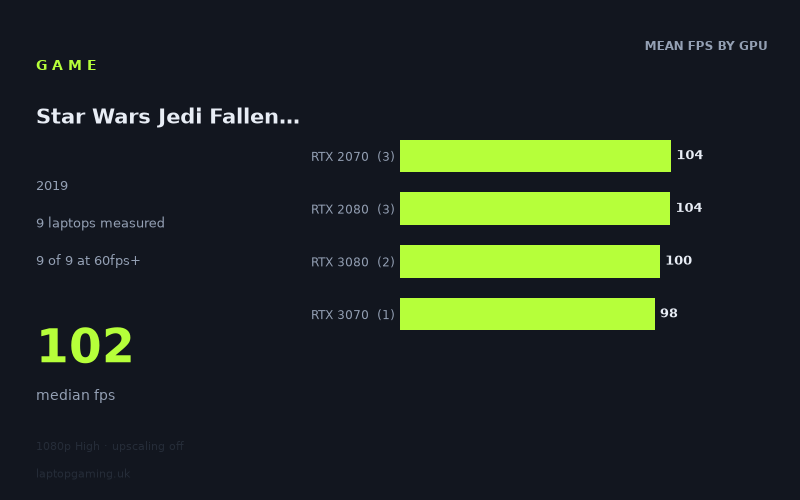
Every laptop we have figures for
Frame rates measured by Notebookcheck.
What it asks of a laptop
At 1,920 x 1,080 on the High preset with upscaling off, Star Wars Jedi Fallen Order looks relatively forgiving for the nine gaming laptops represented in Notebookcheck’s measured figures. Every recorded machine exceeded 60fps, and the slowest result was still 93fps. The full spread runs from 93fps on the Acer Predator Triton 500 with an RTX 2080 to 117fps on the Asus Strix Scar 17 with an RTX 2080.
That is a 24fps gap between the fastest and slowest laptops, while the median result is 102fps. More importantly, the GPUs do not separate into a simple newer-is-faster order. The RTX 2070 and RTX 2080 groups both average 104fps across three laptops each, while the two RTX 3080 laptops average 100fps. The sole RTX 3070 result is 98fps.
This does not mean the graphics chips perform identically in every laptop. It means that, in this particular nine-laptop set and at these settings, the laptop implementation matters at least as much as the GPU label. An RTX 2080 machine produced both the best result, 117fps, and the lowest result, 93fps. Meanwhile, the RTX 3080 entries reached 102fps and 98fps, rather than clearly pulling ahead of the older machines.
For a laptop owner targeting a smooth 60fps experience at 1080p High without upscaling, the figures are reassuring. For someone buying around a 120Hz or 144Hz display, they are more mixed: the game is often near or above 100fps, but the measured numbers do not show a reliable route to 144fps at this preset.
What runs it
All nine measured laptops clear 60fps. Notebookcheck’s lowest recorded figure is 93fps from the Acer Predator Triton 500 with an RTX 2080. The other RTX 2080 machines are the MSI Creator 17 at 102fps and the Asus Strix Scar 17 at 117fps. The three RTX 2070 laptops record 114fps for the MSI GE66 Raider, 104fps for the Gigabyte Aero 17 HDR XB and 95fps for the MSI GS66 Stealth.
The newer-numbered GPUs in this sample are also comfortably over 60fps, but not markedly quicker in the measured results. The Gigabyte Aero 17 HDR YC with an RTX 3080 reaches 102fps, while the Asus ROG Zephyrus G15 with an RTX 3080 records 98fps. The Schenker XMG Neo 17 (Early 2021, RTX 3070, 5800H) records 98fps.
For 60fps
All measured GPU tiers pass this target:
- RTX 2070: 95fps to 114fps across three laptops; 104fps mean.
- RTX 2080: 93fps to 117fps across three laptops; 104fps mean.
- RTX 3080: 98fps to 102fps across two laptops; 100fps mean.
- RTX 3070: 98fps from one laptop.
On these results, 60fps at 1080p High is not a close call for any of the measured systems.
For 100fps
Five of the nine laptops reach at least 100fps. These are the Asus Strix Scar 17 with RTX 2080 at 117fps, MSI GE66 Raider with RTX 2070 at 114fps, Gigabyte Aero 17 HDR XB with RTX 2070 at 104fps, Gigabyte Aero 17 HDR YC with RTX 3080 at 102fps, and MSI Creator 17 with RTX 2080 at 102fps.
The remaining four results are close rather than far behind: 98fps for the Asus ROG Zephyrus G15 with RTX 3080, 98fps for the Schenker XMG Neo 17 with RTX 3070, 95fps for the MSI GS66 Stealth with RTX 2070, and 93fps for the Acer Predator Triton 500 with RTX 2080. A 100fps target is therefore plausible on the measured machines, but it is not guaranteed simply by choosing one of these GPU names.
For 144fps
None of the nine measured laptops reaches 144fps at 1,920 x 1,080, High, with upscaling off. The best result, the Strix Scar 17’s 117fps, is 27fps short of that mark. If your priority is consistently filling a 144Hz panel at these exact settings, the available figures do not identify a suitable laptop.
The cheapest laptop that handles it
The fact sheet provides no laptop prices, so it is not possible to name the cheapest measured machine in GBP. It would be misleading to infer a price order from GPU names or model names alone.
What can be said is that every listed laptop handles the game above 60fps in Notebookcheck’s figures. The lowest recorded result belongs to the Acer Predator Triton 500 with RTX 2080 at 93fps, while the MSI GS66 Stealth with RTX 2070 is also well above the target at 95fps. These are performance observations, not evidence that either was the least expensive option.
What this means if you’re buying
For this game alone, the measured data suggests that chasing a particular GPU badge is less useful than checking results for the specific laptop configuration. RTX 2070, RTX 2080, RTX 3070 and RTX 3080 laptops all sit in a fairly narrow 93fps-to-117fps range here, despite their different names.
If your requirement is 1080p High at 60fps without upscaling, every laptop in the sample has substantial headroom. If you want roughly 100fps, look for evidence from the exact machine rather than assuming that an RTX 3080 laptop will beat an RTX 2070 or RTX 2080 design; Notebookcheck’s numbers show that it did not necessarily do so in this test.
For a high-refresh purchase, set expectations carefully. The 102fps median is a good fit for displays above 60Hz, but the measured figures stop at 117fps and include four systems below 100fps. There is no measured basis here for promising 144fps at 1080p High with upscaling off. The sensible buying conclusion is straightforward: any of these specific laptops is sufficient for smooth play at the stated settings, while 100fps-plus and especially 144fps ambitions require closer model-by-model evidence.
How these numbers were produced
Frame rates here are not measured by us, and we label how each one was arrived at. A figure marked measured comes from a published run on that exact machine. A figure marked representative is derived from the GPU and its power limit (TGP) and cross-referenced against published reviews - a sound estimate of what that configuration delivers, but not a measurement of that specific laptop. Unless stated otherwise, numbers are 1920x1080, High preset, upscaling off. Where a laptop ships in several power configurations we use the wattage of the exact SKU listed, because a 140W RTX 5070 and a 115W one are not the same product.