Performance analysis
Skull & Bones (2024): what it takes to run it
Measured on 6 gaming laptops at 1920×1080, High preset, upscaling off.

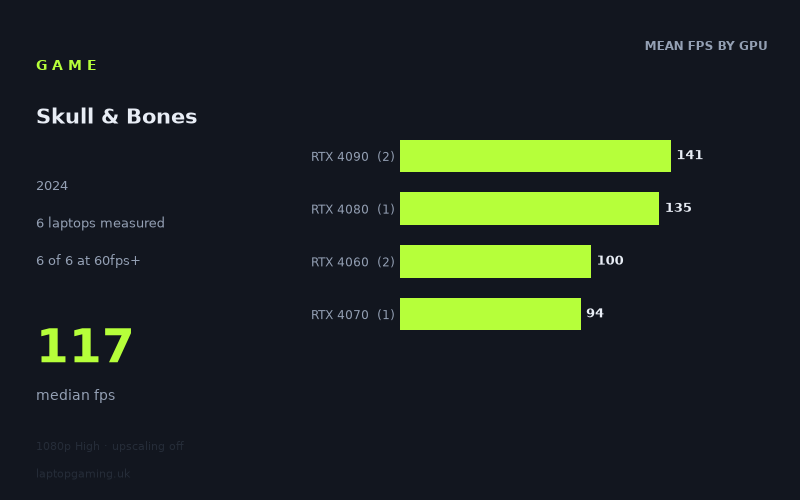
Every laptop we have figures for
Frame rates measured by Notebookcheck.
What it asks of a laptop
At 1920x1080 on the High preset with upscaling off, Skull & Bones looks relatively forgiving for a modern gaming laptop in this set of measured figures. Notebookcheck recorded between 94fps and 149fps across six laptops, with a median result of 117fps. Every machine in the sample cleared 60fps, and four of the six reached 100fps or more.
That is a useful result for buyers who want a straightforward 1080p High experience without relying on upscaling. The slowest measured laptop still returned 94fps, leaving a substantial margin over a 60fps target. On these numbers, the game does not appear to require a top-end GPU merely to feel fluid at the tested settings.
The six-laptop sample is still limited, so these are results from specific machines rather than a guarantee for every laptop carrying the same graphics name. Laptop GPU performance can vary between designs, and the figures here show that clearly enough to warrant caution when comparing individual models.
The performance spread does become more apparent at higher refresh-rate targets. The gap between the fastest and slowest measured systems is 55fps: 149fps for the Lenovo Legion 9 16IRX9 with RTX 4090 graphics, against 94fps for the Aorus 16X with an RTX 4070 specified at 140W. That means Skull & Bones is easy enough for 60fps in this sample, but sustaining the very highest refresh rates is more demanding.
GPU tier broadly matters, particularly once the target moves beyond 100fps. The two RTX 4090 laptops averaged 141fps, while the single RTX 4080 result was 135fps. The two RTX 4060 laptops averaged 100fps. Those figures suggest that the game scales sensibly with more GPU performance, but the measured results do not form a neat tier-by-tier ladder: the one RTX 4070 machine produced 94fps, below both RTX 4060 results. With only one RTX 4070 result, it would be wrong to treat that as a general verdict on RTX 4070 laptops.
What runs it
For 60fps: all six measured laptops were comfortably above the target. The lowest result was the Aorus 16X at 94fps, followed by the Lenovo Legion Pro 5 16IRX9 G9 at 98fps and the Schenker XMG Core 15 (M24) at 101fps. The measured RTX 4060 and RTX 4070 machines therefore all cleared 60fps at 1080p High with upscaling disabled.
For 100fps: the picture is more selective. Four of the six laptops reached or exceeded that mark:
- Lenovo Legion 9 16IRX9, RTX 4090: 149fps
- Lenovo Legion Pro 7, RTX 4080: 135fps
- Acer Predator Helios 18, RTX 4090: 133fps
- Schenker XMG Core 15 (M24), RTX 4060: 101fps
The Lenovo Legion Pro 5 16IRX9 G9 with RTX 4060 was close at 98fps, while the Aorus 16X with RTX 4070 at 140W returned 94fps. So a 100fps aim is plausible on some mid-range machines in this data, but it is not assured by the GPU label alone. The two RTX 4060 results are particularly close to the line: one is just over it and one just under it.
For 144fps: only one laptop made the cut. The Lenovo Legion 9 16IRX9 with RTX 4090 reached 149fps. The RTX 4080-equipped Lenovo Legion Pro 7 achieved 135fps, which is close but below 144fps, and the Acer Predator Helios 18 with RTX 4090 managed 133fps. Notebookcheck's figures therefore support 144fps at the tested settings only for that specific Legion 9 configuration, not as a blanket expectation for RTX 4090 or RTX 4080 laptops.
The cheapest laptop that handles it
Only one price is provided in the fact sheet: £2,633 for the Lenovo Legion Pro 5 16IRX9 G9 with RTX 4060 graphics. It recorded 98fps at 1920x1080 High with upscaling off.
That makes it a clearly documented option for a laptop that handles Skull & Bones well at the tested settings, with a large buffer over 60fps and a result just short of 100fps. It cannot, however, be described as the cheapest option among all six measured machines because no prices are supplied for the other five laptops.
The Schenker XMG Core 15 (M24), also equipped with RTX 4060 graphics, was slightly faster at 101fps, but the fact sheet gives no price for it. Similarly, the Aorus 16X returned 94fps with its 140W RTX 4070, but there is no supplied price to compare against the Lenovo.
What this means if you’re buying
If your priority is a dependable 60fps-class experience at 1080p High without upscaling, the measured data is reassuring. Every laptop tested met that requirement, including the RTX 4060 and RTX 4070 examples. Based on these six machines, there is little evidence that you need to buy an RTX 4080 or RTX 4090 laptop specifically for this game at these settings.
If you are shopping for a 100Hz or 120Hz display and want to make full use of it, inspect reviews of the exact laptop rather than choosing solely by GPU tier. The two RTX 4060 systems landed at 98fps and 101fps, while the sampled RTX 4070 laptop reached 94fps. Those are good results, but they show that 100fps is a borderline target for some machines in this part of the measured range.
For a 144Hz screen, the measured figures point towards high-end hardware, though even that is not an automatic guarantee. Only the RTX 4090 Lenovo Legion 9 16IRX9 exceeded 144fps. The RTX 4080 Legion Pro 7 and RTX 4090 Predator Helios 18 were both strong performers, at 135fps and 133fps respectively, but neither reached that threshold.
In short, Skull & Bones is well suited to a broad range of gaming laptops at 1080p High in this small sample. An RTX 4060-class result was enough for around 100fps on one measured laptop and nearly 100fps on another, while the top-end systems are chiefly relevant for buyers pursuing the highest refresh rates rather than basic playability.
How these numbers were produced
Frame rates here are not measured by us, and we label how each one was arrived at. A figure marked measured comes from a published run on that exact machine. A figure marked representative is derived from the GPU and its power limit (TGP) and cross-referenced against published reviews - a sound estimate of what that configuration delivers, but not a measurement of that specific laptop. Unless stated otherwise, numbers are 1920x1080, High preset, upscaling off. Where a laptop ships in several power configurations we use the wattage of the exact SKU listed, because a 140W RTX 5070 and a 115W one are not the same product.