Performance analysis
Need for Speed Heat (2019): what it takes to run it
Measured on 8 gaming laptops at 1920×1080, High preset, upscaling off.

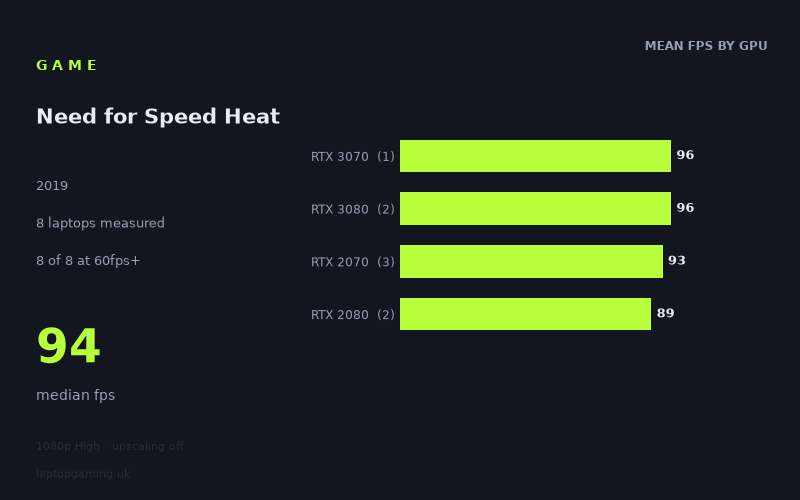
Every laptop we have figures for
Frame rates measured by Notebookcheck.
What it asks of a laptop
At 1,920 × 1,080 on the High preset with upscaling off, Need for Speed Heat is not especially punishing for the eight gaming laptops in Notebookcheck’s figures. Every machine measured clears 60fps, with results ranging from 87fps to 98fps. The median is 94fps, so the typical result in this sample is comfortably above a basic 60fps target.
The spread is narrow: just 11fps separates the fastest result, the Gigabyte Aero 17 HDR YC with RTX 3080 at 98fps, from the Acer Predator Triton 500 with RTX 2080 at 87fps. That is useful context for laptop buyers. The game clearly benefits from capable dedicated graphics, but these numbers do not show the sort of large separation where moving between the listed GPU tiers transforms performance from unplayable to smooth. Instead, all eight tested machines deliver a similar high-refresh-rate-adjacent experience, albeit not one that reaches 100fps in the measured runs.
The GPU-tier averages reinforce that point. The two RTX 3080 laptops average 96fps, while the single RTX 3070 machine also records 96fps. RTX 2070 laptops average 93fps across three systems, and the two RTX 2080 machines average 89fps. The difference between the highest and lowest tier average here is only 7fps. That suggests the measured performance is not determined by the GPU name alone; laptop power limits, cooling and the rest of each machine’s configuration can matter. It also means these eight results should not be read as a universal ranking of mobile RTX 3080, RTX 3070, RTX 2080 and RTX 2070 hardware.
There is still an important ceiling to note. None of the eight laptops reaches 100fps, despite all of them being fitted with RTX 2070-class graphics or better. For a 60fps target, the measured figures are reassuring. For somebody buying specifically to make full use of a 100Hz or 144Hz display at these exact settings, they are less conclusive: the available results do not show that outcome.
What runs it
For 60fps at 1080p High without upscaling, all eight measured laptops make the grade. The lowest recorded result is 87fps on the Acer Predator Triton 500 with RTX 2080, leaving a 27fps margin over 60fps. The MSI GS66 Stealth with RTX 2070 is next at 88fps, followed by the Asus Strix Scar 17 with RTX 2080 at 91fps.
- RTX 3080: The Gigabyte Aero 17 HDR YC records 98fps and the Asus ROG Zephyrus G15 records 94fps. Their average is 96fps across two laptops.
- RTX 3070: The Schenker XMG Neo 17 (Early 2021, RTX 3070, 5800H) records 96fps. This is one result only, so it describes that machine rather than every RTX 3070 laptop.
- RTX 2070: The MSI GE66 Raider reaches 97fps, the Gigabyte Aero 17 HDR XB reaches 94fps, and the MSI GS66 Stealth reaches 88fps. The three-machine average is 93fps.
- RTX 2080: The Asus Strix Scar 17 records 91fps and the Acer Predator Triton 500 records 87fps, for an 89fps average across two systems.
No measured laptop clears 100fps. The closest is the RTX 3080-equipped Gigabyte Aero 17 HDR YC at 98fps, followed closely by the RTX 2070 MSI GE66 Raider at 97fps and the RTX 3070 Schenker XMG Neo 17 at 96fps. It would therefore be wrong to promise a sustained 100fps result from any of these GPU labels based on this data, even though several machines come close.
No measured laptop clears 144fps either. The fastest recorded figure, 98fps, is 46fps below that threshold. A 144Hz panel may still be worthwhile for other games or desktop use, but Notebookcheck’s numbers do not show Need for Speed Heat running at 144fps on High at 1080p with upscaling disabled on any of these eight laptops.
The cheapest laptop that handles it
The fact sheet provides performance figures but does not provide UK prices for any of the eight laptops. As a result, it is not possible to identify the cheapest model that handles the game without inventing pricing or comparing machines from different points in the market.
What can be said from the measured figures is that every named machine handles the stated test comfortably above 60fps. The lowest-performing options in this set are the Acer Predator Triton 500 with RTX 2080 at 87fps and the MSI GS66 Stealth with RTX 2070 at 88fps. The MSI GE66 Raider with RTX 2070 is notably quicker at 97fps, only 1fps behind the fastest result. That makes it a reminder not to buy on GPU badge alone, but it is not evidence that it was cheaper than the other laptops.
What this means if you’re buying
If your aim is simply to play Need for Speed Heat at 1080p High with upscaling off, the measured sample points to a comfortable outcome on these RTX 2070, RTX 2080, RTX 3070 and RTX 3080 laptops. All eight exceed 60fps, and even the slowest recorded machine is well beyond that line. On this evidence, there is no need to chase the highest GPU tier solely to reach a playable frame rate in this game.
For a buyer choosing between the specific machines listed, the RTX 3080 models do not establish a decisive lead. The two RTX 3080 results are 94fps and 98fps, while the RTX 2070 MSI GE66 Raider reaches 97fps and the RTX 3070 Schenker reaches 96fps. Consider the individual laptop’s price, display, portability and cooling arrangement separately, rather than assuming the newer or higher-numbered GPU will automatically produce a materially better result here.
Finally, keep the sample size and test conditions in view. These are eight Notebookcheck measurements at one resolution and one preset, with upscaling off. They support a strong conclusion for 60fps on these particular laptops, but not a blanket guarantee for every laptop carrying the same GPU. They also do not support a confident 100fps or 144fps buying recommendation at the tested settings: zero of eight measured systems reaches either threshold.
How these numbers were produced
Frame rates here are not measured by us, and we label how each one was arrived at. A figure marked measured comes from a published run on that exact machine. A figure marked representative is derived from the GPU and its power limit (TGP) and cross-referenced against published reviews - a sound estimate of what that configuration delivers, but not a measurement of that specific laptop. Unless stated otherwise, numbers are 1920x1080, High preset, upscaling off. Where a laptop ships in several power configurations we use the wattage of the exact SKU listed, because a 140W RTX 5070 and a 115W one are not the same product.