Performance analysis
FIFA 20 (2019): what it takes to run it
Measured on 6 gaming laptops at 1920×1080, High preset, upscaling off.
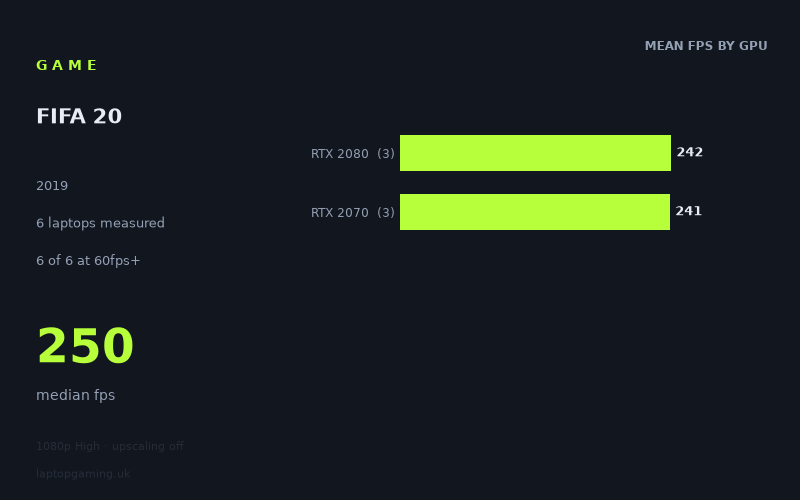
Every laptop we have figures for
Frame rates measured by Notebookcheck.
What it asks of a laptop
On the available figures, FIFA 20 is a very forgiving game for the laptops represented here. At 1920×1080 using the High preset with upscaling off, all six measured machines exceeded 144fps, with the slowest result still reaching 196fps. The full range runs from 196fps to 267fps, while the median is 250fps.
That is an important result for anyone targeting a conventional 60Hz or 120Hz laptop display. Every measured laptop has substantial performance headroom at these settings. Even a 144Hz panel is fully supported by the recorded results: all six systems cleared 144fps, and the lowest figure was 52fps above that threshold.
There is, however, a limit to what this sample can prove. Notebookcheck's numbers cover six laptops only, split evenly between RTX 2070 and RTX 2080 graphics. These are useful results for the specific machines listed, but they are not enough to make confident claims about every laptop carrying either GPU, nor about lower-tier graphics hardware that does not appear in the data.
The most notable pattern is that GPU tier does not separate the results much. The RTX 2080 group averages 242fps across three laptops, while the RTX 2070 group averages 241fps across three laptops. That one-frame difference is effectively no difference in this data set. Performance varies more between individual laptops than it does between the two GPU labels.
For example, the fastest measured machines are the Asus Strix Scar 17 with an RTX 2080 and the MSI GE66 Raider with an RTX 2070, both at 267fps. Meanwhile, the MSI Creator 17 with an RTX 2080 records 217fps, and the MSI GS66 Stealth with an RTX 2070 is the slowest listed system at 196fps. The figures suggest that, for this game and this test configuration, the laptop implementation matters more than choosing between these two particular GPU tiers.
What runs it
Every laptop in Notebookcheck's sample runs FIFA 20 comfortably at 1920×1080, High, with upscaling off. There are no borderline results here.
60fps
All six measured laptops clear 60fps. The MSI GS66 Stealth, the lowest-scoring system in the group, reaches 196fps. That is more than three times the 60fps target, so each of the tested RTX 2070 and RTX 2080 machines has ample room above a standard 60Hz display's refresh rate.
- RTX 2080: 217fps to 267fps across three laptops; 242fps mean.
- RTX 2070: 196fps to 267fps across three laptops; 241fps mean.
100fps
All six laptops also exceed 100fps, again by a wide margin. The 196fps result from the MSI GS66 Stealth is the lowest recorded figure, leaving 96fps of headroom over a 100fps target. A 120Hz screen would therefore be well served by every machine in this small sample at the measured settings, although only actual display refresh rate determines how much of that output a particular laptop can show.
- RTX 2080 laptops measured: Asus Strix Scar 17 at 267fps, Acer Predator Triton 500 at 241fps, and MSI Creator 17 at 217fps.
- RTX 2070 laptops measured: MSI GE66 Raider at 267fps, Gigabyte Aero 17 HDR XB at 259fps, and MSI GS66 Stealth at 196fps.
144fps
All six systems clear 144fps as well. The Asus Strix Scar 17 and MSI GE66 Raider lead the table at 267fps, followed by the Gigabyte Aero 17 HDR XB at 259fps. The Acer Predator Triton 500 reaches 241fps, the MSI Creator 17 manages 217fps, and the MSI GS66 Stealth records 196fps.
For a 144Hz laptop screen, the measured results are straightforward: each of these specific machines has enough performance to exceed 144fps at 1080p High without upscaling. The figures also show that paying for the RTX 2080 rather than the RTX 2070 does not, by itself, guarantee a higher FIFA 20 result. The highest RTX 2070 score matches the highest RTX 2080 score, while the two tier averages are virtually identical.
The cheapest laptop that handles it
The fact sheet provides no laptop prices in GBP, so it is not possible to identify the cheapest option from the measured list. It would be misleading to declare one of the six machines the value choice without comparable pricing.
What can be said is that every named laptop handles the measured 1080p High configuration far beyond 60fps, 100fps and 144fps. If comparing listings for the Asus Strix Scar 17, MSI GE66 Raider, Gigabyte Aero 17 HDR XB, Acer Predator Triton 500, MSI Creator 17 or MSI GS66 Stealth, price and the rest of the laptop specification will matter more than the small RTX 2070-versus-RTX 2080 distinction shown here.
What this means if you're buying
For FIFA 20 at the tested settings, do not assume that an RTX 2080 laptop is automatically the better performer than an RTX 2070 laptop. Notebookcheck's averages are 242fps for the RTX 2080 group and 241fps for the RTX 2070 group, while individual results span from 196fps to 267fps across both tiers.
If your aim is a 60Hz, 100Hz, 120Hz or 144Hz experience at 1920×1080 High with upscaling off, every laptop in this six-machine sample is already comfortably fast enough. A buyer choosing specifically between these measured systems should therefore compare the actual machine, its price, display and wider specification rather than treating the GPU name alone as the deciding factor.
Do keep the evidence in proportion: these results establish what six listed RTX 2070 and RTX 2080 laptops achieved. They do not establish performance for unmeasured GPU tiers, other laptop configurations, other resolutions or settings beyond the recorded 1080p High test.
How these numbers were produced
Frame rates here are not measured by us, and we label how each one was arrived at. A figure marked measured comes from a published run on that exact machine. A figure marked representative is derived from the GPU and its power limit (TGP) and cross-referenced against published reviews - a sound estimate of what that configuration delivers, but not a measurement of that specific laptop. Unless stated otherwise, numbers are 1920x1080, High preset, upscaling off. Where a laptop ships in several power configurations we use the wattage of the exact SKU listed, because a 140W RTX 5070 and a 115W one are not the same product.