Performance analysis
The Quarry (2022): what it takes to run it
Measured on 4 gaming laptops at 1920×1080, High preset, upscaling off.

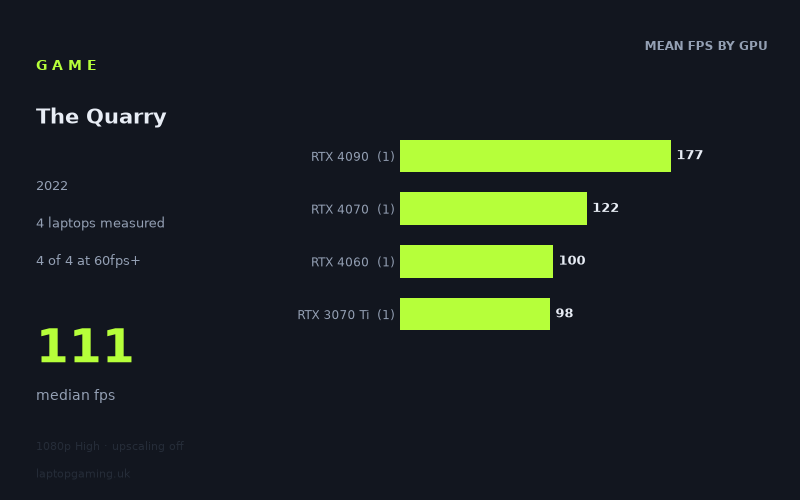
Every laptop we have figures for
Frame rates measured by Notebookcheck.
What it asks of a laptop
The Quarry looks relatively forgiving on the limited evidence available, at least at 1,920 × 1,080 using the High preset with upscaling disabled. Notebookcheck has measured the game on just four laptops, and every one of those machines exceeded 60fps. The recorded range runs from 98fps on the slowest tested laptop to 177fps on the fastest, with a median of 111fps.
That is an encouraging result for a game played at a demanding-looking preset without upscaling, but the sample size matters. These are four individual laptops, each representing a different GPU tier, rather than a broad collection of systems with repeated results for each graphics chip. The figures show what these specific machines achieved; they do not establish a guaranteed result for every laptop carrying the same GPU name.
The separation between the machines is clear, though not extreme at the lower end. The RTX 4090-equipped Medion Erazer Beast X40 reached 177fps, substantially ahead of the rest. Below that, the RTX 4070 Asus ROG Strix G18 managed 122fps, while the RTX 4060 MSI Katana 17 delivered 100fps and the RTX 3070 Ti Aorus 15 XE5 recorded 98fps.
In practical terms, the demanding part is not obtaining a smooth 60fps result from the four tested machines. Instead, the figures suggest that higher refresh-rate targets are where laptop choice starts to matter more. The gap from 98fps to 122fps is meaningful for a 120Hz or 144Hz-class display, while the 177fps result from the RTX 4090 machine is the only measured score high enough to clear 144fps outright. At this preset and resolution, the tested RTX 4060 and RTX 3070 Ti laptops were close together, whereas the RTX 4090 system opened a much larger lead.
What runs it
For a 60fps target, all four measured laptops cleared the line comfortably. The lowest result was 98fps from the Aorus 15 XE5 with an RTX 3070 Ti running at 130W. That is 38fps above 60fps in Notebookcheck’s measurement. The MSI Katana 17 with an RTX 4060 was slightly faster at 100fps, while the Asus ROG Strix G18 with an RTX 4070 at 165W reached 122fps. The Medion Erazer Beast X40 with an RTX 4090 led the group at 177fps.
- RTX 3070 Ti at 130W: 98fps in the Aorus 15 XE5. Clears 60fps, but falls just short of 100fps.
- RTX 4060: 100fps in the MSI Katana 17. Reaches 100fps exactly and clears 60fps.
- RTX 4070 at 165W: 122fps in the Asus ROG Strix G18. Clears 60fps and 100fps, but not 144fps.
- RTX 4090: 177fps in the Medion Erazer Beast X40. The only measured configuration to exceed 144fps.
Three of the four laptops reached at least 100fps: the RTX 4060 MSI Katana 17, RTX 4070 Asus ROG Strix G18 and RTX 4090 Medion Erazer Beast X40. That makes 100fps a demonstrated result on most of this small sample, although the margin varies greatly. The RTX 4060 machine hit the threshold exactly, the RTX 4070 machine had a 22fps margin, and the RTX 4090 machine was 77fps above it.
For 144fps displays, the data is more restrictive. Only one of four tested laptops achieved 144fps or more: the RTX 4090 Medion Erazer Beast X40 at 177fps. The RTX 4070 ROG Strix G18 reached 122fps, so it was the nearest of the remaining three systems but still 22fps below 144fps. Neither the 100fps RTX 4060 result nor the 98fps RTX 3070 Ti result supports treating 144fps as achieved in these measurements.
The cheapest laptop that handles it
No laptop prices are included in the fact sheet, so it is not possible to identify the cheapest measured laptop that handles The Quarry without inventing pricing information. What can be said from the performance data is that the Aorus 15 XE5 with an RTX 3070 Ti at 130W is the lowest-scoring machine in this four-laptop set, yet it still recorded 98fps at 1,920 × 1,080 on High with upscaling off.
The MSI Katana 17 with an RTX 4060 is the lowest measured option to reach 100fps, doing so exactly at 100fps. Whether it is cheaper than the Aorus 15 XE5, or than any of the other tested laptops, cannot be established from the supplied figures.
What this means if you’re buying
If your aim is simply to play at 1,920 × 1,080 on High without upscaling, the measured results are reassuring: every laptop in this small sample was above 60fps, and even the slowest recorded system was near 100fps. The evidence therefore suggests that a laptop need not match the RTX 4090 system to run this configuration smoothly.
If you are choosing around a 100fps target, the distinction is clearer. The measured RTX 4060 laptop reached 100fps, the RTX 4070 laptop reached 122fps, and the RTX 4090 laptop reached 177fps. The RTX 3070 Ti laptop narrowly missed at 98fps. With only one result per GPU tier, however, these should be treated as results for the named machines rather than universal buying rules for all RTX 4060, RTX 4070, RTX 3070 Ti or RTX 4090 laptops.
For a 144Hz screen, only the Medion Erazer Beast X40’s 177fps result provides measured evidence of clearing 144fps at these settings. The RTX 4070 ROG Strix G18’s 122fps result may still suit a high-refresh display, but Notebookcheck’s number does not reach 144fps. Buyers specifically seeking a measured 144fps-plus result should therefore look to the RTX 4090 machine in this data set, while recognising that it is only one tested laptop rather than a broad tier-wide conclusion.
How these numbers were produced
Frame rates here are not measured by us, and we label how each one was arrived at. A figure marked measured comes from a published run on that exact machine. A figure marked representative is derived from the GPU and its power limit (TGP) and cross-referenced against published reviews - a sound estimate of what that configuration delivers, but not a measurement of that specific laptop. Unless stated otherwise, numbers are 1920x1080, High preset, upscaling off. Where a laptop ships in several power configurations we use the wattage of the exact SKU listed, because a 140W RTX 5070 and a 115W one are not the same product.