Performance analysis
Last Epoch (2024): what it takes to run it
Measured on 3 gaming laptops at 1920×1080, High preset, upscaling off.

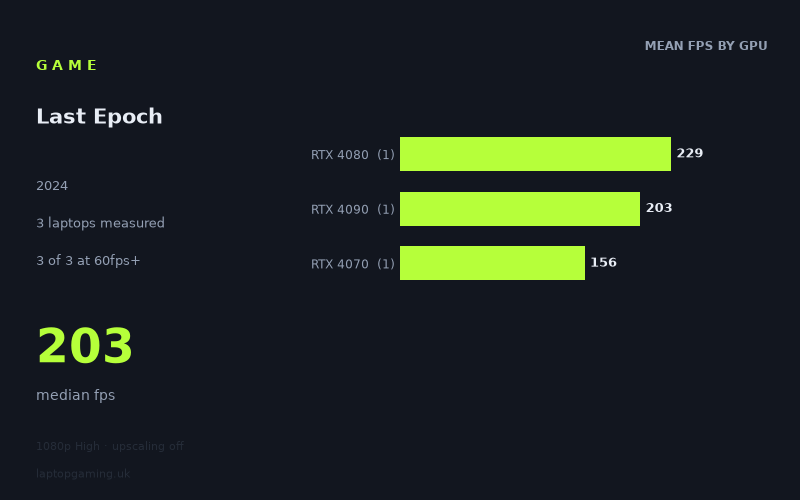
Every laptop we have figures for
Frame rates measured by Notebookcheck.
What it asks of a laptop
On the available evidence, Last Epoch is not especially demanding at 1920 × 1080 using the High preset with upscaling disabled—at least on the three high-end gaming laptops covered by Notebookcheck’s measurements. Every machine recorded well above 144fps, with results ranging from 156fps to 229fps.
That conclusion needs an important qualification: this is a very small sample of three laptops, and all three use powerful GeForce RTX 40-series GPUs. These figures show what three specific premium machines achieved; they do not establish how entry-level gaming laptops, older GPUs, or integrated graphics will perform.
The measured spread is 73fps between the fastest and slowest results. That is a noticeable numerical gap, but the slower machine still produced 156fps, so it does not translate into a poor experience at the tested settings. The median result is 203fps, which reinforces that these particular laptops have ample performance headroom for a 60Hz, 100Hz or 144Hz display at 1080p High.
The GPU order is not a neat performance ladder in this data. The Lenovo Legion Pro 7 with an RTX 4080 was fastest at 229fps, ahead of the Acer Predator Helios 18 with an RTX 4090 at 203fps. Meanwhile, the Aorus 16X with a 140W RTX 4070 returned 156fps. As there is only one laptop per GPU tier, this should not be read as evidence that an RTX 4080 laptop is generally faster than an RTX 4090 laptop in Last Epoch. Laptop performance depends on the complete machine, and the figures here are only individual results rather than a broad GPU comparison.
What the three results do suggest is that, at the tested 1080p High configuration, the game does not force these laptops into the sort of sub-60fps compromises that make settings tuning essential. The main distinction is instead the amount of frame-rate headroom available for high-refresh-rate screens.
What runs it
All three measured laptops clear the common performance targets comfortably at 1920 × 1080 on High, with upscaling off.
- 60fps: 3 of 3 measured laptops cleared 60fps. The slowest result was 156fps on the Aorus 16X with a 140W RTX 4070.
- 100fps: 3 of 3 measured laptops cleared 100fps. Again, the RTX 4070 Aorus 16X was the lowest measured result, but still managed 156fps.
- 144fps: 3 of 3 measured laptops cleared 144fps. The RTX 4070 result was 156fps, while the RTX 4090 Acer Predator Helios 18 achieved 203fps and the RTX 4080 Lenovo Legion Pro 7 reached 229fps.
RTX 4070: Aorus 16X at 140W
The Aorus 16X, equipped with a 140W RTX 4070, produced 156fps. That is the lowest of the three measured figures, but it remains above all three stated thresholds: 60fps, 100fps and 144fps. For a buyer targeting a 144Hz display at the tested settings, this specific RTX 4070 laptop has a measured result that clears that target.
It is important not to extend that result to every RTX 4070 laptop. Notebookcheck’s figures cover one RTX 4070 machine here, and its stated GPU power level is 140W. The data supports saying that this Aorus 16X runs the game well at 1080p High; it does not support a blanket claim about lower-power or differently configured RTX 4070 laptops.
RTX 4090: Acer Predator Helios 18
The Acer Predator Helios 18 with an RTX 4090 recorded 203fps. That is comfortably above 144fps and gives substantial headroom over a 100Hz or 144Hz target at the tested settings. Its result is 47fps ahead of the measured RTX 4070 Aorus 16X figure.
RTX 4080: Lenovo Legion Pro 7
The fastest measured result came from the Lenovo Legion Pro 7 with an RTX 4080, at 229fps. This is 26fps above the measured RTX 4090 result and 73fps ahead of the RTX 4070 result. With only one machine representing each GPU tier, however, these are machine-specific outcomes rather than a reliable ranking of the GPUs themselves.
The cheapest laptop that handles it
The fact sheet does not provide UK prices for the Lenovo Legion Pro 7, Acer Predator Helios 18 or Aorus 16X. As a result, it is not possible to identify the cheapest of the measured laptops in GBP without inventing pricing information.
In performance terms, the lowest-specification measured option is the Aorus 16X with a 140W RTX 4070, which achieved 156fps at 1920 × 1080 High with upscaling disabled. It is therefore the least powerful GPU configuration represented in this small set that still cleared 60fps, 100fps and 144fps. That does not necessarily make it the cheapest laptop available, and it should not be treated as proof that every RTX 4070 model will do the same.
What this means if you’re buying
If your target is 1080p High without upscaling, the measured figures point to strong performance from all three laptops. A 60Hz panel is easily covered by every result, and the same is true for 100Hz and 144Hz displays. On these numbers, buying an RTX 4080 or RTX 4090 laptop specifically to reach 60fps or 144fps in Last Epoch would be unnecessary; even the measured RTX 4070 machine was already at 156fps.
For a purchase focused on this game alone, the sensible reading is to avoid paying for more GPU performance than your display can use. The Aorus 16X’s 156fps result already matches a 144Hz target at the tested settings. The Acer Predator Helios 18 and Lenovo Legion Pro 7 provide higher measured frame rates, but their benefit is mainly additional headroom rather than crossing a threshold the RTX 4070 machine misses.
There is no measured evidence here for 1440p, 4K, alternative presets, or upscaling modes, so a buyer planning to use a higher-resolution panel should not assume these 1080p results will carry over unchanged. Likewise, there are no figures for lower-tier GPUs. The safest conclusion is narrow but useful: these three specific RTX 4070, RTX 4080 and RTX 4090 laptops all run Last Epoch extremely comfortably at 1080p High with upscaling off.
How these numbers were produced
Frame rates here are not measured by us, and we label how each one was arrived at. A figure marked measured comes from a published run on that exact machine. A figure marked representative is derived from the GPU and its power limit (TGP) and cross-referenced against published reviews - a sound estimate of what that configuration delivers, but not a measurement of that specific laptop. Unless stated otherwise, numbers are 1920x1080, High preset, upscaling off. Where a laptop ships in several power configurations we use the wattage of the exact SKU listed, because a 140W RTX 5070 and a 115W one are not the same product.