Performance analysis
Fortnite (2018): what it takes to run it
Measured on 4 gaming laptops at 1920×1080, High preset, upscaling off.
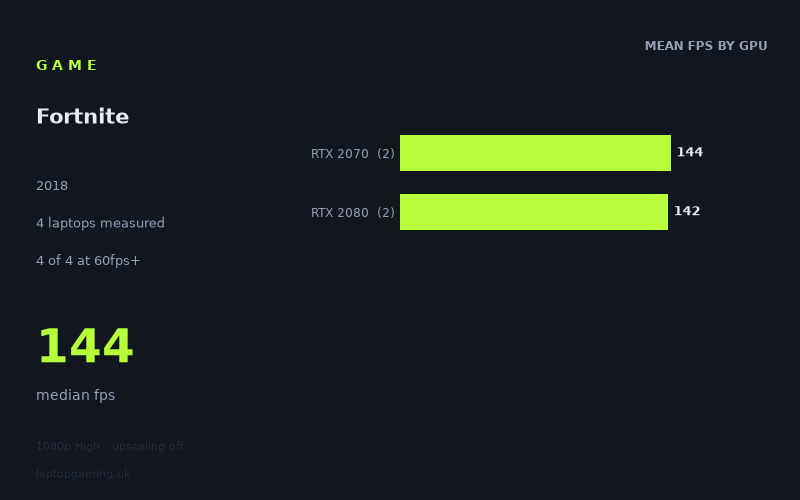
Every laptop we have figures for
Frame rates measured by Notebookcheck.
What it asks of a laptop
Fortnite looks forgiving in this particular set of measured results, at least at 1,920 × 1,080 on the High preset with upscaling disabled. All four laptops in Notebookcheck’s figures exceeded 100fps, and even the slowest result was 114fps. That is a strong outcome for a High-preset test without upscaling, especially for players targeting a responsive 60Hz, 100Hz or 120Hz display.
There is an important limitation: this is a small sample of only four laptops. The results show what these specific machines achieved, not a guarantee that every laptop carrying the same GPU will perform identically. That matters here because the spread is fairly wide: 114fps at the bottom and 171fps at the top, a 57fps difference between the Acer Predator Triton 500 and Asus Strix Scar 17.
The GPU-tier averages do not form the simple hierarchy buyers might expect. The two RTX 2070 laptops averaged 144fps, while the two RTX 2080 laptops averaged 142fps. That does not mean an RTX 2070 is inherently faster than an RTX 2080; with just two examples per tier, it instead shows that the laptop around the GPU matters substantially in these measured figures. The Asus RTX 2080 system was the fastest machine at 171fps, while the Acer RTX 2080 system was the slowest at 114fps.
So, based on these numbers, Fortnite does not appear especially difficult for the four older high-end gaming laptops represented here at 1080p High. The challenge is not reaching a playable frame rate: every tested machine did that comfortably. The more demanding target is maintaining enough performance for a 144Hz panel. Only two of the four laptops reached 144fps or more, despite all four clearing 100fps.
What runs it
Every laptop in the fact sheet cleared 60fps. In fact, the lowest recorded result, 114fps from the Acer Predator Triton 500 with an RTX 2080, was well above that threshold. On these figures, a 60Hz display is not a difficult target for any of the tested systems at 1,920 × 1,080 High with upscaling off.
- RTX 2070: Both measured laptops cleared 100fps. The MSI GE66 Raider reached 156fps, while the Gigabyte Aero 17 HDR XB reached 132fps. Their mean was 144fps across two machines.
- RTX 2080: Both measured laptops also cleared 100fps. The Asus Strix Scar 17 recorded 171fps, while the Acer Predator Triton 500 recorded 114fps. Their mean was 142fps across two machines.
For a 100fps target, the data is unusually straightforward: all four machines did it. That includes both RTX 2070 examples and both RTX 2080 examples. If your concern is whether one of these specific laptops can make good use of a 100Hz or 120Hz display, Notebookcheck’s results are encouraging.
The 144fps target is less certain. Two of the four laptops reached or exceeded it: the Asus Strix Scar 17 at 171fps and the MSI GE66 Raider at 156fps. The Gigabyte Aero 17 HDR XB was close at 132fps, but it did not reach 144fps in this measurement. The Acer Predator Triton 500 was further away at 114fps.
The overall median was 144fps, but that should not be mistaken for every machine delivering 144fps. It simply sits between the four recorded results. For a buyer specifically shopping for a 144Hz experience at these settings, the individual laptop result is more useful than the GPU badge alone.
The cheapest laptop that handles it
The fact sheet provides no UK prices for the four laptops, so it is not possible to identify the cheapest option or compare value in GBP without inventing information. The measured machines are:
- Asus Strix Scar 17, RTX 2080: 171fps
- MSI GE66 Raider, RTX 2070: 156fps
- Gigabyte Aero 17 HDR XB, RTX 2070: 132fps
- Acer Predator Triton 500, RTX 2080: 114fps
All four handled the tested 1080p High workload at more than 100fps. If purchase price is the deciding factor, these figures alone cannot establish which is the best-value choice. They can only show that the Gigabyte and Acer results fall below 144fps in this test, while the Asus and MSI results exceed it.
What this means if you’re buying
For Fortnite at 1,920 × 1,080 on High with upscaling disabled, these measured results suggest that the key decision is your screen refresh-rate target rather than basic playability. A laptop matching any of the four measured examples delivered more than 100fps, so 60Hz and 100Hz-class displays are well covered by this data.
If you are buying for a 144Hz display and want the measured result to meet that refresh rate, the Asus Strix Scar 17 and MSI GE66 Raider are the two demonstrated options, at 171fps and 156fps respectively. The Gigabyte Aero 17 HDR XB at 132fps is close enough to remain a high-frame-rate result, but it is not a measured 144fps machine at the stated settings. The Acer Predator Triton 500, at 114fps, is still comfortably fast but is further from that target.
Do not treat the RTX 2070 and RTX 2080 averages as a buying shortcut. Their measured means were nearly identical—144fps for RTX 2070 and 142fps for RTX 2080—and the individual results varied widely. With only four laptops in the data, the sensible conclusion is that these particular laptop implementations matter more than the small difference between these two GPU labels in this test.
How these numbers were produced
Frame rates here are not measured by us, and we label how each one was arrived at. A figure marked measured comes from a published run on that exact machine. A figure marked representative is derived from the GPU and its power limit (TGP) and cross-referenced against published reviews - a sound estimate of what that configuration delivers, but not a measurement of that specific laptop. Unless stated otherwise, numbers are 1920x1080, High preset, upscaling off. Where a laptop ships in several power configurations we use the wattage of the exact SKU listed, because a 140W RTX 5070 and a 115W one are not the same product.