Performance analysis
F1 2019 (2019): what it takes to run it
Measured on 4 gaming laptops at 1920×1080, High preset, upscaling off.

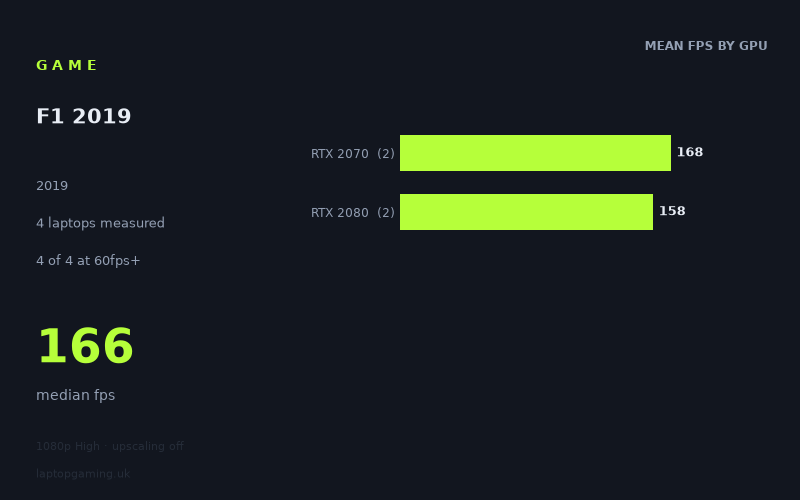
Every laptop we have figures for
Frame rates measured by Notebookcheck.
What it asks of a laptop
F1 2019 looks forgiving on the four gaming laptops covered by Notebookcheck’s measured figures, at least at 1,920 × 1,080 using the High preset with upscaling disabled. Every recorded machine is comfortably above 60fps, every one exceeds 100fps, and three of the four pass 144fps.
That is a small sample, however: there are figures for only four laptops, split between two RTX 2070 systems and two RTX 2080 systems. The sensible conclusion is not that every laptop carrying either GPU will behave identically. Instead, these are four specific examples of what F1 2019 delivered on those machines under the stated test conditions.
The recorded range runs from 141fps to 178fps, a 37fps spread. Even the slowest result is high enough for a fast 120Hz-class panel to be useful, while the highest results make good use of a 144Hz display. The median is 166fps, reinforcing the impression that, on these particular RTX 2070 and RTX 2080 laptops, the game is not especially difficult to run at 1080p High.
The GPU-tier averages do not separate in the expected order. The two RTX 2070 laptops average 168fps, while the two RTX 2080 laptops average 158fps. That does not mean an RTX 2070 is inherently faster than an RTX 2080 in F1 2019. With only two machines in each group, the figures are much more useful as evidence that laptop implementation matters: the complete laptop, rather than the GPU label alone, affects the result.
There is also considerable overlap in the individual results. The fastest laptop in the sample is the RTX 2070-equipped MSI GE66 Raider at 178fps, followed by the RTX 2080 Asus Strix Scar 17 at 174fps. The RTX 2070 Gigabyte Aero 17 HDR XB records 159fps, while the RTX 2080 Acer Predator Triton 500 is the slowest tested system at 141fps. In other words, the two GPU names do not create a clean performance divide here.
What runs it
For a 60fps target, all four measured laptops are more than adequate at 1,920 × 1,080 High with upscaling off.
- RTX 2070: Both measured RTX 2070 laptops clear 60fps by a substantial margin. The MSI GE66 Raider reaches 178fps and the Gigabyte Aero 17 HDR XB reaches 159fps. Their two-machine average is 168fps.
- RTX 2080: Both measured RTX 2080 laptops also clear 60fps easily. The Asus Strix Scar 17 records 174fps and the Acer Predator Triton 500 records 141fps. Their two-machine average is 158fps.
The same applies to a 100fps target. All four recorded results are above 100fps, including the 141fps result from the Acer Predator Triton 500. Based on these numbers, each of these specific machines has enough measured performance for high-refresh play at the tested 1080p High setting, rather than merely aiming for a console-style 60fps cap.
A 144fps target is less universal, though it remains close. Three of the four laptops meet or exceed it:
- MSI GE66 Raider, RTX 2070: 178fps.
- Asus Strix Scar 17, RTX 2080: 174fps.
- Gigabyte Aero 17 HDR XB, RTX 2070: 159fps.
The exception is the Acer Predator Triton 500 with RTX 2080, at 141fps. That is only 3fps below the 144fps threshold, so it is not far away, but it should not be presented as a measured 144fps machine under these conditions. If buying specifically for a 144Hz panel and wanting the strongest evidence from this limited dataset, the MSI, Asus and Gigabyte results are the relevant ones.
The cheapest laptop that handles it
No laptop prices are included in the fact sheet, so it is not possible to identify the cheapest machine or make a GBP value comparison without inventing information.
What the measured figures can establish is that all four named laptops handle F1 2019 at 1080p High above 100fps:
- MSI GE66 Raider, RTX 2070: 178fps.
- Asus Strix Scar 17, RTX 2080: 174fps.
- Gigabyte Aero 17 HDR XB, RTX 2070: 159fps.
- Acer Predator Triton 500, RTX 2080: 141fps.
If comparing second-hand or discounted examples of these exact models, price should therefore be the deciding factor only after checking the exact configuration. The GPU badge alone does not predict the order seen in Notebookcheck’s figures: both RTX 2070 machines outpace one of the RTX 2080 machines in this sample.
What this means if you’re buying
For F1 2019 at the tested 1,920 × 1,080 High preset, the evidence points towards high-refresh gaming rather than a struggle for basic playability. All four laptops deliver at least 141fps, and the median result is 166fps. A 60Hz display would leave much of that measured performance unused; the figures make a 120Hz or 144Hz panel more relevant for these specific systems.
Do not buy on the assumption that an RTX 2080 laptop will automatically be quicker than an RTX 2070 laptop in this game. Notebookcheck’s four results show the reverse in the tier averages, with 168fps for the two RTX 2070 systems versus 158fps for the two RTX 2080 systems. The sample is too small to turn that into a general rule, but it is enough to show why model-specific performance matters.
The practical buying takeaway is straightforward. Any of the four measured laptops is a strong fit for 1080p High in F1 2019 if 60fps or 100fps is the goal. For a measured result above 144fps, look to the MSI GE66 Raider, Asus Strix Scar 17 or Gigabyte Aero 17 HDR XB. The Acer Predator Triton 500 remains very fast at 141fps, but it falls just short of that particular threshold in the available data.
How these numbers were produced
Frame rates here are not measured by us, and we label how each one was arrived at. A figure marked measured comes from a published run on that exact machine. A figure marked representative is derived from the GPU and its power limit (TGP) and cross-referenced against published reviews - a sound estimate of what that configuration delivers, but not a measurement of that specific laptop. Unless stated otherwise, numbers are 1920x1080, High preset, upscaling off. Where a laptop ships in several power configurations we use the wattage of the exact SKU listed, because a 140W RTX 5070 and a 115W one are not the same product.