Performance analysis
Dirt Rally 2.0 (2019): what it takes to run it
Measured on 4 gaming laptops at 1920×1080, High preset, upscaling off.

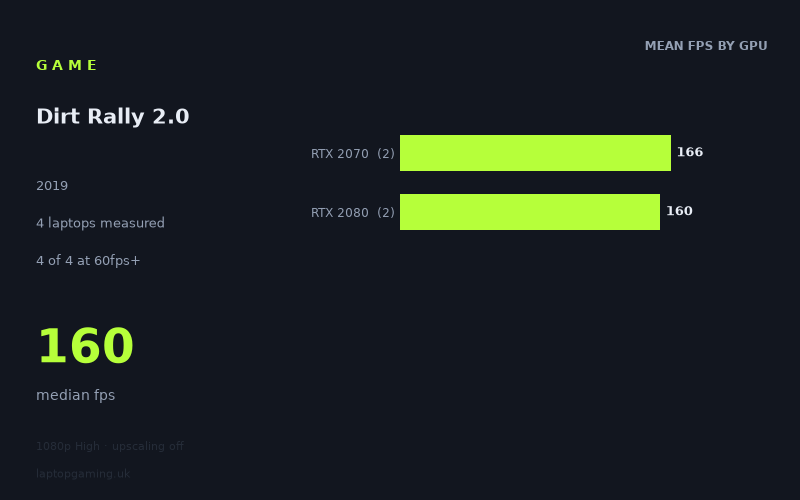
Every laptop we have figures for
Frame rates measured by Notebookcheck.
What it asks of a laptop
Dirt Rally 2.0 looks very manageable on the four gaming laptops covered by Notebookcheck’s figures. At 1920×1080 using the High preset with upscaling disabled, every recorded machine was comfortably beyond 144fps. The measured range runs from 155fps to 178fps, with a median of 160fps.
That is a narrow 23fps spread across the sample, and it matters that this is a small sample of four laptops. These numbers show what these particular RTX 2070 and RTX 2080 machines achieved; they do not prove that every laptop carrying either GPU will perform identically. Laptop graphics performance can vary with cooling, power limits and the rest of the system, none of which is detailed in the supplied figures.
Still, the available results suggest that Dirt Rally 2.0 is not especially punishing for these higher-end older gaming-laptop GPUs at this resolution and preset. The slowest recorded result, 155fps from the Gigabyte Aero 17 HDR XB with an RTX 2070, was well above the 60fps, 100fps and 144fps thresholds. There is substantial headroom in every result provided.
The GPU-tier averages also show that the performance order is not cleanly determined by the GPU name alone in this small group. The two RTX 2070 laptops averaged 166fps, while the two RTX 2080 laptops averaged 160fps. That does not mean an RTX 2070 is inherently faster than an RTX 2080; rather, these four laptop implementations were close enough that the nominal GPU tier did not produce a clear advantage in Notebookcheck’s numbers.
For a buyer, that means it would be unwise to pay extra solely on the assumption that the RTX 2080 examples here must run Dirt Rally 2.0 better. The fastest individual result belonged to an RTX 2070 machine, while the RTX 2080 pair sat in the middle of the four-laptop ranking.
What runs it
Every GPU tier represented in the measurements clears all three practical frame-rate targets at 1080p High without upscaling. The caveat is important: only two laptops represent each GPU, so these are observations from four specific machines rather than broad guarantees for all RTX 2070- and RTX 2080-equipped laptops.
RTX 2070 laptops
- MSI GE66 Raider: 178fps.
- Gigabyte Aero 17 HDR XB: 155fps.
- Tier average: 166fps across two laptops.
Both measured RTX 2070 laptops exceeded 60fps, 100fps and 144fps. The MSI GE66 Raider was the fastest machine in the supplied data at 178fps, while the Gigabyte Aero 17 HDR XB was the slowest at 155fps. Even so, the latter remained 11fps above 144fps at the stated settings.
RTX 2080 laptops
- Acer Predator Triton 500: 162fps.
- Asus Strix Scar 17: 158fps.
- Tier average: 160fps across two laptops.
The two RTX 2080 laptops also cleared 60fps, 100fps and 144fps with room to spare. The Acer Predator Triton 500 reached 162fps and the Asus Strix Scar 17 managed 158fps. Their 4fps gap is particularly small, while both are close to the overall 160fps median.
In short, Notebookcheck’s figures show 4 of 4 laptops at 60fps or better, 4 of 4 at 100fps or better, and 4 of 4 at 144fps or better. On these exact systems, a 144Hz display would have a meaningful opportunity to be fed at the tested 1080p High setting, although the figures alone cannot tell us how consistently that performance is maintained in every possible situation.
The cheapest laptop that handles it
No laptop prices are included in the fact sheet, so it is not possible to identify the cheapest measured option or make a credible GBP value comparison between the MSI GE66 Raider, Acer Predator Triton 500, Asus Strix Scar 17 and Gigabyte Aero 17 HDR XB.
What can be said from performance alone is that all four machines handle the tested configuration exceptionally comfortably. The Gigabyte Aero 17 HDR XB is the lowest-scoring measured laptop at 155fps, but that is a performance ranking, not a statement about its price or value. Likewise, the MSI GE66 Raider is the highest-scoring machine at 178fps, but no cost information is available to establish whether that extra performance would be worth paying for.
What this means if you’re buying
If Dirt Rally 2.0 at 1920×1080 High is one of your main concerns, the supplied results do not point to a need for a clear step up from the measured RTX 2070 laptops to the measured RTX 2080 laptops. Both groups were far beyond 60fps and 100fps, and every individual laptop also surpassed 144fps.
The strongest evidence in the data is therefore not that one GPU tier wins, but that all four listed machines have considerable performance capacity for this specific test. An RTX 2070-equipped MSI GE66 Raider produced the highest result, and the other RTX 2070 laptop remained above 144fps. Meanwhile, both RTX 2080 machines clustered around 160fps.
Keep the sample size in perspective. These results should be used as a guide to the four named laptops, not as a promise for unmeasured models with the same graphics labels. If choosing between laptops, use the measured result for the exact machine where possible rather than assuming that an RTX 2080 badge automatically produces a higher Dirt Rally 2.0 frame rate than an RTX 2070 badge.
How these numbers were produced
Frame rates here are not measured by us, and we label how each one was arrived at. A figure marked measured comes from a published run on that exact machine. A figure marked representative is derived from the GPU and its power limit (TGP) and cross-referenced against published reviews - a sound estimate of what that configuration delivers, but not a measurement of that specific laptop. Unless stated otherwise, numbers are 1920x1080, High preset, upscaling off. Where a laptop ships in several power configurations we use the wattage of the exact SKU listed, because a 140W RTX 5070 and a 115W one are not the same product.